Patrivox vs StatPecker
Side-by-side comparison to help you choose the right product.

Patrivox
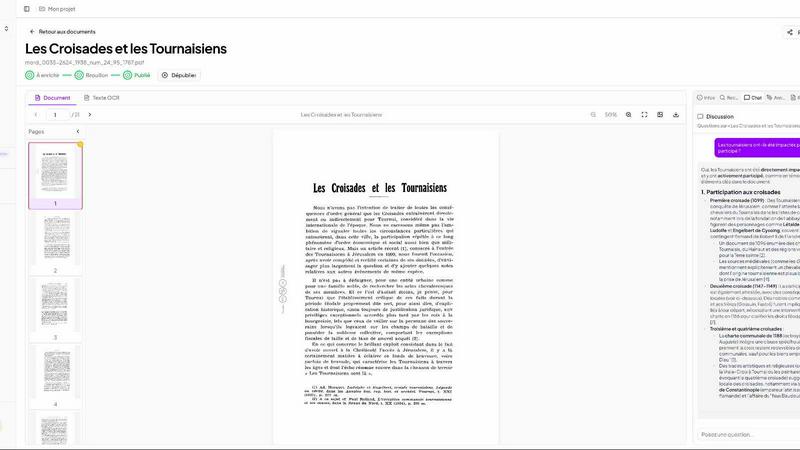
Patrivox transforms your documents into searchable archives in minutes using advanced AI for effortless access and.
Last updated: March 4, 2026

StatPecker
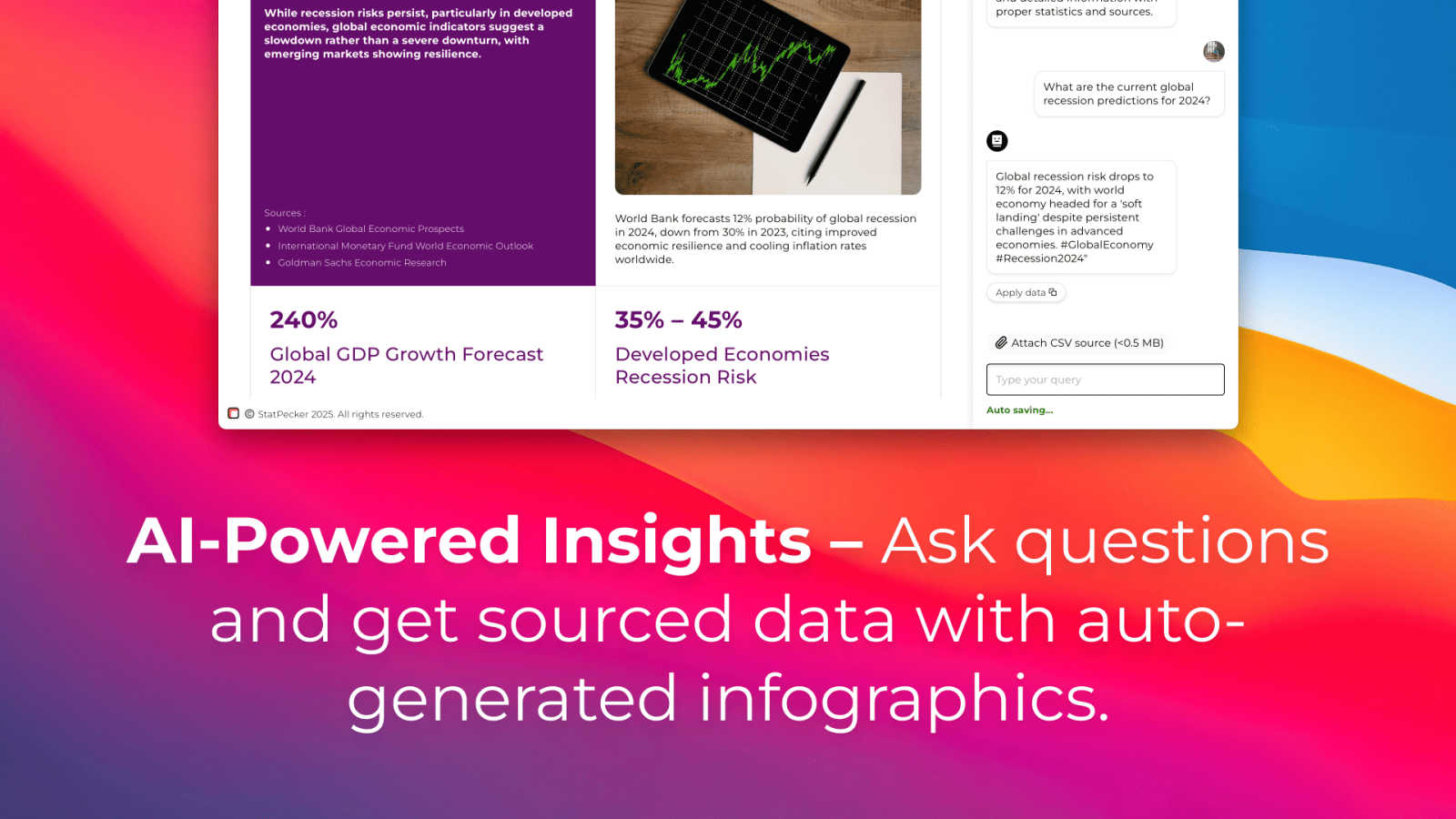
StatPecker delivers fast AI-driven insights and stunning visuals from your data for effective business storytelling.
Last updated: March 1, 2026
Visual Comparison
Patrivox
StatPecker
Feature Comparison
Patrivox
Intelligent OCR Technology
Patrivox utilizes next-gen OCR powered by Mistral AI to automatically read and classify documents. This feature ensures that every page is indexed without manual intervention, allowing users to focus on analysis rather than data entry.
Advanced Search Capabilities
With Patrivox, users can effortlessly conduct full-text searches across their entire document collection. The platform supports typo tolerance and offers filtering options by date, author, and type, making it easy to locate specific information quickly.
Interactive Knowledge Graph
The platform automatically identifies and links entities such as people, places, and organizations mentioned in the documents. This interactive knowledge graph allows users to explore connections and discover insights that may not have been apparent before.
Batch Import Functionality
Patrivox supports batch imports, enabling users to drag and drop hundreds of PDF files at once. This feature streamlines the digitization process, significantly reducing the time needed to make large collections searchable.
StatPecker
Ask Your Query
This feature allows users to gain instant insights from validated sources simply by asking questions. There is no need for complex tools or extensive data manipulation; users can easily request information and receive immediate, accurate responses.
Publish & Embed
With this feature, users can create interactive visuals that are seamlessly integrated into various platforms such as blogs, articles, and websites. This capability enhances the user’s ability to communicate data-driven insights effectively and attractively.
Upload & Analyze CSVs
StatPecker enables users to upload local CSV files, facilitating the extraction of key insights without the hassle of traditional spreadsheet software. This feature allows data analysis to be performed quickly and efficiently, streamlining the process of data visualization.
Download & Use Anywhere
Users can export their created infographics as images, making them easy to include in reports, presentations, and other formats. This flexibility ensures that users can utilize their visuals wherever needed, enhancing the overall impact of their data storytelling.
Use Cases
Patrivox
Municipal Archives Management
Municipal services can utilize Patrivox to digitize and catalog their deliberations, registers, and correspondence. This makes historical records easily accessible to the public and researchers, enhancing community engagement.
Historical Society Collections
Historical societies can benefit from Patrivox by making their bulletins and documentary collections searchable. This feature allows members and the public to explore rich histories with ease, promoting educational initiatives.
Heritage Library Accessibility
Heritage libraries can open their special collections to research and public access using Patrivox. This facilitates scholarly work and increases the visibility of valuable resources that may otherwise remain hidden.
Ecclesiastical Archive Preservation
Dioceses and parishes can preserve and index their parish registers and ecclesiastical archives efficiently. Patrivox ensures that these important documents are not only preserved but also made searchable for future generations.
StatPecker
Content Creation
Content creators can use StatPecker to generate engaging infographics that visually represent data within their articles or blogs. This visual enhancement attracts readers' attention and improves comprehension of complex information.
Data Analysis
Data analysts can leverage StatPecker to quickly visualize trends and patterns from large datasets. By transforming raw data into actionable insights, analysts can present findings to stakeholders more effectively, facilitating informed decision-making.
Marketing Campaigns
Marketers can utilize StatPecker to create compelling visuals that illustrate campaign performance metrics. These infographics can be shared with teams and clients to highlight successes and areas for improvement, driving strategic discussions.
Education and Learning
Educators and students can benefit from StatPecker by creating informative visuals for presentations and assignments. This tool simplifies the process of conveying intricate concepts, making learning more engaging and enjoyable.
Overview
About Patrivox
Patrivox is an innovative European SaaS platform designed specifically for organizations such as heritage institutions, municipal services, associations, and enterprises. Its primary function is to transform extensive collections of scanned documents into a fully searchable knowledge base. With a user-friendly drag-and-drop interface, Patrivox allows users to upload their PDFs seamlessly. The platform leverages Mistral AI's advanced optical character recognition (OCR) technology to extract text within minutes, making previously inaccessible knowledge searchable and shareable. Patrivox excels in entity recognition, identifying key figures, places, and organizations while connecting them in an interactive knowledge graph. This tool is a game changer for those needing quick and efficient access to information, enabling users to perform instant searches with typo tolerance and ask questions in natural language, all while providing sourced answers. Its main value proposition lies in democratizing access to knowledge, enhancing research capabilities, and facilitating public engagement.
About StatPecker
StatPecker is an innovative AI-powered data visualization tool that transforms raw data into stunning, professional visuals within seconds. Designed to streamline the laborious process of data storytelling, it allows users to convert spreadsheets, CSV files, or simple queries into engaging infographics without needing design expertise. This tool is perfect for professionals across various fields, including content creators, journalists, data analysts, marketers, educators, and students. By automating the creation of visuals, StatPecker not only saves time and costs but also enhances the clarity and engagement of data communication. Users can focus on crafting compelling narratives and making informed decisions rather than getting bogged down in the complexities of chart creation. With StatPecker, advanced data visualization is no longer exclusive to specialists; it is accessible to everyone, empowering users to communicate insights effectively and visually.
Frequently Asked Questions
Patrivox FAQ
How does Patrivox ensure data security?
Patrivox is 100% hosted in Europe and is GDPR-native, ensuring compliance with data protection regulations. An audit log is also available to track access and modifications, providing peace of mind regarding data security.
Can I use Patrivox for large batches of documents?
Yes, Patrivox supports batch imports, allowing users to drag and drop hundreds of PDF files at once. This feature is designed to accommodate large collections efficiently.
Is there a limit on the number of users who can access my documents?
No, Patrivox offers unlimited reader access. You can share your digitized archives with as many researchers or public users as you wish without incurring additional costs.
What types of files can I upload to Patrivox?
Patrivox primarily supports PDF files for upload. Each file can be up to 250 MB, ensuring that even large documents can be processed without difficulty.
StatPecker FAQ
How does StatPecker ensure data privacy?
StatPecker prioritizes user privacy by conducting all data analysis locally on the user's device. This means that your data stays secure and is not transmitted over the internet, ensuring confidentiality.
Can I use StatPecker for large datasets?
Yes, StatPecker supports CSV uploads of up to 50 MB, allowing users to analyze substantial datasets efficiently. This capability ensures that users can still extract meaningful insights from larger files.
Is there a free version of StatPecker available?
Absolutely! StatPecker offers a free tier that allows users to create unlimited projects and embeds, making it easy to get started with data visualization without any upfront cost.
What types of visuals can I create with StatPecker?
Users can create a wide variety of infographics, including charts, graphs, and interactive visuals. These can be tailored to suit different presentation styles and purposes, ensuring effective communication of data insights.
Alternatives
Patrivox Alternatives
Patrivox is an innovative Software as a Service (SaaS) platform that leverages artificial intelligence to digitize and categorize documents swiftly, making them fully searchable. Primarily used by heritage institutions, municipal services, and enterprises, Patrivox transforms vast collections of scanned documents into easily accessible knowledge bases. Users can enjoy the benefits of advanced optical character recognition (OCR) technology, allowing them to search for information with ease. Users often seek alternatives to Patrivox for various reasons including pricing, specific feature requirements, or compatibility with their existing platforms. When looking for an alternative, it is essential to consider factors such as the speed of document processing, the accuracy of search results, user interface design, and support for different file formats. These elements can greatly impact the overall user experience and effectiveness of the solution.
StatPecker Alternatives
StatPecker is an AI-powered data visualization tool that streamlines the process of transforming raw data into compelling visuals. It fits within the analytics and data category, providing businesses with quick insights and stunning infographics from their datasets. Users often seek alternatives to StatPecker for various reasons, including pricing structures, specific feature sets, or compatibility with different platforms. When choosing an alternative, it’s essential to consider factors such as ease of use, the flexibility of data integration, the quality of visual outputs, and the overall value it brings to your data storytelling needs.