Rallied AI vs StreamVox - AI Live Translator
Side-by-side comparison to help you choose the right product.

Rallied AI
Rallied AI autonomously resolves L1 and L2 IT tickets, freeing your team to focus on strategic projects and enhancing productivity.
Last updated: April 4, 2026

StreamVox provides real-time AI subtitles and translation for calls, media, and games directly on your PC.
Last updated: April 4, 2026
Visual Comparison
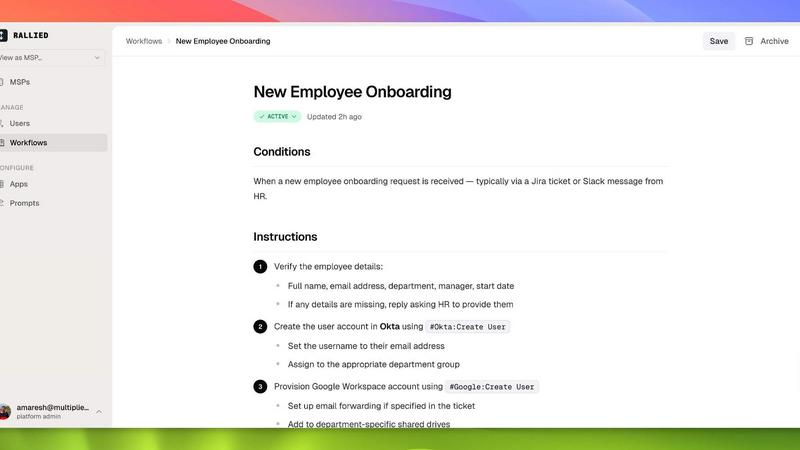
Rallied AI
StreamVox - AI Live Translator

Feature Comparison
Rallied AI
Autonomous Ticket Resolution
Rallied AI handles a variety of common support tasks such as password resets, account unlocks, and mailbox permissions without requiring human intervention. This capability significantly reduces the time spent on L1 and L2 tickets, allowing your technical staff to concentrate on higher-level tasks.
Intelligent Triage and Dispatch
The AI technician intelligently asks users the right questions to categorize issues by priority. It fills in triage fields, retrieves documentation from your existing knowledge base, and routes tickets to the appropriate technician, ensuring efficient workflow management.
Seamless Onboarding and Offboarding
Rallied AI simplifies the onboarding and offboarding processes for employees. Whether it’s setting up M365 licenses and Active Directory accounts for new hires or reclaiming access from departing contractors, Rallied manages these tasks from a single message or ticket.
Integration with Your Entire Stack
Rallied AI connects effortlessly with a comprehensive range of tools including ConnectWise, Autotask, HaloPSA, and more. This integration ensures that it has access to all necessary data and systems to perform its functions effectively, enhancing your overall IT support ecosystem.
StreamVox - AI Live Translator
Per-App Audio Capture & Isolation
This intelligent feature allows you to target translation for specific applications only. Instead of capturing all your PC's audio, you can isolate and translate sound from individual programs like Zoom, Discord, Chrome, or a game. This smart isolation automatically filters out background noise from other apps, notifications, or system sounds, ensuring the translation is focused, accurate, and relevant only to the content you care about. It provides unparalleled control over your audio environment.
Customizable, Always-on-Top Overlay
StreamVox displays translations in a transparent overlay window that stays on top of any other application, whether it's a full-screen game or a video player. You have full control over its appearance to suit your needs: choose between line-by-line mode for fast-paced chats or paragraph mode for natural reading. Adjust the font size (from 12px to 72px), text color, and, crucially, the window opacity to make the subtitles as visible or as unobtrusive as you desire, creating a perfect viewing experience.
Bidirectional Audio Translation
StreamVox doesn't just translate what you hear; it can also translate what you say. It supports capturing both system audio (the sound coming from your PC) and your microphone input simultaneously. This bidirectional capability is essential for live conversations, allowing you to speak in your native language and have your words translated for others on the call, and vice-versa. It facilitates true two-way, real-time communication without requiring all parties to use the same language.
Phone Link Integration for Mobile Calls
Extend StreamVox's power to your smartphone calls. By using Microsoft's Phone Link feature to connect your iPhone or Android to your Windows PC, StreamVox can capture the audio from your mobile calls. This means you can see live subtitles and translations for your phone conversations directly on your computer screen, turning any mobile call into an accessible, cross-language dialogue without needing any special setup on the other person's device.
Use Cases
Rallied AI
Efficient User Support
Rallied AI can handle routine support requests from users, such as unlocking accounts and resetting passwords, allowing your technical staff to focus on more complex issues and projects that drive business growth.
Streamlined Onboarding Processes
When new employees join, Rallied AI can set up their accounts, permissions, and access rights across various platforms, reducing the time and effort required by your IT team, ensuring a smoother onboarding experience.
Improved Incident Management
By triaging and dispatching tickets intelligently, Rallied AI ensures that incidents are categorized and assigned correctly, leading to faster resolution times and improved service quality for end-users.
Cost-Effective Resource Allocation
With Rallied AI handling L1 and L2 support tasks, MSPs can optimize their workforce, reducing the need to hire additional staff for these levels of support, thus saving on recruitment and training costs.
StreamVox - AI Live Translator
International Business Meetings & Calls
Professionals can participate confidently in global meetings on platforms like Zoom, Microsoft Teams, or Google Meet. StreamVox provides real-time subtitles, allowing you to follow every word spoken by international colleagues or clients in your native language. The low latency ensures the conversation feels natural, and the per-app capture keeps the translation focused solely on the meeting audio, ignoring other desktop distractions.
Gaming with Global Teams
Gamers playing multiplayer titles with international friends or on global servers can overcome language barriers in voice chat. StreamVox translates team communications in real-time, displayed as an overlay on your game screen. This allows for coordinated strategy, clear callouts, and social interaction, enhancing teamwork and the overall gaming experience regardless of the languages spoken by other players.
Consuming Foreign Language Media
Enjoy movies, TV shows, YouTube videos, Twitch streams, and other content in any language without relying on official or fan-made subtitles. Simply play the media in your browser or media player, and StreamVox will overlay accurate, real-time translations. This is perfect for watching live streams, news broadcasts, or educational content that hasn't been formally translated, opening up a world of media.
Translating Mobile Phone Conversations
For personal or business calls on your smartphone where language is a barrier, StreamVox's Phone Link integration is a game-changer. Connect your phone to your PC, and the app will transcribe and translate both sides of the conversation live on your monitor. This makes communicating with family, friends, or service providers in another language straightforward and effective.
Overview
About Rallied AI
Rallied AI is an innovative AI technician designed specifically for Managed Service Providers (MSPs). It autonomously resolves Level 1 (L1) and Level 2 (L2) support tickets, allowing your team to focus on more strategic initiatives. By connecting seamlessly to your entire tech stack, Rallied AI can interact with users through popular communication platforms like Slack and Microsoft Teams, functioning as a real coworker. This eliminates the need for manual ticket handling, reducing operational costs and increasing efficiency. Rallied AI is particularly beneficial for MSP owners and service managers looking to streamline their support processes, reduce the burden on their engineering teams, and enhance overall productivity. The main value proposition lies in its ability to automate routine tasks, thereby freeing up valuable human resources to focus on growth-oriented projects rather than repetitive ticket resolutions.
About StreamVox - AI Live Translator
StreamVox is a powerful, real-time AI translation and live subtitle application designed exclusively for Windows PCs. It solves the pervasive problem of language barriers by instantly translating any audio source on your computer into your preferred language. Whether you're on an international Zoom call, watching a foreign-language stream on Twitch, playing a multiplayer game with global teammates, or enjoying a movie without official subtitles, StreamVox provides immediate understanding. Its core value proposition lies in its seamless, privacy-first integration into your existing workflow. The application acts as an intelligent, transparent overlay that captures audio, processes it with ultra-low latency AI, and displays translated subtitles directly on your screen without interrupting your activity. It is built for professionals, gamers, content consumers, and anyone who needs to communicate or consume media across languages. By offering per-app audio capture, it ensures you only translate what you need, eliminating background noise and focusing on clarity. With support for 49+ languages and a flexible pricing model that includes a generous free tier, StreamVox empowers users to break down language walls instantly and effortlessly.
Frequently Asked Questions
Rallied AI FAQ
What if it breaks something?
You have full control over what Rallied AI can do autonomously. You can set permissions for tasks it can handle without human input and specify which scenarios require human oversight, ensuring that critical operations remain secure.
How does Rallied AI integrate with existing tools?
Rallied AI connects to a wide array of platforms including ConnectWise, Autotask, and Microsoft 365. During the setup, your existing tech stack is mapped, ensuring seamless integration and functionality right from the start.
What is the implementation timeline?
Rallied AI can be deployed quickly; in fact, it can be up and running within the same week of setup. This rapid deployment minimizes downtime and allows you to start reaping the benefits of automation sooner.
How does Rallied AI differ from other AI tools?
Unlike other AI solutions that require extensive training and a dedicated admin, Rallied AI operates efficiently with minimal setup, allowing it to start resolving tickets autonomously almost immediately after deployment.
StreamVox - AI Live Translator FAQ
Is my audio data private and secure?
Yes, StreamVox is built with a privacy-first philosophy. Your audio is processed in real-time by the AI translation engine and is never stored on StreamVox's servers or your local disk. The processing happens on-the-fly to generate the subtitles, and the raw audio data is discarded immediately afterward, ensuring your conversations and audio remain confidential.
What are the system requirements for StreamVox?
StreamVox requires a PC running a 64-bit version of Windows 10 or Windows 11. You will need a stable internet connection for the AI translation processing to function. The application is downloaded and installed via the official Microsoft Store, ensuring easy updates and secure distribution.
How does the per-app audio capture work?
When you select "Per-App Capture" mode, StreamVox presents a list of currently running applications that are outputting audio. You can then select one or more specific apps (e.g., Chrome, Discord, a game executable) from this list. StreamVox will then isolate and capture audio only from those selected sources, ignoring all other system and application sounds for clean, focused translation.
Can I try StreamVox for free?
Absolutely. StreamVox offers a Free Starter plan that provides 20 minutes of translation time per day at no cost, forever. This plan includes access to all 49+ languages and core features like system and microphone capture, allowing you to fully test the app's capabilities in your daily workflow before deciding to upgrade to a paid plan for more usage time.
Alternatives
Rallied AI Alternatives
Rallied AI is an advanced AI technician designed specifically for Managed Service Providers (MSPs). This software seamlessly integrates with your existing tech stack to autonomously resolve Level 1 and Level 2 tickets, enhancing efficiency and reducing response times. Users can interact with Rallied through popular platforms like Slack or Teams, creating a collaborative atmosphere akin to working with a human coworker. Despite its robust capabilities, users often seek alternatives for various reasons, including pricing, specific feature sets, or compatibility with their existing platforms. When exploring alternatives, it's crucial to consider factors such as ease of integration, the range of supported ticket levels, user interface, and overall usability to ensure the solution aligns with your operational needs and enhances your service delivery.
StreamVox - AI Live Translator Alternatives
StreamVox - AI Live Translator is a Windows software application that provides real-time AI-generated subtitles and translation for any audio playing on your computer. It falls into the category of real-time communication and accessibility tools, designed to break down language barriers during live calls, gaming, streaming, and media playback. Users often explore alternatives for various practical reasons. These can include budget constraints, needing support for a different operating system like macOS or Linux, or requiring specific integrations that a particular tool might not offer. Some may seek different pricing models or a feature set tailored to a very niche use case. When evaluating other options, key factors to consider are language support breadth, audio capture flexibility (like system-wide or per-application), the quality and speed of the translation, and the display customization for subtitles. Reliability during live scenarios and overall value for the intended use are ultimately the most critical deciding factors.