Pixel Art Village vs SimpleDraw
Side-by-side comparison to help you choose the right product.

Pixel Art Village
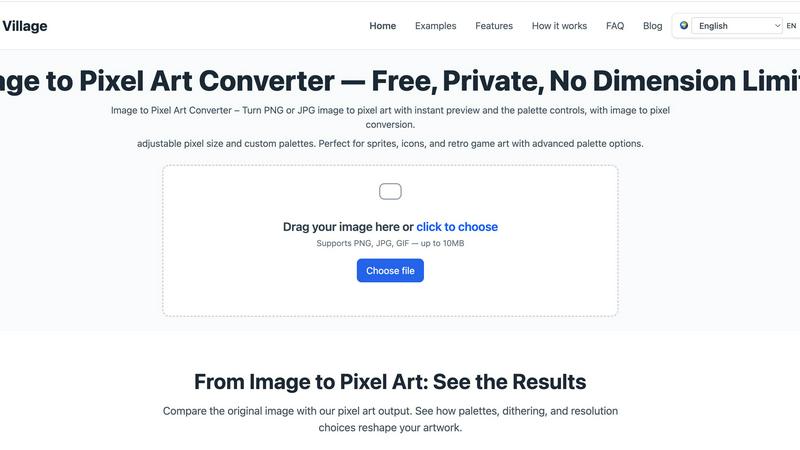
Pixel Art Village effortlessly converts images to pixel art with live previews, custom palettes, and easy exports—all in your browser.
Last updated: March 26, 2026

SimpleDraw
Easily create precise floor plans and scale drawings online with SimpleDraw's intuitive, free web tool.
Last updated: March 1, 2026
Visual Comparison
Pixel Art Village
SimpleDraw
Feature Comparison
Pixel Art Village
Custom Palette
With Pixel Art Village, users can switch between pre-existing color palettes or create their own. This feature allows artists to align their artwork with specific retro systems or personal styles, enhancing the overall aesthetic of the pixel art produced.
Live Adjustments
The platform offers live adjustments for pixel size, brightness, contrast, saturation, and dithering. This means artists can see immediate results and make fine-tuned changes, ensuring the final output meets their creative vision without the need for multiple exports.
Private Processing
All image editing occurs client-side in your browser, keeping your images safe and private. Users can work on their projects with peace of mind, knowing that their data is not being uploaded to external servers or stored anywhere else.
No Dimension Limits
Pixel Art Village supports images of all sizes, from tiny icons to large reference images. This flexibility allows creators to work seamlessly on a variety of projects, ensuring that the final export can be scaled according to their specific needs.
SimpleDraw
Accurate Measurements & Scale Drawing
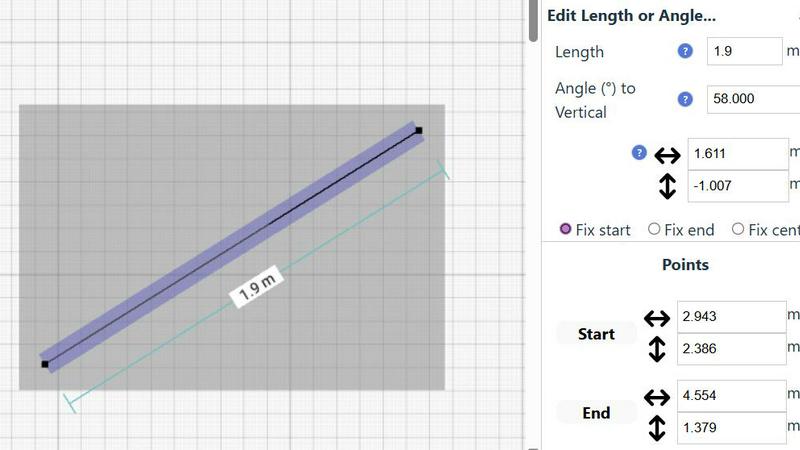
SimpleDraw offers precise measurements and smart alignment, ensuring that your drawings are accurate and to scale. This feature is vital for anyone looking to create professional-looking layouts without the steep learning curve associated with CAD software.
Specialized Floor Plan Creator
With a dedicated Floor Plan Mode, users can create intricate drawings featuring walls, doors, windows, and furniture with just a single click. It allows for real-time measurement adjustments, making it easier to visualize and modify designs as needed.
Smart Alignment System
The smart alignment system aids users in placing points and lines precisely where they want them. This intuitive feature provides clear visual indications, making it easier to achieve accuracy without needing advanced technical skills.
Comprehensive Measurement System
SimpleDraw includes a comprehensive measurement system that gives users fine control over displayed measurements. Users can choose between metric or standard US units, and contextual measurements are dynamically displayed as they work, enhancing the overall drawing experience.
Use Cases
Pixel Art Village
Game Development
Game developers can utilize Pixel Art Village to create sprites and UI elements that are both visually appealing and optimized for their games. The tool's palette and size adjustments make it easy to generate game-ready graphics efficiently.
Social Media Graphics
Social media managers can transform images into engaging pixel art for posts, stories, or promotional materials. The eye-catching nature of pixel art can help increase engagement and capture audience attention.
Digital Art Projects
Artists and designers can leverage Pixel Art Village to explore new styles and experiment with pixel art techniques. The platform allows for creative exploration without the need for extensive software knowledge.
Educational Purposes
Teachers and educators can use Pixel Art Village as a fun tool to introduce concepts of digital art and design to students. It provides an interactive way for learners to engage with technology and creativity in a classroom setting.
SimpleDraw
Kitchen & Bathroom Floor Plans
Homeowners planning renovations can use SimpleDraw to create accurate kitchen and bathroom layouts. This tool allows them to visualize their designs effectively before commencing any physical work, reducing the chances of costly mistakes.
Room Layouts & Furniture Planning
Users can design bedroom, living room, or office layouts to ensure that furniture will fit appropriately before making purchases. This feature saves time and money by allowing for adjustments in the design phase.
House & Apartment Plans
Real estate agents and property owners can create complete floor plans for home projects or rental listings. SimpleDraw helps in space planning by providing accurate representations of available layouts.
Community-Driven Development
Users can suggest features and improvements through the SimpleDraw community. This collaborative approach ensures that the tool evolves based on real user feedback, making it a continually improving solution for everyone.
Overview
About Pixel Art Village
Pixel Art Village is a powerful online tool designed for converting images into pixel art effortlessly. Whether you have a photo, sprite, or any other image in PNG, JPG, GIF, or WEBP format, this intuitive platform allows you to transform your visuals into charming pixel art instantly. The primary value proposition of Pixel Art Village lies in its simplicity and efficiency. With real-time previews and a user-friendly interface, both beginners and seasoned digital artists can navigate the conversion process with ease. The tool emphasizes privacy, as all image processing occurs in your browser, ensuring your images remain secure and private. Additionally, Pixel Art Village is completely free to use, allowing users to explore their creativity without any financial constraints. This makes it an ideal choice for game developers, designers, hobbyists, and anyone looking to create nostalgic art that harkens back to the retro gaming era.
About SimpleDraw
SimpleDraw is a free, web-based tool that addresses the common challenge of creating precise and accurate scale drawings without the complication and expense associated with professional CAD software. It is ideal for casual users, DIY enthusiasts, homeowners, and anyone who needs to visualize a space or project to scale. Whether planning a room layout, sketching a garden design, or mapping out a home renovation, SimpleDraw offers the digital equivalent of pen and paper, enhanced with greater flexibility and precision. Its main value proposition lies in delivering intuitive and powerful drawing capabilities through an accessible interface that requires no installation, login, or prior technical experience. By focusing on a streamlined set of smart tools, SimpleDraw empowers users to quickly and easily translate their ideas into clear, measured drawings, making the planning process more accurate and less frustrating.
Frequently Asked Questions
Pixel Art Village FAQ
Is this image to pixel art tool free to use?
Yes, Pixel Art Village is completely free. Users can upload images, make adjustments, and download their pixel art creations without any cost.
Do you upload images to a server?
No, all image processing is done client-side in your browser. This means your images are never uploaded to a server, ensuring your privacy and security.
What image formats does Pixel Art Village support?
Pixel Art Village supports various image formats, including PNG, JPG, GIF, and WEBP. Users can easily upload their images in any of these formats for conversion.
Can I create custom palettes for my pixel art?
Absolutely! Pixel Art Village allows users to create custom palettes or choose from built-in options. This feature is essential for aligning the artwork with specific themes or projects.
SimpleDraw FAQ
Is SimpleDraw really free to use?
Yes, SimpleDraw is completely free to use. There is no need for subscription fees, hidden costs, or trial periods, allowing anyone to access its features without financial commitment.
Do I need to create an account to use SimpleDraw?
No, SimpleDraw does not require any account creation or login. Users can start drawing immediately in their web browser, making it incredibly accessible and user-friendly.
Can I use SimpleDraw on my mobile device?
While SimpleDraw is primarily designed for web browsers, it can be accessed on mobile devices. However, the user experience may vary depending on the device's screen size and capabilities.
How can I provide feedback or suggest features?
Users are encouraged to join the SimpleDraw Discord community, where they can share their feedback, request new features, and connect with other users. This community-driven approach helps shape the future development of the tool.
Alternatives
Pixel Art Village Alternatives
Pixel Art Village is an innovative online tool designed for converting images into pixel art effortlessly. It falls under the categories of design tools, image and photo editing, and image generation, making it a versatile resource for artists and designers alike. Users often seek alternatives to Pixel Art Village for various reasons, including pricing, specific feature sets, or compatibility with different platforms and devices. When searching for an alternative, it's crucial to consider factors such as ease of use, available features, real-time preview capabilities, and export quality to ensure a seamless experience. --- [{"question": "What is Pixel Art Village?", "answer": "Pixel Art Village is an online tool that allows users to convert images into pixel art quickly and easily."}, {"question": "Who is Pixel Art Village for?", "answer": "Pixel Art Village is ideal for artists, designers, and anyone interested in creating pixel art from images."}, {"question": "Is Pixel Art Village free?", "answer": "The pricing details for Pixel Art Village can vary, so it's best to check the official website for the most current information."}, {"question": "What are the main features of Pixel Art Village?", "answer": "Main features include real-time preview, palette control, and high-quality export options."}]
SimpleDraw Alternatives
SimpleDraw is a free, web-based tool designed for creating accurate scale drawings and floor plans. It falls under the category of design tools aimed at casual users, DIY enthusiasts, and homeowners who need to visualize spaces or projects with precision. Users often seek alternatives to SimpleDraw for various reasons, including the desire for additional features, different pricing models, or compatibility with specific platforms. When choosing an alternative, it's essential to consider factors such as user-friendliness, available features, and the ability to meet specific project needs without overwhelming complexity. --- [{"question": "What is SimpleDraw?", "answer": "SimpleDraw is a free, web-based tool that enables users to create accurate scale drawings and floor plans easily."},{"question": "Who is SimpleDraw for?", "answer": "SimpleDraw is designed for casual users, DIY enthusiasts, homeowners, and anyone needing to visualize a space or project to scale."},{"question": "Is SimpleDraw free?", "answer": "Yes, SimpleDraw is a completely free tool available for anyone to use without the need for installation or login."},{"question": "What are the main features of SimpleDraw?", "answer": "SimpleDraw offers dedicated floor plan mode, smart alignment and precision control, and non-destructive editing for full control over designs."}]