SupaSidebar vs Typoro
Side-by-side comparison to help you choose the right product.

SupaSidebar
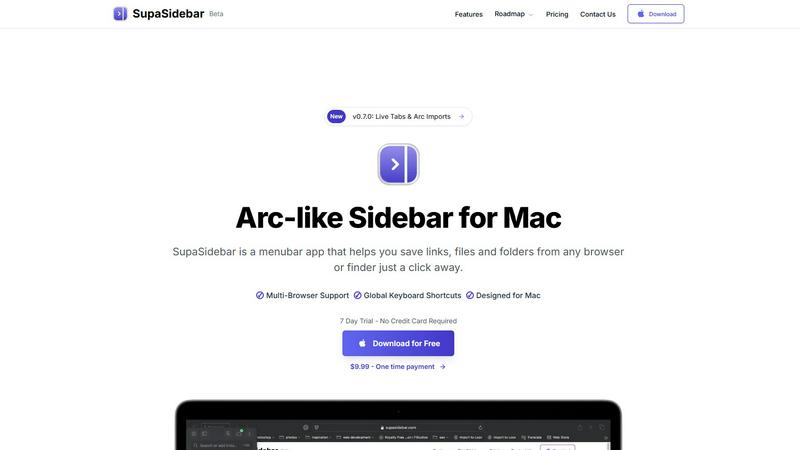
SupaSidebar streamlines your Mac experience by providing quick access to links, files, and folders with easy keyboard.
Last updated: February 28, 2026

Typoro
Typoro automates LinkedIn posts for founders, helping them build their personal brand effortlessly and consistently.
Last updated: March 1, 2026
Visual Comparison
SupaSidebar
Typoro

Feature Comparison
SupaSidebar
Global Keyboard Shortcuts
SupaSidebar incorporates global keyboard shortcuts, allowing users to save or copy URLs effortlessly. By pressing CMD CTRL S, you can save a link, while CMD CTRL C copies the current website link directly to the sidebar. This feature significantly reduces the time spent switching between applications, making your workflow smoother and more efficient.
Recent Item Tracking
The Recent feature tracks every website you have accessed in the last 48 hours, enabling quick retrieval of previously visited links. This functionality helps you stay organized, ensuring you can find essential information instantly without sifting through multiple tabs or bookmarks.
Pinned Favorites
SupaSidebar allows users to pin their favorite items, which are displayed at the top of the sidebar for easy access. This feature is particularly beneficial for those who frequently revisit specific websites or files, as it saves time and keeps your most important resources readily available.
Fast Search Functionality
With the CMD CTRL K shortcut, users can initiate a fast search for any file, folder, website, or app. This feature enables you to find what you need instantly, eliminating the frustration of digging through multiple directories or browser tabs. It enhances overall efficiency and ensures you stay focused on your tasks.
Typoro
AI Content Creation
Typoro's AI agents are designed to research, write, and refine your LinkedIn posts automatically. This feature ensures that your content is not only relevant but also tailored to resonate with your audience, allowing you to maintain a consistent posting schedule without added stress.
Seamless Posting and Scheduling
With Typoro, you can schedule an entire week of posts in just 20 minutes. This feature automates your posting process, ensuring that you remain consistently active on LinkedIn while freeing you from the need to log in and post manually every day.
Performance Tracking
Typoro provides built-in analytics that track your post engagement, follower growth, and overall content performance. This feature allows you to measure what is working, enabling you to refine your strategy and adapt your content for greater impact.
Voice-to-Text Transcription
Record your thoughts naturally, and Typoro will transcribe them into clear, editable notes that you can save as topics. This feature is perfect for busy professionals who prefer speaking over typing, making the content creation process even more efficient.
Use Cases
SupaSidebar
Researchers
For researchers juggling multiple sources and data points, SupaSidebar serves as a centralized hub. You can quickly save links to articles, studies, and resources, keeping everything organized in one place for easy referencing and note-taking.
Students
Students can benefit immensely from SupaSidebar by managing their study materials and resources. With the ability to pin important links and track recent sites, they can streamline their research process and focus on learning rather than searching.
Professionals
Professionals who work on various projects can utilize SupaSidebar to manage their tasks more effectively. By keeping essential links and files at their fingertips, they can switch between tasks seamlessly, enhancing productivity and reducing downtime.
Creative Individuals
For creatives who often gather inspiration from various online sources, SupaSidebar provides an efficient way to save and organize ideas. Whether it is design resources, articles, or reference materials, this tool helps keep your creative workflow organized and accessible.
Typoro
Consistent Content Creation for Professionals
Typoro is ideal for busy professionals who struggle to find time to create engaging LinkedIn posts. By automating the writing process, they can maintain a steady flow of content without the hassle of daily logging in and posting.
Personal Branding for Entrepreneurs
Entrepreneurs looking to grow their personal brand on LinkedIn can leverage Typoro to transform raw ideas into polished posts that resonate with their target audience. This helps them establish authority and build connections within their industry.
Time-Saving Solution for Marketing Teams
Marketing teams can utilize Typoro to streamline their content strategy, allowing team members to collaborate on posts effortlessly. This ensures a cohesive brand message while saving time on content creation and scheduling.
Performance Monitoring for Content Strategy
Businesses seeking to improve their LinkedIn engagement can use Typoro's analytics features to track follower growth and post performance. This data-driven approach enables them to refine their content strategy based on what resonates with their audience.
Overview
About SupaSidebar
SupaSidebar is a beautifully designed sidebar application specifically crafted for Mac users looking to elevate their productivity by creating a streamlined digital workspace. With SupaSidebar, you can easily save and access links, files, and folders from any web browser or Finder with just a click. Drawing inspiration from the Arc browser, it features an elegant interface that integrates flawlessly with all major web browsers, including Safari, Chrome, Firefox, Brave, and Arc. The main value proposition of SupaSidebar is its ability to maintain organization and efficiency in your digital tasks, allowing users to manage essential items at their fingertips. Its intuitive keyboard shortcuts facilitate quick actions like capturing or copying URLs, enabling users to stay in their workflow without distractions. SupaSidebar is ideal for researchers, students, professionals, and anyone who needs to manage multiple tasks simultaneously, ensuring that vital resources are always just a click away.
About Typoro
Typoro is a cutting-edge LinkedIn writing tool tailored for busy professionals who seek to maintain an effective and consistent presence on the platform without the tedious task of manual posting. Designed for founders, entrepreneurs, and professionals, Typoro transforms your ideas, emails, notes, or even voice recordings into cohesive and engaging LinkedIn posts that authentically represent your unique voice and tone. The platform leverages powerful AI agents to organize content into themes, enabling automatic draft generation that is ready for your review and editing. By streamlining the content creation process, Typoro saves you hours each week, allowing you to focus on what truly matters: growing your brand and engaging effectively with your audience. With seamless integration, you can post directly to LinkedIn and monitor your performance through built-in analytics. Typoro stands as a solution to the common challenge of maintaining an active LinkedIn profile, optimizing your content for maximum engagement while saving you time.
Frequently Asked Questions
SupaSidebar FAQ
Is SupaSidebar a browser extension?
No, SupaSidebar is a standalone menubar application designed for Mac users, enabling quick access to links, files, and folders without being tied to a specific browser.
Which browsers does SupaSidebar work with?
SupaSidebar is compatible with all major web browsers, including Safari, Chrome, Firefox, Brave, and Arc, ensuring seamless integration across your digital workspace.
What macOS version do I need?
SupaSidebar requires macOS version 13 or later to ensure optimal performance and compatibility with the latest features.
Where is my data stored?
Your data is stored locally on your Mac, ensuring that nothing leaves your device. This focus on privacy allows you to manage your links and files without concerns about data security.
Typoro FAQ
How does Typoro ensure my unique voice is maintained?
Typoro’s AI agents learn your writing style and tone over time, ensuring that each post reflects your unique voice. This personalization helps maintain authenticity across all your content.
Can I use Typoro on mobile devices?
Yes, Typoro is designed to be accessible on various devices, allowing you to create and manage your LinkedIn posts conveniently from your mobile device or desktop.
Is Typoro approved by LinkedIn?
Absolutely! Typoro is officially approved and integrated with LinkedIn, which allows users to publish posts and track performance directly from their Typoro account.
What types of content can I create with Typoro?
You can create a wide variety of content, including thought leadership articles, personal updates, industry insights, and more. Typoro can transform ideas from voice recordings, emails, and notes into engaging LinkedIn posts.
Alternatives
SupaSidebar Alternatives
SupaSidebar is a productivity-enhancing sidebar application designed specifically for Mac users. It simplifies the way individuals access links, files, and folders across various web browsers, helping to streamline workflow and improve efficiency. Users often seek alternatives to SupaSidebar due to reasons such as pricing, specific feature sets, compatibility with different platforms, or personal preferences regarding user interface design. When searching for an alternative, it is crucial to consider the functionality that best suits your needs, including ease of access, organization capabilities, and how well it integrates with your existing tools and workflows. A good alternative should also provide a seamless user experience, intuitive navigation, and robust support for managing multiple tasks effectively.
Typoro Alternatives
Typoro is an innovative tool designed to automate LinkedIn posts, making it easier for busy professionals, especially founders and entrepreneurs, to build their personal brand consistently without the hassle of manual posting. As a content creation platform, Typoro transforms various inputs like ideas, emails, or voice recordings into engaging LinkedIn posts, thereby streamlining the content generation process. Users often seek alternatives to Typoro for various reasons, including pricing considerations, specific feature requirements, or compatibility with different platforms. When choosing an alternative, it's essential to evaluate factors such as ease of use, the comprehensiveness of features, integration capabilities, and the ability to track performance effectively. Finding a solution that aligns with your content strategy can significantly impact your branding efforts.