
AI Audio Translator
Turn spoken content into transcribed, translated, and dubbed audio instantly with an interactive studio that puts live capture and low-latency.
Visit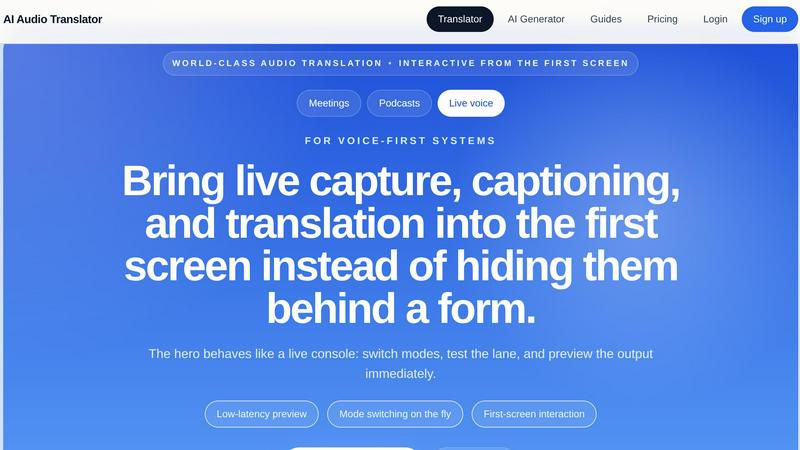
About AI Audio Translator
AI Audio Translator is a practical, browser-based tool designed to simplify spoken-content workflows for professionals who need to transcribe, translate, and optionally dub audio without juggling multiple disconnected applications. Unlike generic AI generators that hide core functions behind complex forms, this product brings transcription, translation, and dubbing into an interactive first screen that behaves like a live console. Users can upload audio files in common formats like MP3, WAV, M4A, AAC, and OGG up to 100MB, paste a public audio URL, or record directly in the browser using a microphone. The tool supports a wide range of source and target languages including English, Chinese, Japanese, Korean, French, German, Spanish, Portuguese, Italian, Russian, Arabic, Hindi, Dutch, Polish, Turkish, Vietnamese, Thai, and Indonesian. The core workflow is built for practical review: users first inspect the generated transcript, then check the translated text, and only create dubbed speech when actually needed. This reduces wasted processing time and keeps the output inspectable before sending it downstream to editing, QA, or localization teams. The product is especially valuable for podcasters, localization teams, educators, and anyone working with interviews, lessons, demos, meetings, or live voice content. By locking a language pair and running the full pipeline, AI Audio Translator eliminates the friction of stitching together separate transcription and translation services. The result is a focused, efficient tool that prioritizes clarity, reviewability, and practical output over flashy but unnecessary features.
Features of AI Audio Translator
Interactive Studio with First-Screen Access
The hero interface functions as a live console rather than a static form. Users can switch between input modes, test language lanes, and preview output immediately without navigating through multiple pages. This low-latency design allows mode switching on the fly, making the tool feel responsive and intuitive for professionals who need to iterate quickly on spoken content.
Flexible Input Options
AI Audio Translator supports three distinct input methods from the same unified studio: uploading audio files up to 100MB in MP3, WAV, M4A, AAC, or OGG formats; pasting a public audio URL for direct processing; and recording audio live in the browser using a microphone. This flexibility means users can handle pre-recorded content, online clips, or spontaneous recordings without switching tools.
Transcript-First Review Lane
The product prioritizes inspectability by presenting the transcript first, then the translated text, and only generating dubbed audio on demand. This workflow allows users to review and edit the transcript, verify translation accuracy, and decide whether dubbing is necessary before committing processing resources. Copying text, downloading transcripts, and performing QA remain clean and straightforward.
Optional Dubbed Speech Generation
When users need playable translated audio, the tool can generate dubbed speech using AI voices. This feature is optional and only activated when required, keeping the workflow efficient. The dubbed output is suitable for product demos, learning materials, localization handoffs, and any scenario where translated voice tracks are needed for playback or distribution.
Use Cases of AI Audio Translator
Podcasters Translating Interviews
Podcasters frequently interview guests speaking different languages and need to reach broader audiences. AI Audio Translator allows them to upload interview recordings, generate accurate transcripts, translate the text into target languages, and optionally create dubbed audio clips for international distribution. This streamlines a previously multi-tool process into one focused workflow.
Localization Teams Reviewing Spoken Content
Localization teams handling voiceovers, training materials, or customer calls can use the transcript-first review lane to inspect and edit translations before finalizing dubbed audio. This ensures accuracy and context preservation, reducing costly errors. The ability to download transcripts and translated text keeps the handoff to editors and voice talent clean and efficient.
Educators Translating Lessons and Lectures
Teachers and course creators can record lectures or upload existing lesson audio, generate translated transcripts for multilingual students, and produce dubbed explainer videos. This is particularly useful for online courses, international classrooms, and corporate training programs where content needs to be accessible across language barriers without requiring separate recording sessions.
Product Demos for Overseas Partners
Teams preparing product demonstrations for international clients can record a demo in their native language, translate the transcript, and generate a professional dubbed voice track before release calls. This ensures partners receive a polished, understandable presentation without the need for live interpretation or manual re-recording in multiple languages.
Frequently Asked Questions
What audio formats and sizes does AI Audio Translator support?
The tool accepts MP3, WAV, M4A, AAC, and OGG audio files up to 100MB in size. This covers the most common formats used for podcasts, interviews, meetings, and recordings. For larger files or unsupported formats, users can convert their audio before uploading. The 100MB limit accommodates most standard-length spoken content sessions.
Can I use AI Audio Translator without creating an account?
While some basic functionality may be accessible, full access to the interactive studio, language pair locking, transcript review, translation, and dubbing features requires signing up. Account creation allows the tool to track usage, manage credits, and provide a consistent workflow experience. Pricing and plan details are available on the pricing page.
How accurate are the transcription and translation outputs?
Accuracy depends on audio quality, speaker clarity, background noise, and language complexity. The tool uses advanced AI models optimized for spoken content, but users are encouraged to review the transcript and translated text in the review lane before generating dubbed audio. This inspect-first approach ensures quality control and allows manual corrections when needed.
Can I download the transcript, translation, or dubbed audio separately?
Yes. The workflow is designed for practical output. Users can copy text directly from the transcript and translation panels, download transcript files for editing or archiving, and generate playable dubbed audio files when needed. This flexibility supports clean handoffs to editing, localization, and publishing workflows without requiring additional tools.
Pricing of AI Audio Translator
AI Audio Translator uses a credit-based pricing model where credits map directly to actual audio work processed, such as transcription minutes, translation volume, and dubbed speech generation. This approach avoids bundling unrelated features like image or video processing, keeping costs transparent and predictable for spoken-content workflows. Specific plan tiers, credit amounts, and pricing details are available on the product's pricing page. Users can view current plans and choose the option that best fits their monthly audio processing needs, whether for occasional podcast editing or regular localization work.
Explore more in this category:
Similar to AI Audio Translator

Beat-synced music visuals in your browser for releases, social content, live sets, and campaigns.


Melodank is an AI-powered song creation platform that turns personal stories into custom German songs, featuring editable lyrics, dual 60-second audio


VideoAny generates uncensored videos, images, and audio from text or photos using top AI models in one platform.

Turn text into original royalty-free songs in seconds with AI-powered vocals, instruments, and cover art.

MusicAny turns your text prompts into original songs, background music, and video-ready audio in one free workflow.

Turn any text into royalty-free, studio-quality music in 60 seconds without any skills or credit card required.