
ButterKit
ButterKit helps developers boost app store conversions by streamlining the creation of stunning screenshots and translated metadata.
Visit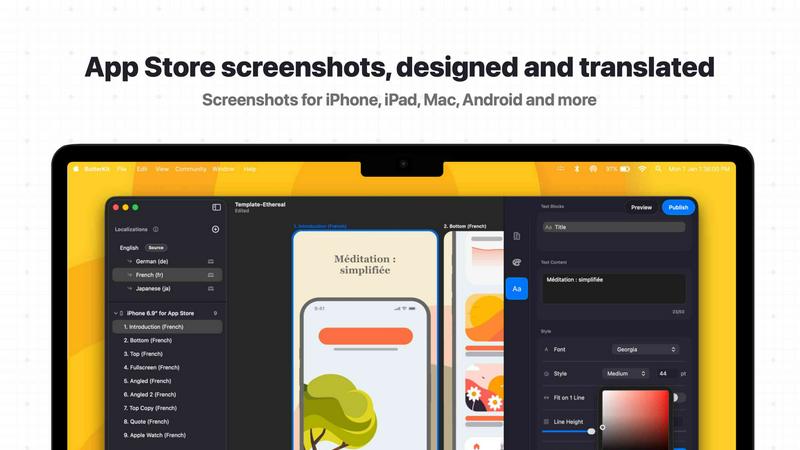
About ButterKit
ButterKit is a native macOS application built specifically for Apple developers who need to streamline their App Store publishing workflow. If you have ever struggled with creating polished screenshots, managing multiple device frames, or translating app metadata for global audiences, ButterKit solves these problems directly. The application allows you to capture screenshots directly from the Xcode Simulator and instantly place them into photorealistic 3D device frames. This eliminates the tedious process of manually compositing screenshots in separate design tools. Beyond visual polish, ButterKit integrates advanced AI models to translate your app metadata into all 50 App Store Connect languages, removing the traditional hassle and cost of localization. The tool connects directly to the App Store Connect API, enabling one-click uploads of both screenshots and metadata directly from the application. ButterKit is designed for efficiency in professional workflows. It supports linking entire folders for input and output, making it a natural fit for CI/CD pipelines and Fastlane automation. Whether you are a solo indie developer, a design studio, or a marketing agency managing multiple client apps, ButterKit provides a practical, time-saving solution. Created by a solo developer who understands the pain points of app publishing, this tool focuses on removing friction at every step, from initial screenshot capture to final App Store submission.
Features of ButterKit
Direct Xcode Simulator Capture
ButterKit integrates directly with Xcode and the iOS Simulator, allowing you to capture screenshots without leaving your development environment. Unlike web-based tools that require manual file exports and uploads, this feature enables rapid iteration. You can capture, adjust, and recapture screenshots in seconds, ensuring you get the exact design and layout you need for your App Store listing.
Photorealistic 3D Device Frames
Place your captured screenshots into high-resolution, photorealistic 3D device frames that are built on Apple's Metal graphics framework. These are not flat mockups; they are true 3D models that you can adjust and rotate to achieve the perfect presentation angle. Edits render at up to 120 frames per second, providing a smooth, responsive design experience that helps you create the polished screenshots that drive conversions.
AI-Powered Instant Translation
Translate your app screenshots and metadata into all 50 App Store Connect localizations in seconds using advanced AI models. Designs remain fully synced across all languages, so any change you make to your base design automatically propagates to every localized version. This feature eliminates the manual, error-prone process of managing multiple language versions and ensures consistency across your global App Store presence.
One-Click Upload to App Store Connect
ButterKit connects directly to the App Store Connect API, enabling batch export and direct upload of your finalized screenshots and metadata. Images are automatically placed in the correct order and format required by Apple. This integration removes the need to manually drag and drop files into your App Store Connect dashboard, saving significant time during the submission process.
Use Cases of ButterKit
Indie Developer Streamlining App Launches
A solo developer building their first iOS app can use ButterKit to capture screenshots directly from Xcode Simulator, apply professional 3D device frames, and translate metadata for international markets. The one-click upload feature eliminates the final friction point of submitting to App Store Connect, allowing the developer to focus on coding and marketing instead of manual publishing tasks.
Design Agency Managing Multiple Client Apps
A design studio handling App Store assets for multiple clients can leverage ButterKit's folder linking and Fastlane integration. By connecting folders of pre-generated screenshots from automated UI testing pipelines, the agency can quickly apply consistent branding across all client projects. The template marketplace allows designers to create reusable assets that maintain visual quality across different apps.
Marketing Team Localizing for Global Audiences
A marketing team responsible for a popular app's international presence can use ButterKit's AI translation feature to rapidly localize metadata and screenshots into all 50 supported languages. The synced design system ensures that promotional materials remain consistent across regions. The team can preview how the app's story will look on every device and in every language before publishing.
CI/CD Pipeline Integration for Automated Publishing
A development team using Fastlane and continuous integration can integrate ButterKit into their automated build pipeline. By linking the output folder from Xcode UI tests that generate localized screenshots, ButterKit automatically processes and uploads the final assets. This removes manual intervention from the release process, reducing the risk of human error and speeding up deployment cycles.
Frequently Asked Questions
How does ButterKit capture screenshots from the Xcode Simulator?
ButterKit integrates directly with Xcode and the iOS Simulator running on your Mac. When you activate the capture tool within ButterKit, it communicates with the Simulator to take a screenshot of the currently displayed app screen. This eliminates the need to manually save screenshots from the Simulator and then import them into a separate design tool. The captured image is automatically placed onto the 3D device frame you have selected, allowing for rapid iteration and design adjustments.
Can I use ButterKit with Fastlane and automated screenshot generation?
Yes, ButterKit is designed to work seamlessly with Fastlane and other CI/CD tools. You can link an entire folder of images as your input source, which is perfect for workflows where Fastlane's snapshot tool or Xcode UI tests generate a complete set of localized screenshots. ButterKit will process all images in the folder, apply your chosen device frames and design templates, and prepare them for upload. The output folder can also be linked, making the entire process automated.
How does the AI translation feature work for app metadata?
ButterKit uses advanced AI models to translate your app metadata, including app descriptions, keywords, and promotional text, into all 50 App Store Connect supported languages. Simply input your base language metadata, and the AI generates accurate translations for each localization. The designs for your screenshots remain synced across all languages, meaning any text or visual changes you make are automatically reflected in every translated version. You can review and edit translations before uploading.
Does ButterKit support uploading directly to App Store Connect?
Yes, ButterKit integrates directly with the App Store Connect API to enable one-click uploads. After you have finalized your screenshots, device frames, and translated metadata, you can upload everything directly from within the application. Images are automatically sorted into the correct order and format required by Apple for each device type and localization. This feature eliminates the need to manually drag and drop files into the App Store Connect web interface, saving significant time during the submission process.
Similar to ButterKit

Amazon research data APIs for developers, sellers and AI agents. Integrate product, keyword and market research through REST APIs and MCP.

Residential and datacenter proxy provider with 50M+ ethically sourced IPs across 150+ countries. Unlimited from $4.08/hr, pay-per-GB from $1.64/GB.

No-code 2D game editor: visual node logic, drag-and-drop scenes, live preview. Exports to Windows, macOS, Linux, Android, iOS, Web.

Jev-compatible typed decisions API: moderation, routing, intent and scoring for any text, hosted in the EU.

A free directory of 950+ projects built on Laya, the open-source decision model. Updated daily.

A free browser-based toolkit for creating, cutting, converting, and previewing sprite sheet animations.

The #1 Native Form Builder Plugin for Framer - No Code, No Embeds, No External Platforms.
