
Customer Reach Map
Stop wasting hours on spreadsheets and start visualizing your WooCommerce customer locations instantly with private heatmaps and public.
Visit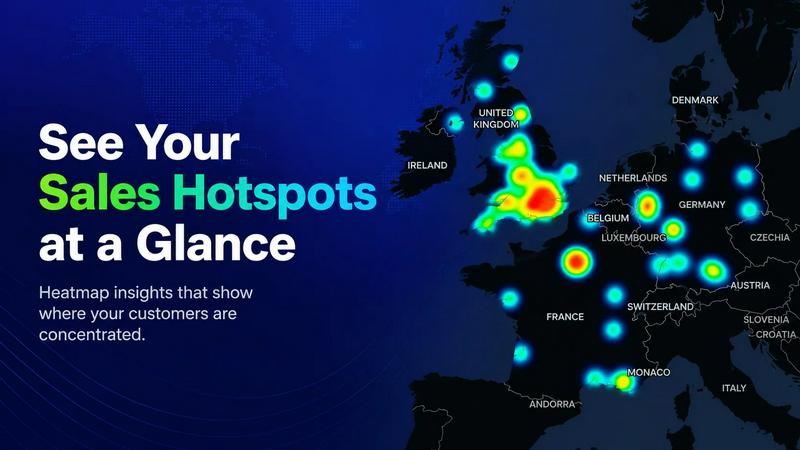
About Customer Reach Map
Customer Reach Map is a specialized WooCommerce extension designed to transform raw order data into clear, actionable geographic insights. For store owners drowning in spreadsheets and CSV exports, this tool offers a visual alternative that reveals exactly where customers are located. Instead of manually sifting through thousands of rows to identify regional trends, you get an interactive map that plots customer locations instantly. The product serves two distinct purposes. First, it provides a private dashboard view with heatmaps that highlight high-density customer areas at the city or regional level. This helps you understand market penetration, identify underserved regions, and make informed decisions about shipping zones or marketing campaigns. Second, it includes an optional public map that you can embed on your website to showcase your global customer base. This public map is fully anonymized and aggregated, meaning no personal customer data is ever exposed. It functions as a powerful trust signal, showing potential buyers that real people from various locations trust your store. Customer Reach Map is built for WooCommerce store owners of all technical skill levels. Setup takes under five minutes with no coding required. The plugin works seamlessly with your existing store, importing historical orders with one click. Processing happens in the background during scheduled tasks or on-demand in the admin dashboard, so your storefront performance remains unaffected. Whether you run a small niche shop or a growing ecommerce brand, this tool provides the geographic clarity you need to move from spreadsheet fatigue to visual intelligence.
Features of Customer Reach Map
Private Sales Heatmaps
Identify high-density customer areas at a glance down to the region or city level. The heatmap visualization uses color gradients to show concentration, making it immediately obvious where your strongest markets are located. This feature eliminates the need to manually cross-reference shipping addresses or export data to external mapping tools. You can zoom in on specific regions to see granular distribution patterns, helping you spot emerging trends or areas where your marketing efforts are underperforming. The heatmap updates as new orders come in, giving you a living view of your customer base.
Public Maps for Trust Building
Embed an interactive, anonymized map on your website to show visitors where your customers come from. This feature transforms your customer data into a social proof tool that builds credibility and trust. Potential buyers can see that real people from various locations have purchased from your store, which reduces hesitation and encourages conversions. The public map displays aggregated location data only, with no personal information like names, addresses, or purchase amounts. You control where the map appears on your site and can customize its appearance to match your brand.
Privacy First Architecture
Every feature in Customer Reach Map is built with strict privacy protections. Public maps show only anonymized, aggregated data, ensuring that no individual customer can be identified. The plugin does not expose personal details such as names, email addresses, full street addresses, or purchase histories. This approach keeps you compliant with data protection regulations like GDPR while still allowing you to benefit from geographic insights. Your customers privacy is never compromised for the sake of visualization.
One-Click Historical Data Import
Import your entire order history with a single click, no manual data preparation required. The plugin connects directly to your WooCommerce database and pulls all existing order data, including shipping addresses and billing locations. This means you get immediate value from day one without waiting for new orders to accumulate. The import process runs in the background and does not slow down your storefront. You can also schedule regular imports to keep your maps current as new orders come in.
Use Cases of Customer Reach Map
Optimize Shipping Zones and Carriers
Use the private heatmap to identify which regions generate the most orders. If you see a high concentration of customers in a specific state or country, you can negotiate better shipping rates with carriers for that zone. Conversely, if you notice sparse coverage in a region, you might consider adjusting your shipping policies or adding local fulfillment centers. The visual data makes it easy to justify operational changes with concrete evidence, reducing guesswork and wasted shipping costs.
Target Regional Marketing Campaigns
Analyze your customer distribution to launch geographically focused advertising. If the heatmap shows a strong presence in the Pacific Northwest but low penetration in the Southeast, you can allocate more ad spend to the underperforming region. You might also create location-specific promotions, such as free shipping to a particular state or a discount code for customers in a target city. The map provides the data foundation for these decisions, moving you from broad campaigns to precision targeting.
Build Social Proof on Product Pages
Embed the public map on your homepage, product pages, or checkout page to reassure potential buyers. When a visitor sees that customers from multiple countries or states have purchased from your store, it reduces perceived risk and increases purchase confidence. This is especially effective for new stores or those selling high-ticket items where trust is a major barrier. The map serves as a continuous trust signal that updates automatically as your customer base grows.
Monitor Regional Growth Over Time
Track how your customer base expands into new territories. By comparing the heatmap at different intervals, you can see which regions are growing fastest and which remain untapped. This insight helps you evaluate the effectiveness of past marketing campaigns and adjust future strategies. For example, if you ran a social media ad targeting Texas and the map shows increased density in that state, you know the campaign worked. If not, you can pivot to different channels or messaging.
Frequently Asked Questions
Will this slow down my site?
No. Processing happens during scheduled background tasks or on-demand in the admin dashboard. Your storefront performance remains entirely unaffected. The plugin is designed to run efficiently without interfering with customer browsing, checkout, or any other frontend operations.
Do you store my customer data?
Customer Reach Map accesses your WooCommerce order data to generate maps, but it does not transmit or store your customer data on external servers. All processing occurs locally within your WordPress installation. For public maps, only anonymized and aggregated location data is displayed, ensuring no personal information is ever exposed.
Can I import historical data?
Yes. The plugin includes a one-click import feature that pulls all existing order history from your WooCommerce database. You do not need to manually export CSV files or prepare data. The import runs in the background and populates your maps with historical customer locations immediately.
Is this a real-time analytics tool?
Customer Reach Map is designed for periodic updates rather than real-time streaming. New orders are processed during scheduled background tasks or when you manually refresh the data in the admin dashboard. This approach keeps the plugin lightweight and ensures it does not impact your store's performance. For most store owners, daily or weekly updates provide sufficient insight into customer distribution trends.
Pricing of Customer Reach Map
Customer Reach Map is available for purchase at the WooCommerce Marketplace. The current pricing is 89 USD per year for a single site license. This includes full access to all features, regular updates, and priority support. You can save 20 percent by choosing a two-year subscription. The plugin was previously offered for free during a beta testing phase, but that program has ended. There are no tiered plans or feature limitations based on pricing level. All customers receive the complete product with private heatmaps, public maps, privacy protections, and historical data import. Purchasing through the WooCommerce Marketplace ensures you receive automatic updates and compatibility with the latest WooCommerce versions.
Similar to Customer Reach Map

Create AI UGC video ads from a product URL, image, or script with AI creators, natural voices, captions, product visuals, and calls to action.

An AI-powered Etsy market research and seller platform that connects product discovery, keyword validation, competitor analysis, listing creation

Videowise is an AI-powered video commerce platform that turns content into shoppable experiences to boost conversions and drive measurable revenue.

eSagu helps online sellers automate repricing, FBA recovery, and support across Amazon, eBay, and other marketplaces to boost margins and efficiency.

Effortlessly list anything for sale with AI-generated titles and descriptions, connecting you to local buyers in seconds.

Tiendli lets you sell products, accept bookings, and get paid online in minutes with no coding or design skills required.

Transform your space with Melanin Art's bold Afrocentric prints that celebrate culture and heritage, bringing warmth and identity to your walls.

RocketCart automatically recovers lost sales by instantly detecting abandoned carts and sending AI-optimized emails, with a 3-minute setup that pays.