
CustomTattoo AI
CustomTattoo AI turns your tattoo ideas into realistic on-skin previews so you can confidently bring clear, artist-ready concepts to your next.
Visit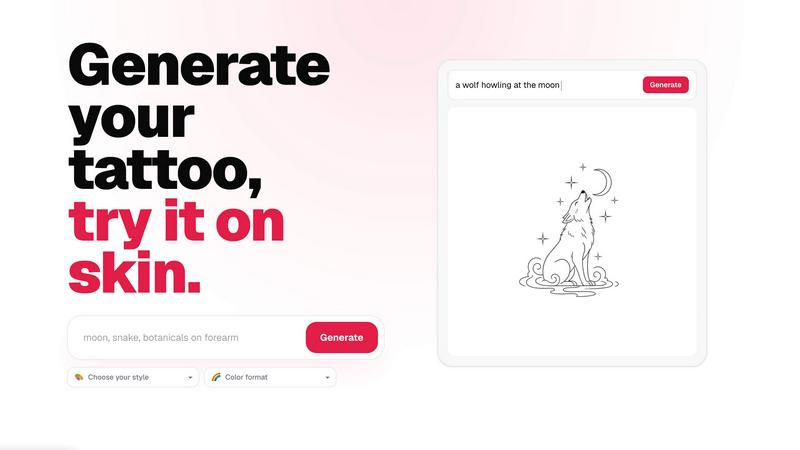
About CustomTattoo AI
CustomTattoo AI is a purpose-built platform that solves a common problem for anyone planning a tattoo: the gap between a vague idea and a design you are confident enough to make permanent. Instead of relying on rough sketches, Pinterest boards, or hoping your artist interprets your description correctly, this tool lets you generate realistic, style-specific tattoo concepts from a simple text prompt. You describe your idea, choose a style like Gothic blackwork or neo-traditional, and the AI produces a set of unique designs tailored to your vision. The real differentiator is the on-skin preview feature, which lets you see how a design looks on your own body using your own photos, helping you test placement, size, and proportion before you commit. This is especially valuable for first-time clients who feel uncertain about the process, as well as experienced collectors who want to explore multiple directions quickly. The platform also includes a personal library to save and compare favorites, making it easy to build a clear, artist-ready reference. CustomTattoo AI removes the guesswork and anxiety from the planning stage, giving you a practical way to refine your concept, test visual outcomes, and walk into a studio with a design you already know works for you. It is a solution for anyone who wants more control, clarity, and confidence in their tattoo decision.
Features of CustomTattoo AI
AI Tattoo Generator
The core feature allows you to describe your tattoo idea in natural language, specifying the subject, placement, and desired mood. The AI then generates multiple unique design concepts based on your input. You can refine your prompt, adjust the style, and regenerate until you find a direction that resonates. This eliminates the need for artistic skill or guesswork, giving you a concrete visual starting point.
On-Skin Preview
This feature lets you upload a photo of the body part where you want the tattoo and digitally place the generated design onto your skin. You can adjust the size, rotation, and exact position to see how the tattoo will look in real life. This practical tool helps you evaluate proportion, flow, and how the design interacts with your body's natural contours before any needle touches your skin.
Style and Format Selection
You are not limited to one artistic direction. The platform offers a wide range of tattoo styles, including traditional, neo-traditional, blackwork, geometric, watercolor, and more. You can also choose the color format, such as full color, black and grey, or a specific palette. This allows you to explore different aesthetics for the same idea and compare which style best suits your vision.
Personal Design Library
Every design you generate is automatically saved to your personal library. You can organize your favorites, revisit previous concepts, and compare different styles side-by-side. This library becomes your curated mood board, making it easy to track your creative journey and present a clear, cohesive direction to your tattoo artist for their consultation.
Use Cases of CustomTattoo AI
First-Time Tattoo Client
For someone getting their first tattoo, the biggest fear is the unknown. CustomTattoo AI helps you overcome this by letting you visualize the design on your own skin before committing. You can test different styles, see how a small or large piece looks, and build confidence in your choice. This reduces anxiety and ensures you arrive at the studio with a clear, well-considered plan.
Exploring Multiple Style Options
You might have a core idea, like a crescent moon with botanicals, but be unsure whether it works best as fine line, watercolor, or blackwork. This platform lets you generate the same concept in multiple styles simultaneously. You can compare the results side-by-side on your skin preview, making it easy to identify which aesthetic best captures the mood and meaning you want.
Refining Artist Consultation
Walking into a tattoo appointment with a vague description often leads to misinterpretation and longer sessions. With CustomTattoo AI, you can bring a printed or digital reference of a design you have already previewed on your body. This gives your artist a clear visual target, saving time during the consultation and ensuring the final piece aligns with your expectations.
Testing Placement and Size
A design that looks great on paper might not work well on a curved surface like a forearm or ribcage. Use the on-skin preview to test different placements and sizes. You can see how a large gothic dragon fits on your back versus a smaller version on your shoulder. This practical testing helps you make informed decisions about the most flattering and functional placement for your body.
Frequently Asked Questions
Is CustomTattoo AI free to try?
Yes, you can start for free. When you sign up for an account, you receive 3 free credits immediately with no credit card required. These credits allow you to generate your first tattoo designs and use the on-skin preview feature. This gives you a risk-free opportunity to test the platform and see if it meets your needs before deciding to purchase additional credits.
How does the on-skin preview work?
You upload a clear photo of the body part where you want the tattoo. After generating a design, you can digitally place it onto your photo. The tool allows you to move, rotate, and resize the design to fit your anatomy. The preview is realistic and helps you assess how the tattoo will look in terms of proportion, placement, and flow with your body's natural lines.
Will there be hidden subscriptions?
No. CustomTattoo AI operates on a credit-based system, not a subscription model. You purchase credits as you need them, and they do not expire. There are no recurring charges or hidden fees. You have full control over your spending, and you only pay for the design generation and preview tools you actually use.
Can I take the design to my tattoo artist?
Absolutely. The designs you generate are intended to be used as a visual reference or direction for your tattoo artist. You can download or save your favorite designs and the on-skin preview images. This provides a strong starting point for a consultation, allowing your artist to understand your vision clearly and create a custom piece based on the concept you have refined.
Similar to CustomTattoo AI

Create and edit AI images through conversation, using text or reference images and refining results in chat.

Clone any webpage pixel-perfect, export HTML/CSS/ZIP or React/Vue components.

Explore open-source creative software by workflow, platform and development stage, with comparisons and official project links.

Generate iOS and Android app icons from any image and export all platform sizes for free.

Free, open-source 2D CAD app in Rust: command-line drafting, layers, dimensions, DWG/DXF support, and AI-agent automation via MCP/CLI.

Free AI image and video studio with no sign-up: generate images from text or photos, turn prompts into short videos, plus editing and upscaling.

Paste a URL and AI designs on-brand Open Graph images from your page's colours, fonts and logo. Free, no sign-up.

Free Online Screen Test Tool - Instantly diagnose dead pixels, lines, color issues, and flickering. Multiple test modes, no download needed.