
EditTextImage
EditTextImage lets you replace text in any image online, keeping the original font and style, in under 30 seconds without Photoshop.
Visit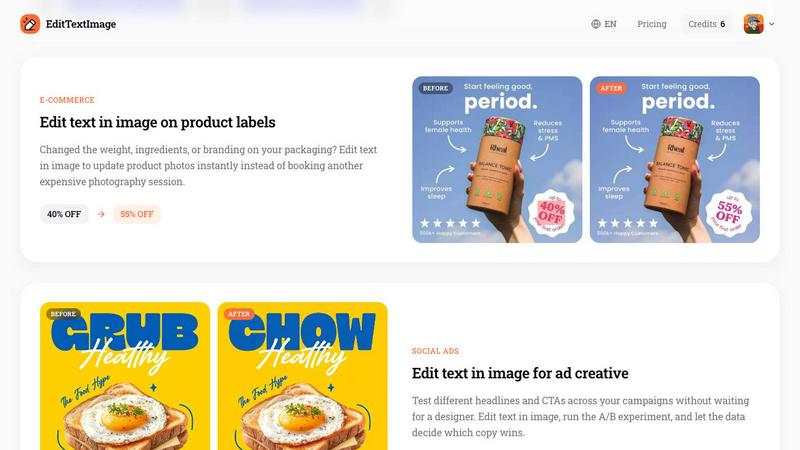
About EditTextImage
EditTextImage is a powerful online AI tool that solves a common and frustrating problem: you need to change a single word in an image, but you have lost the original design file. Whether it is a finished poster, a product screenshot, a document scan, or a social media graphic, this tool lets you replace text directly in the image without needing Photoshop, font files, or any design skills. The core technology samples the typography straight from the pixels of the image. This means the AI analyzes the font, color, size, drop shadow, perspective, and background of the existing text. When you provide the original text and the replacement text, the tool edits the image while keeping every visual element pixel-perfect. The process takes approximately 10 seconds and outputs a high-resolution 2K image. It is designed for anyone who needs a quick fix: marketers running A/B tests on ad creatives, product managers updating localization screenshots, event coordinators changing dates on flyers, or professionals fixing typos in documents. The tool is accessible online, requires no subscription, and offers a free first edit with no credit card needed. It is a practical, solution-oriented tool that eliminates the need to recreate designs from scratch or hire a designer for minor text changes.
Features of EditTextImage
AI-Powered Font Sampling
The core feature of EditTextImage is its ability to sample the typeface directly from the image pixels. Unlike traditional image editors that require you to know the exact font name or have it installed on your computer, this AI analyzes the visual characteristics of the text. It identifies the font style, weight, spacing, and even complex elements like drop shadows or perspective distortions. This means you can edit text in paid fonts, hand-lettering, or custom typefaces without ever owning the original font file. The AI replicates the typography so accurately that the edited text blends seamlessly with the rest of the image, preserving the original design intent.
Pixel-Perfect Layout Preservation
When you edit text in an image, most tools either leave a messy background or warp the surrounding elements. EditTextImage ensures that every pixel around the text stays exactly where it should be. The AI does not just replace the text; it reconstructs the background behind the original text and then places the new text in the same position. This process preserves the color, lighting, and spatial relationships of the image. Whether the text is on a complex gradient, a textured surface, or a photograph, the tool maintains the original layout without smearing or distortion, delivering a clean, professional result.
High-Speed Processing with 2K Output
Time is a critical factor when you need a quick edit. EditTextImage processes your request in an average of 12 seconds, making it one of the fastest solutions for text replacement in images. Despite the speed, the tool does not compromise on quality. The output is rendered at a 2K resolution, ensuring the final image is sharp and suitable for both digital and print use. This combination of speed and high resolution makes it ideal for production workflows, last-minute changes, and bulk editing tasks where every second counts.
No Subscription Model with Free Trial
EditTextImage operates on a simple, user-friendly pricing model that avoids the complexity of monthly subscriptions. New users receive one free credit to test the tool without providing a credit card. This allows you to experience the full capability of the AI before making any commitment. After the free trial, you can purchase a pack of 30 edits for a one-time fee of $9.90. Credits never expire, and commercial use is included in the price. This straightforward approach means you pay only for what you need, without recurring charges or hidden fees.
Use Cases of EditTextImage
Document Fixes and Corrections
Professionals often work with scanned documents, contracts, or invoices where a single typo or wrong number can cause significant issues. With EditTextImage, you can edit text in image files of these documents directly. For example, you can update an invoice number, correct a misspelled name in a contract, or fix a date on a scanned official letter. This eliminates the need to find the original editable file or recreate the entire document. The AI preserves the font and layout, so the corrected document looks original and professional, saving hours of manual work.
Poster and Flyer Updates
Event organizers and marketing teams frequently face last-minute changes to dates, venues, or speaker names on promotional materials. When the original design file is with a designer who is unavailable, EditTextImage provides an instant solution. You upload the finished poster, type the old text and the new text, and the AI updates the image in seconds. This is particularly useful for recurring events where you reuse a beautiful design from a previous year. Instead of paying for a full redesign, you simply edit the text in the image to reflect the new date or location, saving significant time and money.
App and Website Localization
For product managers and developers, creating screenshots for app stores in multiple languages is a tedious process. Traditionally, you would need to rebuild each UI mockup for every language. EditTextImage streamlines this by allowing you to edit text in image screenshots directly. You take a single screenshot of your app in English, and then use the tool to swap the text for French, Spanish, German, or any other language. The AI preserves the UI layout, button styles, and font characteristics, producing pixel-perfect localized screenshots in minutes. This accelerates the localization workflow and ensures consistency across all language versions.
E-Commerce and Product Photography
E-commerce businesses frequently update product labels, pricing, or promotional text on packaging images. If you change the weight, ingredients, or launch a new discount, you need updated product photos. Instead of booking another expensive photography session or using complex photo editing software, you can edit text in image of your existing product photos. For instance, change a "40% OFF" sticker to "55% OFF" or update a product name on a label. The AI handles the perspective and lighting of the original image, so the edited text looks like it was always part of the photo. This allows for rapid iteration on ad creatives and product listings.
Frequently Asked Questions
What types of images can I upload to EditTextImage?
You can upload images in PNG, JPEG, and WebP formats, with a maximum file size of 10 MB. The tool works best with images where the text is clearly visible and has a consistent font, color, and style. It can handle complex backgrounds, gradients, and even text with perspective or drop shadows. However, the tool is not designed for editing handwritten text with extreme variability or text that is heavily obscured by other elements. For best results, ensure the original text is legible and occupies a reasonable portion of the image.
Is my image data secure and what is the acceptable use policy?
EditTextImage takes data security seriously. The service explicitly prohibits the processing of IDs, passports, visa support letters, official seals, bank statements, or tampered receipts. Users must confirm they own or are licensed to edit the uploaded image. The edit must not be intended to deceive a third party, including visa or immigration submissions, fake refund proofs, or altered chat screenshots. Violations of this policy result in account termination without refund, and request logs may be shared with law enforcement. This policy ensures the tool is used responsibly for legitimate corrections and creative work.
How does the free trial and credit system work?
New users receive one free credit immediately upon signing in with Google. No credit card is required to start. This free credit allows you to edit one image completely, experiencing the full speed and quality of the AI. After using the free credit, you can purchase a pack of 30 edits for a one-time fee of $9.90. These credits never expire, meaning you can use them over months or years as needed. There are no recurring subscriptions or hidden fees. Commercial use of the edited images is included in the price, so you can use the results for business purposes without additional licensing.
Can I edit text in images with complex fonts or hand-lettering?
Yes, this is one of the primary strengths of EditTextImage. The AI samples the typeface directly from the pixels of the image. This means it can replicate paid fonts that are not installed on your computer, custom hand-lettering, or any unique typography present in the image. The AI analyzes the stroke width, curvature, and spacing of the original text to generate a replacement that matches the style. While the tool is highly accurate, extremely ornate or highly distorted text may require a manual touch-up. For most standard and moderately complex fonts, the results are pixel-perfect.
Pricing of EditTextImage
EditTextImage offers a simple and transparent pricing structure. New users receive one free credit to edit a single image, with no credit card required to start. After the free trial, you can purchase a pack of 30 edits for a one-time fee of $9.90. These credits never expire, so you can use them at your own pace without worrying about monthly subscriptions. Commercial use of the edited images is included in the purchase price. This pay-as-you-go model is ideal for individuals and businesses that need occasional text edits without committing to an ongoing subscription.
Similar to EditTextImage

Create and edit AI images through conversation, using text or reference images and refining results in chat.

All-in-one AI workspace to generate images, videos, and audio with multiple leading AI models.

Free AI age filter: upload an adult portrait, add 10-40 years, meet your older self. No app needed.

Generate iOS and Android app icons from any image and export all platform sizes for free.

Free AI image and video studio with no sign-up: generate images from text or photos, turn prompts into short videos, plus editing and upscaling.

AI image and video generation, photo editing, restoration and free prompt tools in one browser studio.

Turn text prompts into polished, copyright-safe visuals that plug directly into branded templates

Create and edit AI images, generate videos, and compare models in one creative workbench.