
Formly
Create and analyze forms by chatting with any AI agent, then fine-tune every detail in a visual editor.
Visit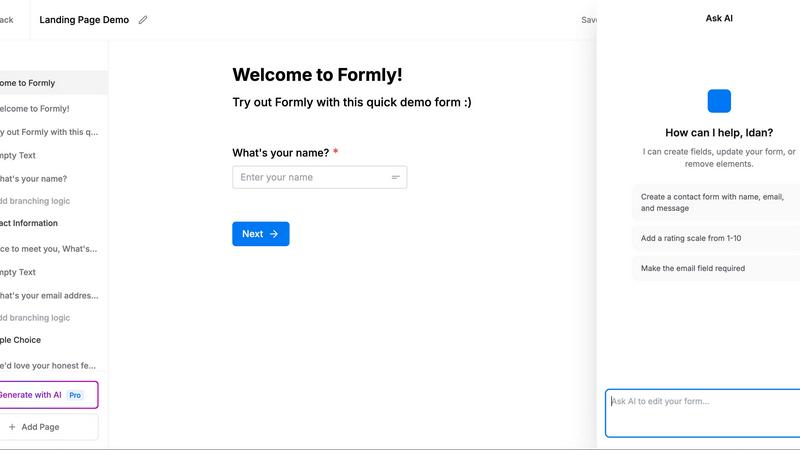
About Formly
Formly is a form builder designed for teams who need to create polished, high-converting forms without starting from a blank page. The core problem Formly solves is the friction of traditional form creation: you typically need to decide every question, field type, and layout detail before you can publish anything. Formly eliminates that by letting you describe the outcome you want in plain language to an AI agent like Claude, ChatGPT, Cursor, or Codex. The agent then drafts the entire form questions, field types, page flow, and logic. You review it, make changes in a full visual editor, and publish. This approach is ideal for product teams collecting user feedback, HR departments screening applicants, event organizers managing signups, and any team that needs to gather structured data quickly. Formly is built for practical, solution-oriented users who value speed but refuse to sacrifice quality. The product handles everything from simple contact forms to complex multi-page applications with conditional logic, answer piping, file uploads, signatures, and ratings. It also provides robust analytics, submission management, webhooks, email notifications, and GDPR-conscious hosting in Europe. Your data stays yours no cookies, no tracking of responses. Formly connects to your workflow once, and from then on, you simply ask your agent to create, update, or summarize forms and responses directly in chat.
Features of Formly
AI-Powered Form Generation from Chat
Describe the outcome you need in plain language to any connected AI agent like Claude, ChatGPT, Cursor, Codex, or OpenClaw. The agent drafts the entire form including questions, field types, multi-page flows, and conditional logic based on your goal. For example, saying "I need to screen 200 job applicants" generates a complete screening form with relevant fields, resume upload, and scoring questions. You then review and publish in seconds.
Full Visual Editor with Drag-and-Drop
Every AI-generated form opens in a complete visual editor, not a locked template. You can drag and drop blocks, rearrange pages, add new fields, and fine-tune every detail. The editor supports real-time preview, custom branding, and every block type you need from text inputs and dropdowns to signatures, ratings, matrices, phone, email, and file uploads. You have full control to go far beyond what the agent built.
Conditional Logic and Answer Piping
Make every response feel personal and relevant. Use conditional logic to show or hide questions based on previous answers, and pipe answers into later questions or confirmation messages. For example, you can greet respondents by name using "Hey @First Name" or tailor follow-up questions based on their selections. This keeps forms concise and increases completion rates.
Multi-Page Flows and Personalized Paths
Split longer surveys, applications, or feedback forms into focused steps that people actually finish. Create multi-page flows with progress indicators, and use answer piping to carry information across pages. This reduces abandonment on complex forms like job applications, event registrations, or multi-step feedback surveys. Each page feels like a natural step forward.
Use Cases of Formly
Collecting Beta User Feedback
Launch a feedback survey for beta users in seconds. Ask your agent to create a survey with rating scales, open-ended questions, and conditional follow-ups based on user responses. Publish the form, collect responses, and ask your agent to summarize the results. For example, you can learn that 72% of beta users want dark mode and 54% want CSV export, all without manually analyzing data.
Screening Job Applicants at Scale
Build a complete job application form with resume upload, skills assessment, and multi-page flow. Use conditional logic to show different questions based on the role applied for. Pipe the applicant name into personalized messages throughout the form. Webhooks push every submission directly to your ATS or CRM the moment it arrives, so your team can act immediately.
Managing Event Registrations and Signups
Create event signup forms with custom fields, ticket types, and payment collection if needed. Use multi-page flows to gather contact info, preferences, and dietary restrictions in separate steps. Embed the form on your event page or share a short link. Analytics show completion rates and drop-off points, helping you optimize the registration process for future events.
Qualifying Leads and Capturing Sales Inquiries
Generate lead capture forms that ask the right qualifying questions without scaring prospects away. Use conditional logic to show advanced questions only for high-intent leads. Pipe answers directly into your CRM via webhooks. Email notifications alert your sales team instantly when a qualified lead submits. The AI agent can also summarize weekly responses, showing trends in lead sources and common questions.
Frequently Asked Questions
How does the AI form generation work?
You connect Formly to your preferred agent (Claude, ChatGPT, Cursor, Codex, or OpenClaw) once. After that, you simply describe the outcome you want in chat. For example, "Create a feedback survey for our beta users and publish it." The agent drafts the form, you review it in the visual editor, and publish. You can also ask the agent to show responses or summarize results.
Is my data secure and GDPR compliant?
Yes. Formly is hosted in Europe and is GDPR compliant. We do not use cookies or track your form responses. Your data stays yours. The platform is designed for teams that need to handle sensitive information like job applications, customer feedback, or lead data without compromising on privacy or compliance.
Can I embed forms on my own website?
Yes. You can embed any Formly form directly on your website, landing page, or blog. You can also launch forms as popups, share them via short links, or use your own custom domain. This flexibility lets you put forms where your audience already is, increasing completion rates without forcing people to navigate away.
What integrations are available for submissions?
Formly supports webhooks out of the box, allowing you to push every submission to any service that accepts webhooks the moment it arrives. You can also use the REST API or MCP to pull responses programmatically. Coming soon are direct integrations with Notion, Zapier, and Make. This ensures your answers go where you work, not just into a dashboard.
Pricing of Formly
Formly offers one simple plan with unlimited forms and unlimited submissions. You can cancel anytime. There are no hidden tiers or per-response fees. This straightforward pricing is designed for teams that need to scale their form collection without worrying about hitting limits or unexpected costs. Start generating forms immediately and collect as many responses as you need.
Similar to Formly

No-code 2D game editor: visual node logic, drag-and-drop scenes, live preview. Exports to Windows, macOS, Linux, Android, iOS, Web.

The #1 Native Form Builder Plugin for Framer - No Code, No Embeds, No External Platforms.

Bolt Scraper extracts verified business leads from Google Maps, Facebook, and more with auto-captcha solving and unlimited data.

VibeBot lets you create a custom AI Discord bot by simply describing what you want, with no coding required, to replace multiple bots with one.

Stop wasting weeks on coding and launch premium no-code sites and apps in days with vetted templates.

Miget offers one flat-rate plan to deploy unlimited apps and services without per-component fees.

Effortlessly host and share any file with a simple drag and drop, generating shareable links in seconds.

Vidori empowers creators to launch fully branded streaming apps on all platforms without coding or revenue sharing.