
GeoRank
GeoRank lets you explore, compare, and rank any place on earth by sunshine, cost, tax, and visa rules, then ask AI about your shortlist.
VisitPublished on:
July 13, 2026
Pricing:
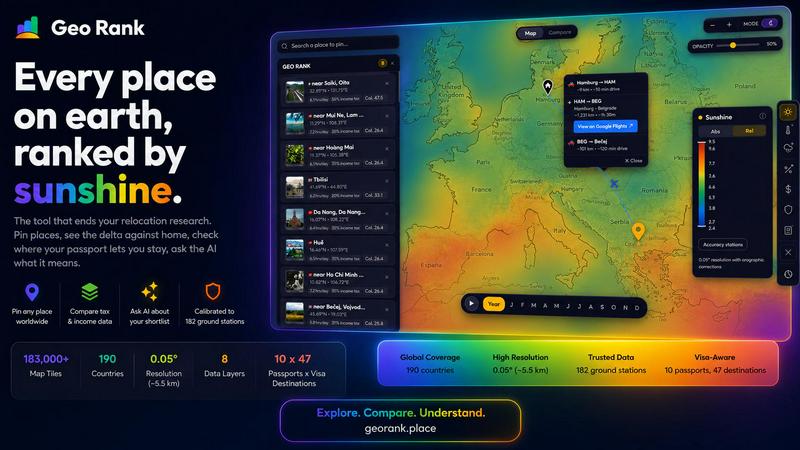
About GeoRank
GeoRank is a free, no-signup interactive map tool designed to end the chaotic, multi-tab research process of deciding where to relocate or spend an extended stay abroad. Instead of juggling a dozen separate websites for weather, cost of living, taxes, visa rules, and safety, GeoRank layers nine comprehensive data sets onto a single global map with a resolution of approximately 5.5 kilometers. The tool is built for the actual decision of where to live next, not just for browsing data. It serves digital nomads, remote workers, expatriates, and anyone considering a move by providing calibrated, grounded information. Users can explore globally, pin up to 20 candidate locations, compare them against their current home using deltas for warmth, cost, safety, and taxes, and then ask a built-in AI assistant that reasons exclusively over the user's own shortlist. The platform covers sunshine and temperature data calibrated against 182 ground stations, tax rates from OECD, PwC, and KPMG, visa and residency routes for 47 destinations across 10 passports, cost of living data from 478 cities, geopolitical risk, and a community-sourced "Nomad Pulse" sentiment tracker. GeoRank replaces scattered research with one unified, decision-focused platform.
Features of GeoRank
Explore with 9 Live Data Layers
Toggle any of the nine comprehensive data layers on the interactive map to see global patterns at a glance. Layers include Sunshine, Temperature, Rainfall, Outdoor Hours, Tax, Visas and Residency, Cost of Living, Geopolitical Risk, and Nomad Pulse. Each layer is powered by a specific data source, such as SARAH-3 satellite observations for sunshine or OECD tax databases, and you can stack multiple layers to see how factors interact in a specific location. The map allows you to pan globally and zoom down to approximately 5.5 kilometer cells for detailed local analysis.
Pin and Compare Against Your Home
Click any location on the map to pin it to your shortlist, which can hold up to 20 places and saves across sessions. Once you have your candidate locations, switch to Compare mode and set your current home as a baseline. Every metric for your pinned places is then shown as a delta against your home, answering questions like "how much warmer is it?", "how much cheaper is the cost of living?", or "how much lower are the taxes?" This relative comparison transforms absolute data into actionable, personal insights relevant to your specific situation.
AI Assistant for Your Shortlist
The built-in chat function operates exclusively on your pinned locations and their specific data, not on a generic knowledge base. You can ask complex, comparative questions like "Which of my 5 places has the best winter?" or "Score my shortlist for sunshine, cost, and low tax combined." The AI reasons across all your pinned places in one response, providing grounded answers with cited sources from the platform's data layers. This feature helps you understand trade-offs between locations that a simple table cannot easily convey.
Calibrated Data with Ground Truth
Unlike tools that rely solely on raw satellite data, GeoRank calibrates its environmental data against ground truth. The sunshine and temperature data, for example, merges SARAH-3 satellite observations with ERA5 reanalysis data and is bias-corrected against 182 ground stations from Reykjavik to Phoenix to Sydney, with orographic terrain corrections applied. This methodology provides significantly higher accuracy, especially in cloudy regions or areas with complex terrain, giving you confidence in the numbers you use to make your decision.
Use Cases of GeoRank
Choosing a Winter Base as a Remote Worker
A remote worker with a UK passport wants to escape the cold winter months. They can use GeoRank to pin several candidate cities like Paphos, Tbilisi, and Medellin. By setting their current home as a baseline, they can instantly see the delta in winter sunshine hours and temperature. They can then ask the AI assistant, "Which of my pinned places has the best winter for a freelancer?" The AI will compare the sunshine hours, temperature, cost of living, and visa-free stay duration for their specific passport, providing a clear recommendation with trade-offs.
Evaluating Cost of Living vs. Tax Benefits for Relocation
An American considering a full relocation to Europe can use GeoRank to narrow down options. They can pin locations like Lisbon, Porto, and a city in Cyprus. Using the Compare mode, they can set their current US city as home and see the delta for cost of living and income tax rates. The AI can then answer a question like, "Which of my places has the lowest combined cost of living and income tax for a US citizen?" The response will factor in specific tax regimes like Portugal's NHR or Cyprus's non-dom status, alongside monthly living costs.
Assessing Safety and Stability for a Family Move
A family considering a move abroad needs to prioritize safety and stability alongside climate. They can use GeoRank to pin locations like a city in Switzerland, a city in Singapore, and a city in Uruguay. They can toggle the Geopolitical Risk layer to visually assess each location's stability. In Compare mode, they can see the delta for safety and climate factors against their current home. They can then ask the AI, "What are the tradeoffs between Zurich and Montevideo for a family with young children?" The AI will synthesize the safety data, cost of living, and school climate factors.
Short-Term Extended Stay Planning for a Digital Nomad
A digital nomad with an Australian passport wants to plan a six-month stay in Southeast Asia. They can pin locations like Chiang Mai, Bali, and Da Nang. Using the Visas & Residency layer, they can immediately see how long their passport allows them to stay in each country without a visa. They can then use the Nomad Pulse layer to check the current community sentiment and the Cost of Living layer to compare monthly expenses. The AI can answer, "Which of my three pinned places has the best community sentiment and longest visa-free stay for an Australian?"
Frequently Asked Questions
Is GeoRank really free and do I need to sign up?
Yes, GeoRank is completely free to use and requires no signup or account creation. You can access the interactive map, toggle all nine data layers, pin locations, use the Compare mode, and ask the AI assistant without providing any personal information or paying any fees.
How accurate is the environmental data on GeoRank?
The environmental data, particularly for sunshine and temperature, is highly accurate because it is calibrated against ground truth. GeoRank does not rely solely on raw satellite data. It merges SARAH-3 satellite observations with ERA5 reanalysis data and then bias-corrects the results against 182 ground stations worldwide, including orographic terrain corrections. This results in accuracy of around plus or minus 8 percent for most locations.
How does the AI assistant work with my shortlist?
The AI assistant is designed to reason only over the specific locations you have pinned to your shortlist. It does not use a generic knowledge base or search the internet. When you ask a question like "Which of my places is best for winter?", the AI analyzes the specific data for each of your pinned locations across all available metrics (sunshine, cost, tax, visa, etc.) and provides a comparative answer with cited sources from the platform's data.
What data sources power the tax and visa information?
The tax data on GeoRank is sourced from official and reputable institutions including the OECD Tax Database, PwC Worldwide Tax Summaries, and KPMG tax guides. The visa and residency information covers 47 destinations for 10 different passports, detailing visa-free stays, visa-on-arrival options, and residency routes, and is kept updated to reflect current regulations.
Similar to GeoRank

Wheel of Names Spin Wheel Picker tool for classrooms or events


#1 Emotion Intelligence Analysis tool to understand better Texts, Email Letters, Videos, Photos and even Dating profiles

Verla is an AI academic assistant for university and college students, combining AI essay writing, academic research, AI detection, AI humanization, p

Wery is an AI-powered virtual creative studio for entertainment content.

Apps and files on an infinite canvas where people and AI agents work together.

Snapkin is a calorie tracker you use by photographing your plate.

Privacy-first, cookieless web analytics that ties your traffic and marketing channels to real Stripe revenue.