
JustPDF
JustPDF is a privacy-first toolkit that lets you edit, convert, and compress PDFs directly in your browser without uploading your files.
Visit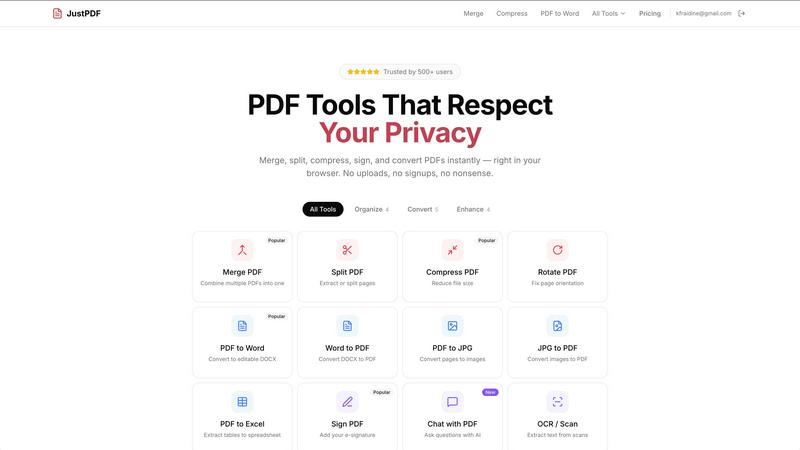
About JustPDF
JustPDF is a revolutionary suite of PDF tools designed for anyone who needs to handle PDFs with speed, privacy, and simplicity. It provides 17 professional-grade tools for merging, splitting, compressing, converting, and editing PDF documents. The core value proposition is absolute privacy: unlike services like Smallpdf or iLovePDF, JustPDF processes all files entirely within your web browser using JavaScript and WebAssembly. Your documents are never uploaded to a remote server, a fact you can verify yourself by checking your browser's Network tab. This makes it the ideal solution for students, professionals, legal teams, and anyone handling sensitive information. The platform requires no account for its generous free tier, which allows for 3 operations per day, and offers a Pro plan for unlimited access. With its FERPA-compliant status and ability to work offline, JustPDF delivers powerful functionality without compromising on security or convenience, putting you in complete control of your documents.
Features of JustPDF
100% Browser-Based Processing
Every operation in JustPDF happens locally on your device. When you drag and drop a file, it is processed using JavaScript and WebAssembly within the browser's secure environment. This means your confidential contracts, personal documents, or sensitive research never travel over the internet to a third-party server. You maintain full ownership and privacy from start to finish, with the peace of mind that comes from knowing your data stays with you.
Comprehensive PDF Tool Suite
JustPDF consolidates 17 essential PDF tools into one seamless interface. Beyond basic functions like Merge, Split, and Compress, it includes advanced converters (PDF to Word, Excel, JPG), specialized tools for image formats (WebP/HEIC to PDF), and editing capabilities like Rotate, Flatten, and Unlock. This eliminates the need to juggle multiple websites or software, providing a complete, all-in-one workstation for virtually any PDF task you encounter in your daily workflow.
AI-Powered Chat with PDF
This innovative feature allows you to interact with your PDF documents conversationally. Upload a lengthy report, manual, or contract and simply ask questions in natural language. The AI will scan the document and provide instant answers, summaries, or pinpoint specific information. This transforms static PDFs into interactive resources, saving hours of manual reading and searching, making research and data extraction remarkably efficient.
Offline Functionality & No Account Required
JustPDF is built for immediate use without barriers. You can start using the tools instantly without creating an account or providing an email address. Furthermore, because the processing engine runs in your browser, core functionalities remain available even without an internet connection after the initial page load. This ensures reliability and access whenever you need it, whether you're on a plane, in a remote location, or simply prefer not to register for another service.
Use Cases of JustPDF
Handling Sensitive Legal or Business Documents
Lawyers, consultants, and business professionals often work with confidential contracts, merger agreements, and client data. Using JustPDF ensures these sensitive PDFs are merged, compressed, or converted without ever being exposed to the cloud. The local processing provides a verifiable security audit trail, crucial for maintaining client confidentiality and meeting strict data governance policies, all while streamlining document preparation.
Student and Academic Workflow
Students and researchers can safely handle thesis papers, research submissions, and graded assignments. The FERPA-compliant nature of JustPDF makes it suitable for educational records. A student can compress a large portfolio for email submission, merge scanned textbook chapters, or convert a lecture PDF to Word for note-taking, all without worrying about their academic work being stored or analyzed on external servers.
Preparing Digital Documents for Signatures
Professionals needing a quick e-signature solution can use the Sign PDF tool to add their signature directly to agreements, proposals, or consent forms. Since the document never leaves the computer, it's a secure and fast alternative to printing, signing, and scanning. This is perfect for finalizing remote work contracts, freelance agreements, or internal approvals on the go with complete privacy.
Optimizing and Converting Scanned Files
Administrative staff or archivists dealing with scanned documents can use the OCR/Scan tool to make image-based PDFs searchable and editable. They can also convert batches of JPG, WebP, or HEIC images from smartphones or cameras directly into a single, professional PDF file. This simplifies document digitization projects and improves the usability of archival materials without relying on insecure online services.
Frequently Asked Questions
Is JustPDF really free, and what are the limits?
Yes, JustPDF offers a completely free tier that requires no account or sign-up. Free users can perform 3 operations per day across all tools. This is ideal for occasional use. If you need unlimited access to all 17 tools, you can upgrade to the Pro plan, which starts at $4 per month, removing the daily limit and providing full, unrestricted usage.
How does JustPDF protect my privacy compared to other online tools?
JustPDF's technology is fundamentally different. While most online PDF tools upload your file to their servers for processing, JustPDF runs the entire operation locally in your web browser using WebAssembly. You can confirm this by opening your browser's Developer Tools (F12), going to the Network tab, and seeing that no file data is transmitted during processing. Your files literally never leave your device.
What does "works offline" mean?
Because the core processing code is loaded into your browser when you first visit the site, many of JustPDF's core tools (like merge, split, compress) do not require an active internet connection to function after that initial load. You can process files even if you lose connectivity. Note that some features requiring external AI models or validations, like Chat with PDF, may need an internet connection.
Can I use JustPDF for my work at a school or university?
Absolutely. JustPDF is explicitly designed to be FERPA-compliant, meaning it meets the stringent data privacy and security standards required for handling educational records in the United States. The local processing model ensures student information is protected, making it a safe and approved tool for teachers, administrators, and students to use with academic documents.
Pricing of JustPDF
JustPDF operates on a freemium model. The free plan allows all users to perform 3 operations per day across any of the 17 tools without needing to create an account. For users with higher volume needs, the Pro plan offers unlimited access to all tools. The Pro subscription starts at $4 per month, providing a cost-effective solution for professionals, students, or teams who require regular, unrestricted use of the platform's private and powerful PDF utilities.
Explore more in this category:
Similar to JustPDF

Apps and files on an infinite canvas where people and AI agents work together.

Panzoe is an all-in-one AI platform for personal productivity, business automation, AI assistants, content creation, and custom AI solutions.

AI Email Filter sorts incoming mail into folders using plain-language prompts you write. Works with any IMAP mailbox; bring your own LLM if you want.

No-code 2D game editor: visual node logic, drag-and-drop scenes, live preview. Exports to Windows, macOS, Linux, Android, iOS, Web.

Free collection of online developer utilities, code formatters, and digital converters designed to streamline your daily workflow.

Online tally counter for tracking attendance, workouts, inventory, visitors, sports scores, habits, and everyday counting tasks.

Visual financial timelines for couples and young professionals: model cash flow, life events, and shared goals.

The #1 Native Form Builder Plugin for Framer - No Code, No Embeds, No External Platforms.