
KPI Studio
KPI Studio turns raw data into video-ready animated charts in under 60 seconds without timelines or keyframes.
Visit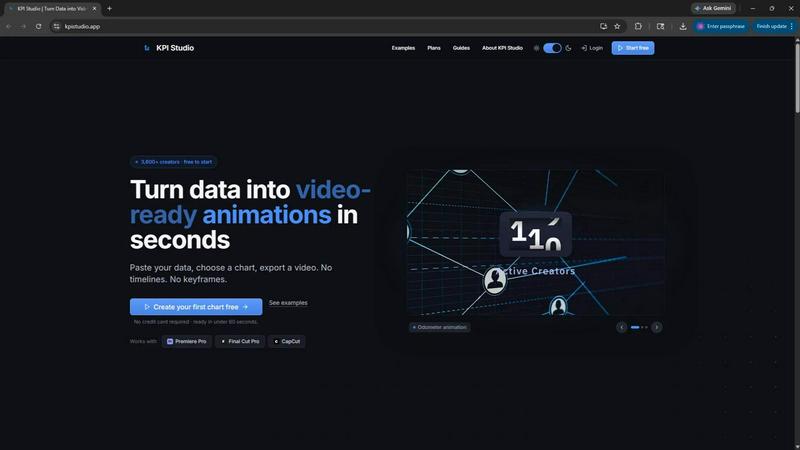
About KPI Studio
KPI Studio is a specialized software tool built for data-driven video creators who need to incorporate animated charts and metrics into their content without the overhead of traditional motion design. The product directly addresses a broken workflow where creators resort to amateur screenshots, rigid Canva templates, time-consuming After Effects projects, or slow and expensive freelancers. KPI Studio eliminates this entire process by allowing users to paste their data, choose a chart type, and export a fully animated, video-ready visual in under 60 seconds. There are no timelines to manage, no keyframes to set, and no complex setup required. The tool is designed for creators operating on a strict publish schedule who need charts ready today, not tomorrow. Exports include transparent background support, so charts drop directly into editing timelines like Premiere Pro, Final Cut Pro, and CapCut with zero additional editing. For advanced workflows, JSON export enables deeper customization and integration into custom pipelines. With over 3,600 creators already using the platform, KPI Studio positions itself as the fast, practical path from raw numbers to polished video content, solving the specific pain point of turning static data into engaging motion graphics that hold viewer attention and drive higher engagement metrics.
Features of KPI Studio
Instant Data-to-Video Conversion
The core feature is the ability to paste raw data, select a chart type, and export a fully animated video in under 60 seconds. This eliminates the need for any motion design skills, keyframe animation, or complex software. Users simply input their numbers, customize the visual appearance, and export a finished animation ready for their video timeline. Data changes are handled by re-exporting, not by redoing keyframes or timelines.
Multiple Export Formats with Transparency
KPI Studio supports a comprehensive range of export formats including MP4, GIF, MOV with alpha channel transparency, and PNG sequences. The transparent background export is critical for video editors, allowing charts to be dropped directly into Premiere Pro, Final Cut Pro, CapCut, or any other editing software without requiring additional compositing or background removal steps. This saves significant post-production time.
Variety of Animated Chart Types
The tool offers multiple chart types specifically designed for video content. Users can create count-up number animations that reveal milestone metrics like subscriber counts or revenue totals. Growing bar charts allow for comparison animations where bars rise on screen. Drawing line charts show trends and changes over time as a self-drawing line. These formats are optimized for visual storytelling and audience retention.
Flexible Aspect Ratios and Resolutions
KPI Studio provides preset aspect ratios matching common video platforms and formats. Users can export in 16:9 widescreen for YouTube, 9:16 vertical for Stories and TikTok, 1:1 square for Instagram, and 4:3 standard for presentations. The Pro plan supports 4K resolution exports, while all paid plans offer 1080p HD. This ensures the output fits seamlessly into any project without manual resizing or cropping.
Use Cases of KPI Studio
YouTube Data-Driven Content
YouTube creators who produce analysis videos, monthly reports, or comparison content can use KPI Studio to generate animated charts showing subscriber growth, revenue trends, or view count milestones. Instead of spending hours in After Effects or settling for static screenshots, creators paste their data and export a professional animated visual in under a minute. The transparent background allows the chart to overlay existing footage or background graphics directly in the editing timeline.
Social Media Shorts and Stories
For platforms like TikTok, Instagram Reels, and YouTube Shorts, engaging motion graphics are essential for stopping the scroll. Creators can use KPI Studio to produce vertical 9:16 count-up animations showing follower growth, engagement rates, or sales figures. The animated visuals outperform static screenshots, leading to higher retention and engagement. The quick export time means creators can produce multiple data-driven posts for a single campaign without a heavy production burden.
Client Reporting and Presentations
Agencies and freelancers who need to present performance metrics to clients can use KPI Studio to create polished, animated visual reports. Instead of sending static PDFs or spending hours on custom motion graphics, they generate professional count-up counters and animated charts that work seamlessly in PowerPoint, Google Slides, or video presentations. The JSON export option allows for deeper customization when integrating into branded client dashboards or custom pipelines.
eLearning and Educational Content
Educators, trainers, and course creators can use KPI Studio to visualize statistics, historical data trends, or progress metrics in their video lessons. Animated charts make complex data more digestible and memorable for learners. The tool's simplicity means instructors can update data for new cohorts or versions of a course without redoing animations. The transparent background allows charts to be placed alongside talking head footage, slides, or other visual elements.
Frequently Asked Questions
Do I need any motion design or animation skills to use KPI Studio?
No, KPI Studio is specifically designed to eliminate the need for motion design skills. There are no timelines, keyframes, or complex animation settings. You simply paste your data, choose a chart style, and export a fully animated video. The entire process takes under 60 seconds and requires no technical animation knowledge.
What export formats and resolutions are available?
KPI Studio supports MP4, GIF, MOV with alpha channel transparency, and PNG sequences. The Free plan includes unlimited PNG exports and 3 animated exports. The Creator Pack offers 10 video exports at 1080p. The Pro plan provides unlimited video exports at up to 4K resolution. All paid exports are watermark-free.
Can I use KPI Studio charts in my video editing software?
Yes, charts export with transparent backgrounds, allowing them to be dropped directly into Premiere Pro, Final Cut Pro, CapCut, or any other video editor without additional editing. You can overlay the animated chart on top of existing footage, background graphics, or text. No chroma key or background removal is needed.
What happens when my data changes after I have exported a chart?
KPI Studio makes data updates simple. Since there are no keyframes or complex project files to manage, you can simply paste the updated data, customize the chart, and re-export a new video. This process takes under 60 seconds, meaning you can update metrics for recurring reports, new episodes, or client revisions without redoing any animation work.
Pricing of KPI Studio
KPI Studio offers three pricing tiers to accommodate different usage levels. The Free plan is available at $0 per month and includes unlimited PNG exports, 3 free animated exports, all chart types, and real-time preview. The Creator Pack is a one-time purchase for $11.99 and includes everything in Free plus 10 video exports (GIF, MP4, WebM, and MOV), no watermark, 1080p export resolution, and no expiry on credits. The Pro plan is the most popular option at $19.99 per month and includes everything in Free plus unlimited video exports, no watermark, 4K export resolution, and the ability to cancel anytime.
Similar to KPI Studio

A fast, simple image studio powered by Nano Banana 2.1. Create and edit high-quality images with accurate details and readable text.

AIPetGen turns a photo of your dog, cat, or other pet, or a written description, into a new picture or a short animation.

The agentic social media content engine: write once, publish to 20 networks, and track every click in real time.


A focused two-photo AI studio for original duet videos or portraits, with paid credits and MP4 export.

Enhance photos, create images, and generate videos with AI workflows, creative effects, and a shared asset library.

Create AI UGC video ads from a product URL, image, or script with AI creators, natural voices, captions, product visuals, and calls to action.