
About Mod
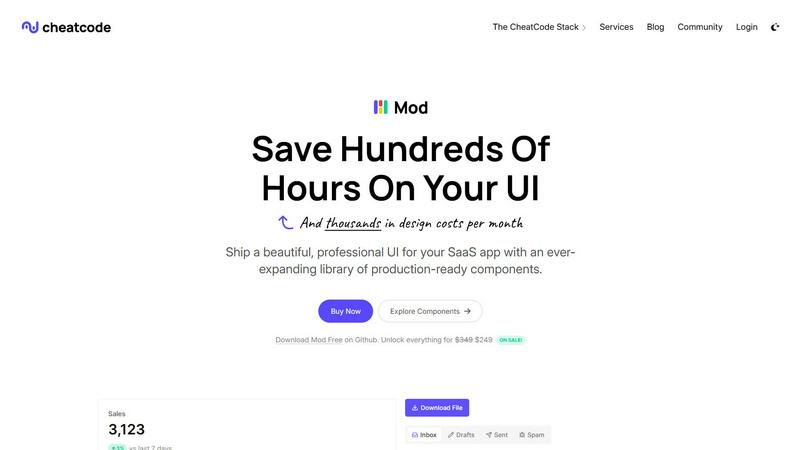
Mod is a comprehensive, production-ready CSS framework designed specifically for building modern, polished SaaS (Software as a Service) user interfaces. It solves the common and costly problem of UI design and front-end development for startups and development teams by providing a vast, meticulously crafted library of components and styles. The core value proposition of Mod is acceleration: it enables developers to ship professional, visually consistent, and fully responsive applications dramatically faster, without the need for a dedicated designer or countless hours spent on CSS. It is built for solo developers, small startups, and engineering teams who need to move quickly from idea to MVP and beyond, ensuring their product looks credible and professional from day one. As part of the CheatCode developer stack, Mod integrates seamlessly with its companion tools but is fundamentally framework-agnostic. This means it works effortlessly with popular front-end frameworks like Next.js, Nuxt, Svelte, and Vite, as well as back-end-focused frameworks like Rails and Django, making it a versatile choice for any tech stack. By offering a complete design system out of the box, Mod drastically reduces design debt, eliminates UI inconsistency, and allows teams to focus their energy on core application logic and unique features instead of rebuilding common interface elements.
Features of Mod
Extensive Component Library
Mod provides over 88 professionally designed, accessible, and fully responsive UI components. This library covers everything from basic buttons, forms, and navigation bars to complex data tables, modals, dashboards, and pricing sections. Each component is built with SaaS applications in mind, featuring clean, modern aesthetics and interactive states. This eliminates the need to build these elements from scratch, saving hundreds of hours of development and design time while ensuring a high-quality, cohesive look across your entire application.
Customizable Design System with Multiple Themes
Beyond individual components, Mod offers a complete and flexible design system. It includes 168 distinct style utilities and two built-in themes (light and dark mode) that can be applied globally. The system is built with CSS custom properties (variables), making it incredibly easy to customize colors, spacing, typography, and more to match your brand identity. The mobile-first, responsive grid ensures your application looks perfect on any device, from desktops to smartphones.
Framework-Agnostic Integration
A key strength of Mod is its complete independence from any specific JavaScript framework. It is delivered as pure, well-structured CSS. This means you can seamlessly integrate it into a Next.js or Nuxt.js project, a SvelteKit application, a Vite-powered site, or even a traditional server-rendered application using Rails or Django. This flexibility future-proofs your investment and allows teams to adopt Mod regardless of their preferred or existing technology stack.
Comprehensive Icon Suite & Dark Mode
Mod includes a library of over 1,500 consistent, sharp icons that align perfectly with the component aesthetics, removing the need to source or manage icons from multiple third-party packs. Furthermore, full support for dark mode is built directly into the design system. Implementing a theme switcher or respecting user OS preferences becomes straightforward, providing a modern user experience that is increasingly expected in today's applications.
Use Cases of Mod
Rapid SaaS MVP Development
For founders and solo developers building a minimum viable product, Mod is the ultimate accelerator. Instead of spending weeks designing and coding a basic UI, you can use Mod's components to assemble a professional-looking landing page, authentication flow, and user dashboard in days. This allows you to validate your business idea with real users much faster and with a product that appears established and trustworthy.
Standardizing UI Across Development Teams
In growing engineering teams, inconsistent UI implementation is a common pain point. Mod acts as a single source of truth for the front-end. By providing a shared component library and design tokens, it ensures that every developer builds features that look and behave consistently, whether they are working on the settings page, the admin panel, or the customer portal. This reduces review cycles and improves overall product quality.
Modernizing Legacy Application Interfaces
For companies with functional but outdated web applications, a full UI redesign can be a daunting, expensive project. Mod offers a practical path to modernization. Developers can incrementally replace old, custom CSS with Mod's components and styles, section by section. This approach delivers visual improvements quickly without a risky, complete rewrite, steadily enhancing the user experience over time.
Building Internal Tools and Admin Panels
Internal dashboards and admin interfaces are crucial for business operations but often don't justify a large design budget. Mod is perfect for this scenario. Its comprehensive set of data display components, forms, and layouts allows developers to build powerful, intuitive, and good-looking internal tools efficiently. This improves productivity for internal teams without diverting significant resources from customer-facing product work.
Frequently Asked Questions
What frameworks is Mod compatible with?
Mod is completely framework-agnostic. It is written in plain CSS and can be used with any front-end or full-stack framework that can import CSS files. This includes, but is not limited to, Next.js, Nuxt.js, Svelte/SvelteKit, Vue.js, React, Vite, Astro, Ruby on Rails, Django, Laravel, and plain HTML websites. Its utility-class approach integrates smoothly into any environment.
Does Mod include JavaScript for interactive components?
No, Mod is a CSS framework focused on styling, layout, and visual presentation. It provides the complete styles for interactive states (like hover, focus, active) for components such as dropdowns or modals. However, the actual interactive functionality (opening/closing, toggling) must be implemented using your chosen framework's JavaScript or a dedicated JavaScript library. This separation keeps Mod lightweight and flexible.
How customizable are the components and themes?
Mod is highly customizable. It is built using CSS custom properties (variables) for core design tokens like colors, fonts, spacing, and radii. You can easily override these variables in your own CSS to match your brand. Furthermore, the utility-class system allows you to modify individual components on the fly. The two included themes (light/dark) serve as excellent starting points that can be extended or completely altered.
What is the update policy for Mod?
Mod receives yearly updates as part of the CheatCode ecosystem. These updates ensure the component library stays current with modern design trends, accessibility standards, and best practices. This update policy provides a predictable maintenance cycle, giving developers confidence that the tool they are building with will be supported and improved over the long term without constant, breaking changes.
Similar to Mod

Amazon research data APIs for developers, sellers and AI agents. Integrate product, keyword and market research through REST APIs and MCP.

Residential and datacenter proxy provider with 50M+ ethically sourced IPs across 150+ countries. Unlimited from $4.08/hr, pay-per-GB from $1.64/GB.

No-code 2D game editor: visual node logic, drag-and-drop scenes, live preview. Exports to Windows, macOS, Linux, Android, iOS, Web.

Jev-compatible typed decisions API: moderation, routing, intent and scoring for any text, hosted in the EU.

A free directory of 950+ projects built on Laya, the open-source decision model. Updated daily.

A free browser-based toolkit for creating, cutting, converting, and previewing sprite sheet animations.

The #1 Native Form Builder Plugin for Framer - No Code, No Embeds, No External Platforms.
