
PicSpeak
PicSpeak delivers instant, professional AI critiques on your photos, helping you enhance composition, lighting, and overall impact with actionable.
VisitPublished on:
April 12, 2026
Pricing:
About PicSpeak
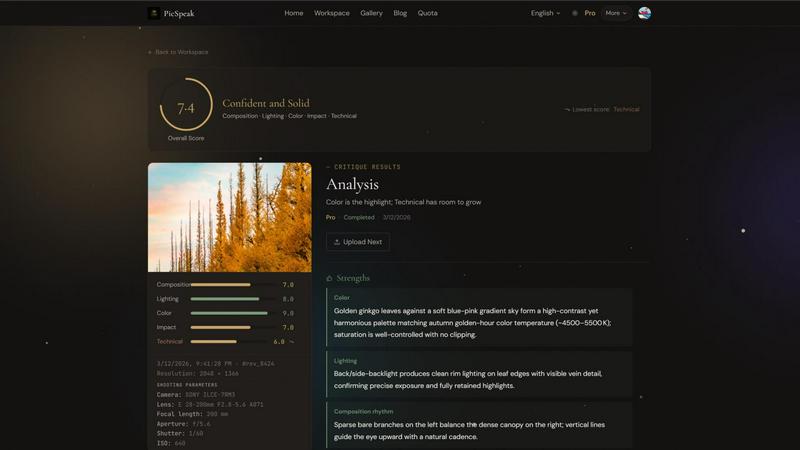
PicSpeak is an innovative AI-powered photography critique tool that empowers photographers to enhance their craft through detailed analysis of their images. Designed for both amateur and professional photographers, the platform provides instant feedback on various aspects of photography, including composition, lighting, color, emotional impact, and technical execution. Users can upload their photos and receive critiques that help them understand their strengths and areas for improvement. PicSpeak caters to a diverse audience, from those just starting out in photography to seasoned professionals looking for an edge in their work. The main value proposition lies in its ability to offer constructive critiques quickly and efficiently, allowing photographers to learn and grow in their skills without the need for traditional, time-consuming feedback methods. Whether someone is looking to refine their technique or gain insight into their artistic choices, PicSpeak serves as an invaluable resource.
Features of PicSpeak
Guest Mode
This feature allows users to start using the app instantly without the need for registration. Ideal for newcomers, Guest Mode provides an opportunity to explore the platform and its capabilities without any commitment.
Google Sign-In
With a simple one-click authorization, users can leverage their Google accounts to access PicSpeak. This feature not only provides higher usage limits but also streamlines the login process, making it easier to start critiquing photos.
Direct Image Upload
Users can upload files directly from the frontend to object storage without routing through the backend. This feature ensures a seamless experience, allowing photographers to quickly get their images analyzed by the AI.
AI Critique by Category
Receive tailored critiques across various categories such as composition, lighting, color, emotional impact, and technical execution. This feature offers both lightweight (Flash) and in-depth (Pro) modes, catering to the different needs of users based on their experience level.
Use Cases of PicSpeak
Instant Feedback for Beginners
New photographers can use PicSpeak to quickly receive feedback on their photos, helping them understand the fundamentals of photography and improve their skills without waiting for lengthy critiques from mentors.
Professional Development
Experienced photographers can utilize the platform to gain insights into their work, receiving detailed critiques that highlight their strengths and suggest areas for improvement, thus aiding their professional growth.
Portfolio Enhancement
Photographers looking to refine their portfolios can use PicSpeak to analyze their best works. The critiques help in selecting the strongest images that resonate with potential clients or galleries.
Community Engagement
Users can engage with the PicSpeak community by showcasing their work in the gallery and accessing tutorials and insights from other photographers, fostering a collaborative learning environment.
Frequently Asked Questions
What image formats does PicSpeak support?
PicSpeak supports a variety of image formats, allowing users to upload their photos seamlessly for critique. Common formats include JPEG, PNG, and others, ensuring flexibility for different users.
What is the difference between Flash and Pro critique modes?
Flash mode provides instant and precise scoring on key elements of photography, while Pro mode offers a deeper analysis, including actionable suggestions for improvement, making it ideal for users seeking thorough feedback.
What are the differences between Guest, Free, and Pro accounts?
Guest accounts allow limited usage without registration, Free accounts provide moderate usage with access to both critique modes, and Pro accounts offer unlimited critiques and priority queue management for heavy users.
Is my photo data secure?
Yes, PicSpeak prioritizes user privacy and data security. All uploaded images are handled with strict security protocols to ensure that your data remains confidential and protected throughout the critique process.
Similar to PicSpeak

Nevisible is an AI-sourced pipeline platform that makes suppliers readable to AI, uncovers AI-sourced buyers and tracks AI answers for manufacturers.

Edit text already printed in any photo: change a price, date or label and AI redraws that area in the original style. Three versions per edit, free HD

Turn text ideas or reference images into videos through conversation, with agent-assisted prompts and a choice of video models.

Open-source Android comic & manga reader with encrypted cloud streaming and AI ad-page stripping.

Restore old photos with RestoreOldPhoto.ai: repair scratches, creases and fading, sharpen faces and details, and optionally colorize family memories.


Create and edit AI images through conversation, using text or reference images and refining results in chat.

All-in-one AI workspace to generate images, videos, and audio with multiple leading AI models.