
Prompt Builder
Prompt Builder instantly creates, refines, and manages AI prompts so you can get better results from models like ChatGPT and Gemini.
Visit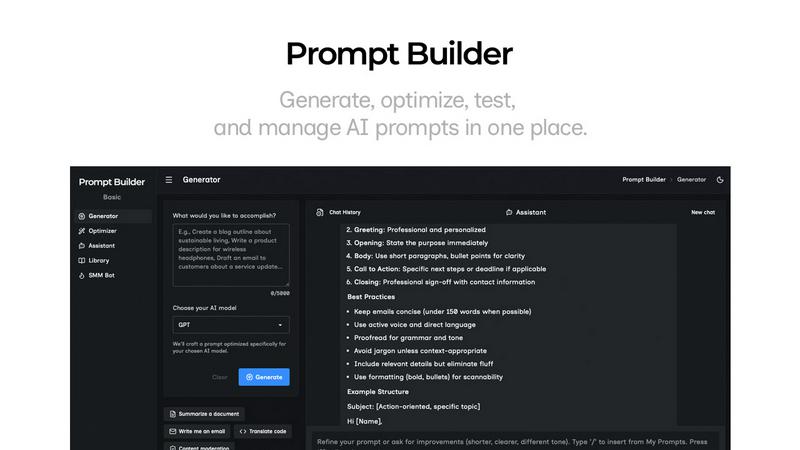
About Prompt Builder
Prompt Builder is a comprehensive prompt engineering workspace designed to eliminate the guesswork and inefficiency from working with AI. It transforms the frustrating, time-consuming process of crafting prompts into a streamlined workflow. The core problem it solves is the inconsistency and wasted effort that comes from manually rewriting prompts for different AI models, losing good versions in messy chat histories, and spending more time on setup than on actual results. Prompt Builder provides a unified environment where you can generate a prompt draft tuned for your specific target model (like GPT, Claude, or Gemini), refine it through iterative chat, and then save, organize, and run your perfected prompts. It's built for anyone who uses AI regularly—content creators, developers, marketers, researchers, and business professionals—who wants to achieve higher-quality outputs faster and build a reusable library of effective prompts. Its main value proposition is turning an initial idea into a production-ready, model-optimized prompt in seconds, not hours, all within a single, organized platform.
Features of Prompt Builder
Prompt Generator
The Prompt Generator is your starting point for creating high-quality prompts from a simple idea. You describe your task in plain English, select the target AI model (e.g., Gemini, Claude, GPT-4), and instantly receive a professionally structured first draft. This draft is not generic; it's specifically tuned to the conventions and strengths of your chosen model. You can then move this draft directly into a chat interface to refine it through conversation, ensuring the final prompt is perfectly calibrated before saving it to your personal Library for future use.
Prompt Assistant
The Prompt Assistant is a built-in chat workspace that allows you to test and run your prompts without ever leaving Prompt Builder. After generating or optimizing a prompt, you can execute it immediately using the Assistant. It supports a wide range of models including Grok, Gemini, GPT, and DeepSeek, letting you compare outputs. This integrated testing ground keeps your prompt development, iteration, and final execution organized in one place, preventing the chaos of switching between multiple tabs and applications.
Prompt Optimizer
The Prompt Optimizer takes your existing prompts—whether pasted in or selected from your Library—and enhances them for better performance. It provides structured improvements focused on clarity, adding constraints, defining output formats, and incorporating examples. You can select a different AI model to power the optimization, review an auto-saved history of changes, and pin your favorite versions. With one click, you can send the optimized prompt to the Assistant for immediate testing, closing the loop on refinement.
Prompt Library
The Prompt Library is your centralized hub for all saved prompts, featuring both your personal collection and a community-driven repository. You can save, pin, edit, and organize your best prompts with search and filter tools (by category, model, etc.). Any saved prompt can be launched in the Assistant as a new chat instantly. The Community section allows you to explore and favorite proven prompts and templates from other users, accelerating your workflow by building on shared knowledge.
Use Cases of Prompt Builder
Content Creation and Marketing
Marketers and content creators can use Prompt Builder to rapidly generate and refine prompts for blog outlines, social media posts, ad copy, and email campaigns. The SMM Bot feature specifically streamlines creating platform-ready content for X, LinkedIn, and Instagram by tailoring tone, format, and CTAs. This ensures consistent brand voice and high engagement across all channels without starting from scratch each time.
Software Development and Technical Writing
Developers and technical writers can craft precise prompts for code generation, debugging, documentation, and API explanation. By tuning prompts for models like Claude or GPT, they can get more accurate, syntactically correct code snippets and clearer technical explanations. The Library allows teams to save and share effective prompts for common tasks like writing functions or generating tests, standardizing output quality.
Research and Data Analysis
Researchers and analysts can leverage Prompt Builder to design prompts for summarizing complex papers, extracting insights from datasets, generating literature reviews, or formulating hypotheses. The ability to optimize a prompt for clarity and specific output formats (like tables or bullet points) ensures the AI provides structured, usable information, saving hours of manual synthesis and data processing.
Business Operations and Productivity
Professionals across sales, HR, and operations can automate and improve routine tasks. This includes generating sales email sequences, creating job descriptions, drafting meeting summaries, or building project plans. Prompt Builder's workflow lets users quickly turn a business need into a reliable AI-assisted process, pinning the most effective prompt versions to a shared Library for team-wide efficiency.
Frequently Asked Questions
What AI models does Prompt Builder work with?
Prompt Builder is compatible with a wide array of popular and emerging AI models. This includes OpenAI's GPT models, Anthropic's Claude, Google's Gemini, Meta's Llama, Mistral AI, DeepSeek, xAI's Grok, Perplexity, and Cohere. The Prompt Generator tailors your prompt's structure for the specific model you select, while the Assistant allows you to run and test prompts using many of these models directly within the platform.
How does the free plan work?
The free plan offers a generous starting point with 25 assistant requests per month at no cost and without requiring a credit card. This allows you to fully experience the core workflow: generating model-tuned prompts, refining them in chat, and testing them with the Assistant. It's designed to let you validate the tool's value in streamlining your prompt engineering process before considering an upgrade.
Can I use my own API keys with Prompt Builder?
The provided context does not specify details regarding API key integration. For the most accurate and current information on whether you can use your own API keys to access models or if usage is provided through Prompt Builder's own integrations, please refer to the official Prompt Builder website or their documentation for precise technical details on model connectivity.
How does the Prompt Library and community work?
Your Prompt Library is your personal workspace to save, pin, and organize the prompts you create or optimize. You can categorize them and run them anytime. Separately, there is a community section where users can share and explore public prompts and templates. You can browse these community prompts, add useful ones to your own Library, and use them as a foundation for your work, significantly speeding up your prompt creation process.
Similar to Prompt Builder

Free YouTube transcripts on the web, a Chrome extension, and an API + MCP server so AI assistants can read YouTube.

Soul Cinema turns a written shot into film-grade stills with cinematographer lighting, Soul ID character consistency across a sequence, reusable looks

Built2WinWeb builds high-performance custom PHP websites, ecommerce stores, and AI discovery infrastructure that make your site readable by AI.


Turn any image into editable layers with AI—separate subject, background, and objects as transparent PNG layers.


Find an AI tool by the job you need done, not the buzzword.

AI transcription for voice notes, meetings, and audio files in 1,700 languages, with AI summaries and subtitle export and unlimited chat ai usage.