
RoomCreator
Transform any room instantly with RoomCreator's AI, turning your photos into stunning, realistic designs without any skills required.
Visit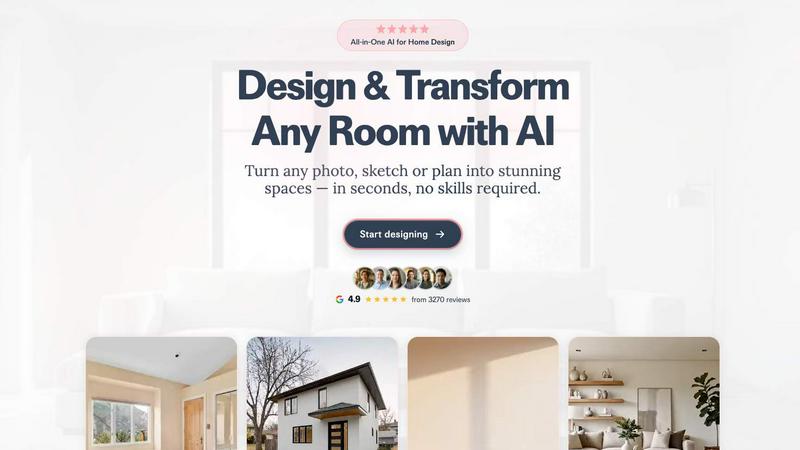
About RoomCreator
RoomCreator is an innovative AI-powered room design tool that simplifies the home makeover process for homeowners and DIY enthusiasts alike. By allowing users to upload a photo of their kitchen, bedroom, living room, or even exterior spaces, RoomCreator delivers stunning, realistic redesigns in just 10 seconds. This tool is designed for anyone looking to visualize their space without needing any prior design skills. Whether you are planning a full renovation, seeking fresh ideas for a small room, or simply want to test out color schemes and furniture arrangements before making a purchase, RoomCreator offers a quick and efficient solution. With its user-friendly interface and advanced AI technology, it empowers users to make confident design decisions, transforming ordinary spaces into dream homes effortlessly.
Features of RoomCreator
AI Room Design in Seconds
With RoomCreator, you can transform any space by uploading just one photo and seeing AI-generated redesigns in a mere 10 seconds. This enables users to visualize changes quickly and effectively without complex software or design expertise.
Smart Layouts for Improved Functionality
RoomCreator's AI analyzes your space and suggests smart layouts that enhance flow and functionality. This feature is crucial for maximizing small spaces or optimizing room arrangements, ensuring you make the most of your environment.
Instant Color and Furniture Changes
Experiment with different wall colors, flooring options, and furniture arrangements instantly. RoomCreator allows you to visualize various styles and aesthetics, making it easier to select the perfect design elements for your space.
Realistic 3D Previews
Experience hyper-realistic 3D previews that include natural lighting effects. This feature provides an accurate representation of how your redesigned room will look, allowing for informed decision-making before investing in any changes.
Use Cases of RoomCreator
Homeowners Seeking Renovation Ideas
Homeowners can benefit immensely from RoomCreator by visualizing how their space could look after renovations. This tool allows them to explore new styles, furniture options, and layouts, leading to confident design choices.
Real Estate Agents Enhancing Listings
Real estate agents can use RoomCreator to create eye-catching visuals that enhance property listings. By transforming outdated or empty spaces into beautifully staged interiors, agents attract more potential buyers and increase property appeal.
Investors Evaluating Renovation Potential
Individual investors can utilize RoomCreator to assess the renovation potential of properties. By generating realistic visuals for flips or rentals, investors can showcase the value of their projects without incurring high staging costs.
Interior Designers Streamlining Client Presentations
Interior designers can enhance their client presentations by using RoomCreator to visualize ideas rapidly. This tool allows them to present multiple design concepts and make revisions on-the-fly, ensuring client satisfaction and streamlined workflow.
Frequently Asked Questions
How does RoomCreator work?
RoomCreator operates by allowing users to upload a photo of their room. The AI then analyzes the image and produces realistic redesigns, offering various style options and layout changes.
Is there a cost to use RoomCreator?
You can try RoomCreator for free with 10 credits and no credit card required. Additional credits can be purchased for continued use, making it accessible for all users.
Can I use RoomCreator for exterior designs?
Yes, RoomCreator also features an exterior paint color visualizer, enabling users to test different styles and colors for the outside of their homes, perfect for renovations or curb appeal enhancements.
What types of spaces can I design with RoomCreator?
You can design a wide range of spaces including kitchens, bedrooms, living rooms, bathrooms, kids' rooms, and even home exteriors. The tool caters to various design needs and preferences.
Similar to RoomCreator

Apps and files on an infinite canvas where people and AI agents work together.

Privacy-first, cookieless web analytics that ties your traffic and marketing channels to real Stripe revenue.

No-code 2D game editor: visual node logic, drag-and-drop scenes, live preview. Exports to Windows, macOS, Linux, Android, iOS, Web.

Online tally counter for tracking attendance, workouts, inventory, visitors, sports scores, habits, and everyday counting tasks.

SnitchFeed is an agentic social listening tool that surfaces high-intent conversations on LinkedIn, X, Hackernews, and more for GTM and product teams.


Explore Flux LoRA online workflows in a browser-based AI Studio, with a roadmap for dedicated Flux LoRA models, generation, and training.

Create readable text, logos, posters, ads, packaging, and ecommerce visuals with Ideogram 4 AI workflows.