
SocialCal
SocialCal simplifies your social media management by posting to ten platforms simultaneously with smart scheduling and.
Visit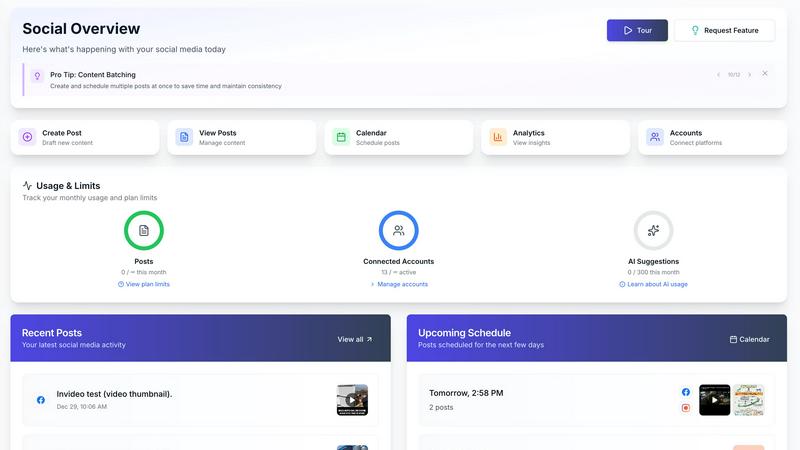
About SocialCal
SocialCal is an all-in-one social media management platform tailored for creators, marketers, and small businesses seeking to streamline their social media efforts. It consolidates the chaos of managing multiple social networks into a single, intuitive dashboard, allowing users to focus on what truly matters: creating engaging content. With SocialCal, you can post across ten major platforms including Facebook, Instagram, Threads, TikTok, YouTube, LinkedIn, Pinterest, Telegram, Bluesky, and X, all with one click. The platform's AI assistant, powered by GPT-5.2, crafts platform-optimized captions and suggests relevant hashtags, saving users valuable time. The visual drag-and-drop calendar and comprehensive analytics provide users with complete control over their social media strategies. The main value proposition is clear: save over 15 hours a week, increase productivity by 25%, and maximize reach without the complexity or high costs associated with traditional enterprise tools, all at an affordable price.
Features of SocialCal
Multi-Platform Publishing
Post to ten platforms with just one click, including Instagram, X, LinkedIn, Facebook, TikTok, and more. This feature eliminates the need to log into multiple accounts, allowing you to create once and publish everywhere, saving you hours each week.
Smart Scheduling
Schedule your posts for optimal engagement times. This feature uses data-driven insights to suggest the best times to post for each platform, ensuring your content reaches the widest audience possible, maximizing interaction and visibility.
AI Caption Writer
Leverage the power of AI to generate captivating captions in various tones tailored to each platform. This feature not only saves time but also helps maintain a consistent voice across your social media channels while enhancing engagement through creative and relevant content.
Analytics Dashboard
Track performance across all platforms with a comprehensive analytics dashboard. This feature provides you with essential insights into how your posts are performing, helping you make informed decisions to optimize your social media strategy and improve future content.
Use Cases of SocialCal
Freelance Social Media Managers
Freelancers can manage multiple client accounts from one dashboard, streamlining their workflow. With SocialCal, they can schedule and analyze posts for various clients without the hassle of switching between different apps, saving time and increasing their productivity.
Small Business Owners
Small business owners can utilize SocialCal to enhance their online presence without dedicating excessive time to social media management. By scheduling posts in advance and using the AI caption writer, they can focus on running their business while still engaging with their audience effectively.
Content Creators
Content creators can maximize their reach by posting simultaneously across multiple platforms. SocialCal's visual grid planner also allows them to preview their Instagram feed layout, ensuring a cohesive aesthetic while managing their content effortlessly.
Marketing Teams
Marketing teams can collaborate effectively using SocialCal's features for drafting and previewing content before publishing. The analytics dashboard helps them track engagement and adjust their strategies in real-time, ultimately driving better results for their campaigns.
Frequently Asked Questions
What platforms does SocialCal support?
SocialCal supports ten major platforms, including Facebook, Instagram, X (Twitter), LinkedIn, YouTube, TikTok, Threads, Bluesky, Pinterest, and Telegram, allowing for seamless multi-platform posting.
How does the AI Caption Writer work?
The AI Caption Writer uses advanced algorithms to generate captions tailored to each social media platform's unique audience. Users can select from various tones and styles, ensuring that their messaging resonates with their target audience.
Can I manage multiple clients with SocialCal?
Yes, SocialCal allows you to manage multiple client profiles from a single dashboard, making it an ideal solution for social media managers and agencies looking to streamline their operations.
What is the benefit of using the Analytics Dashboard?
The Analytics Dashboard provides valuable insights into your posts' performance across all platforms. By tracking metrics such as engagement rates and audience reach, you can refine your content strategy and improve your overall social media effectiveness.
Similar to SocialCal

Turn plain English into credible LinkedIn writing—or decode professional jargon into direct language.


Schedule and publish social content across 10 platforms with one dashboard, API, and MCP built for teams and AI agents.

Curated directory of tools for influencers engaged with the creator economy

Turn Instagram comments into automated DMs and sales with an all-in-one toolkit for your bio, shop, and storefront.

Vaydur AI finds and analyzes viral content in your niche, then generates ready-to-film scripts and briefs so you can stop hunting for ideas and start.

Chatzyo connects you instantly with strangers for free video, voice, or text chats with no signup or app needed.

Post, schedule, and manage Instagram content from your desktop while growing your account on autopilot with our privacy-focused web assistant.