
BlueHumanizer
BlueHumanizer transforms stiff AI text into clear, natural writing with one click, keeping your meaning intact and citations untouched.
Visit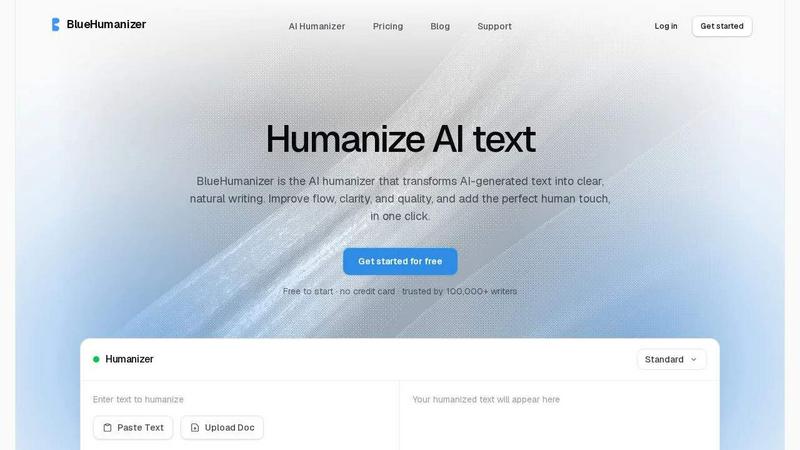
About BlueHumanizer
BlueHumanizer is an AI humanizer tool that transforms AI-generated text into clear, natural writing in a single click. It addresses a common problem for anyone using AI writing tools like ChatGPT, Claude, Gemini, or any other AI writer: the output often sounds stiff, robotic, or unnatural. BlueHumanizer solves this by rewriting that text into polished, human-sounding prose with better flow and sharper phrasing, all while keeping your original meaning, tone, and key points intact. Unlike basic humanizer tools that simply swap words for synonyms, BlueHumanizer reshapes sentence structure and restores the natural rhythm that makes writing feel real. Quotes and citations stay untouched during the process, which is critical for academic and professional use. The tool supports over 50 languages with automatic detection, offers adjustable humanization strength levels, and provides tone controls so you can dial in the exact style each rewrite needs. It is built for a wide range of users including students refining essays, researchers polishing papers, marketers shipping on-brand copy, non-native English writers seeking fluency, and bloggers maintaining a steady content flow. BlueHumanizer is free to start with no credit card required, and it is trusted by over 100,000 writers. The core value proposition is simple: paste AI text in, get clear, natural, publish-ready writing out, with no editing skills required.
Features of BlueHumanizer
One-Click Humanization
Copy and paste your AI-generated text from any source like ChatGPT, Gemini, or Claude, then click humanize. There is no setup, no learning curve, and no complex configuration. The output is clear, polished writing that flows naturally in a single click, saving you time and effort.
Clearer, Smoother Writing
The tool tightens phrasing, varies sentence rhythm, and improves overall flow. Your writing reads smoothly and naturally without changing what you actually said. This feature solves the problem of robotic or repetitive sentence structures common in AI output, making your text more engaging and easier to read.
Intent and Tone Preservation
BlueHumanizer rewrites your text while preserving your original tone, intent, and key points. The result is cleaner, smoother phrasing that still sounds like you. You can also adjust tone controls to match specific styles like casual or professional, giving you control over the final output.
Citation and Quote Protection
Your quotes, citations, and references stay exactly as they are during the humanization process. Only the writing around them changes. This is a critical feature for students, researchers, and academics who need to maintain proper attribution and avoid altering source material.
Use Cases of BlueHumanizer
Students Refining Essays and Assignments
Students frequently use AI tools to draft essays and assignments, but the output often lacks a natural, personal voice. BlueHumanizer refines these AI-assisted drafts into clear, well-structured writing that flows logically and reads authentically. This helps students submit work that feels original and polished, without the telltale signs of AI generation.
Researchers and Academics Polishing Papers
Researchers and academics can use BlueHumanizer to refine AI-drafted papers, abstracts, and literature reviews into clear, natural prose. The tool leaves every citation and reference intact, which is essential for maintaining academic integrity. The result is professional, publishable writing that communicates complex ideas effectively.
Marketers and Content Teams Shipping Brand Copy
Marketing professionals and content teams need to produce blog posts, emails, landing pages, and social media copy quickly. BlueHumanizer helps them take AI-generated drafts and polish them into on-brand, clear, and engaging content. Tone controls allow teams to match the specific voice of their brand, ensuring consistency across all channels.
Non-Native English Writers Achieving Fluency
Non-native English speakers often struggle with making AI-generated English text sound natural and fluent. BlueHumanizer solves this problem by rewriting the text into smooth, idiomatic English that reads as effortless. This empowers non-native writers to communicate more effectively in professional and academic settings without language barriers.
Frequently Asked Questions
How does BlueHumanizer differ from other AI humanizer tools?
BlueHumanizer goes beyond simple synonym swapping, which is common in basic humanizer tools. It reshapes sentence structure and restores natural rhythm, making the writing flow like a person wrote it. The tool also preserves your original meaning, tone, and key points, and it leaves quotes and citations untouched. Additionally, it offers adjustable humanization levels and tone controls for more precise output.
Is BlueHumanizer free to use?
Yes, BlueHumanizer is free to start with no credit card required. You can begin humanizing AI text immediately without any upfront commitment. The free tier allows you to test the tool and see the quality of the output before deciding if you need a paid plan for higher volume or advanced features.
Which AI writing tools does BlueHumanizer work with?
BlueHumanizer works with text from any AI writer, including ChatGPT, Claude, Gemini, Mistral AI, and others. You can paste output from any of these tools, and BlueHumanizer will rewrite it into clear, natural prose. This makes it a versatile solution for anyone using multiple AI writing assistants.
Does BlueHumanizer change my quotes or citations?
No, BlueHumanizer leaves your quotes, citations, and references completely untouched. Only the writing around them is rewritten to improve flow and clarity. This is a critical feature for academic, research, and professional writing where proper attribution is essential and altering source material is not acceptable.
Pricing of BlueHumanizer
BlueHumanizer is free to start with no credit card required. This allows you to test the tool and experience its capabilities without any financial commitment. For users who need higher volume or advanced features, paid plans are available. Specific pricing details for paid tiers are not provided in the available context, but the free tier offers a risk-free way to evaluate the product.
Similar to BlueHumanizer


Verla is an AI academic assistant for university and college students, combining AI essay writing, academic research, AI detection, AI humanization, p

Apps and files on an infinite canvas where people and AI agents work together.

Signage and kiosk infrastructure for AI agents. Your agent publishes images, video, streams, web pages and apps to screens via one plugin.screenRIG is

Free YouTube transcripts on the web, a Chrome extension, and an API + MCP server so AI assistants can read YouTube.

Soul Cinema turns a written shot into film-grade stills with cinematographer lighting, Soul ID character consistency across a sequence, reusable looks

Built2WinWeb builds high-performance custom PHP websites, ecommerce stores, and AI discovery infrastructure that make your site readable by AI.
