
Browser Notes
Browser Notes lets you create notes, sticky boards, and mind maps directly in your browser with no signup or cloud storage required.
Visit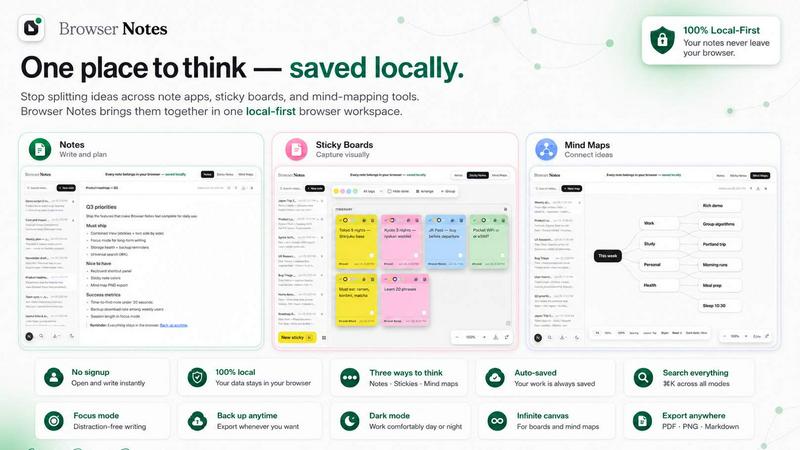
About Browser Notes
Browser Notes is a local-first workspace that consolidates your notes, sticky notes, and mind maps directly inside your browser. It solves the common problem of scattered information across multiple writing apps, sticky boards, and mind-mapping tools. Instead of pushing your private ideas to the cloud, Browser Notes stores everything locally on your device. No account creation, no tracking, and no forced sync are required. The tool works fully offline, so you can capture and organize thoughts without an internet connection. You maintain complete control over your data, with the ability to back up your work anytime. This product is designed for professionals, students, writers, and anyone who values privacy, simplicity, and quick access to their ideas. Whether you need to draft a document, brainstorm on a free canvas, or map out a complex project, Browser Notes provides three distinct tools within a single interface. The extension integrates seamlessly with your Chrome browser, making it accessible from any tab. You can start from scratch or use a template to accelerate your workflow. The markdown editor supports formatting for structured writing, while the sticky notes canvas allows freeform brainstorming. The mind map tool helps you branch ideas from a central concept. Because everything stays in your browser, you never worry about data breaches or subscription fees. Browser Notes is a practical, solution-oriented tool that puts you back in charge of your notes.
Features of Browser Notes
Notes with Markdown Support
Write and format your notes using markdown syntax, giving you full control over headings, lists, bold, italics, links, and code blocks. This feature is ideal for creating structured documents, meeting notes, or personal journals. The editor is lightweight and responsive, so you can focus on content without distractions. You can start a new note instantly or open an existing one from your local storage. All changes are saved automatically in your browser, ensuring nothing is lost.
Sticky Notes on a Free Canvas
Brainstorm ideas on an infinite canvas where you can place sticky notes anywhere. This feature mimics the experience of a physical whiteboard but in a digital format. You can drag, resize, and color-code sticky notes to group related concepts. It is perfect for visual thinkers who need to map out workflows, project tasks, or creative concepts. The canvas is fully interactive and supports zooming and panning for easy navigation.
Mind Maps from a Central Idea
Create hierarchical mind maps by branching ideas from a single center point. This tool helps you break down complex topics, plan projects, or organize research. You can add child nodes, rearrange branches, and expand each node with additional text. The mind map interface is intuitive and responsive, allowing you to focus on the structure of your thoughts. It works offline and saves directly to your browser storage.
Local-First Storage and Backup
All your notes, sticky boards, and mind maps are stored locally in your browser. There is no cloud sync, no account, and no tracking. You retain full ownership of your data. You can export a backup of your entire workspace at any time and import it later if needed. This feature ensures that your information remains private and accessible even without an internet connection. It also protects against data loss from browser crashes or accidental deletions.
Use Cases of Browser Notes
Capturing Quick Ideas During Research
When browsing the web, you often encounter information worth saving. Instead of opening a separate app or writing on a physical sticky note, you can open Browser Notes directly from your Chrome extension. Use the sticky notes canvas to jot down a sudden insight or create a quick mind map to connect related facts. Everything stays in your browser, so you can revisit and refine your ideas later without cluttering your desktop.
Planning a Project from Start to Finish
Project planning requires organizing tasks, deadlines, and dependencies. Use the mind map tool to break down the project into phases, assign sub-tasks, and visualize the overall structure. Then switch to the notes editor to draft detailed requirements or meeting minutes. The sticky notes canvas is useful for brainstorming risk factors or resource needs. Because all tools are in one place, you avoid switching between multiple applications.
Taking Private Meeting Notes
For sensitive meetings where confidentiality is critical, Browser Notes offers a secure alternative to cloud-based note apps. You can write detailed meeting minutes using markdown formatting, including action items and decisions. Since no data leaves your browser, there is zero risk of unauthorized access or data mining. You can back up the notes locally after the meeting and delete the session data if needed.
Organizing Personal Knowledge and Learning
Students and lifelong learners can use Browser Notes to compile study materials, summarize articles, and create concept maps. The mind map feature helps in understanding relationships between topics, while the notes editor allows for detailed annotations. The sticky notes canvas is useful for creating visual study boards. All content remains local, so you can study offline without distractions or ads.
Frequently Asked Questions
Do I need to create an account to use Browser Notes?
No, you do not need to create an account. Browser Notes is designed to work without any registration. There is no tracking, no forced sync, and no cloud storage. You simply install the Chrome extension and start using it immediately. Your data stays entirely on your device.
Can I access my notes when I am offline?
Yes, Browser Notes works fully offline. Since all data is stored locally in your browser, you can create, edit, and view your notes, sticky boards, and mind maps without an internet connection. This is ideal for travel, remote areas, or any situation where connectivity is limited.
How do I back up my data?
You can back up your entire workspace at any time by using the export feature. This creates a backup file that you can save to your computer or an external drive. If you ever need to restore your data, simply use the import backup option within the extension. This gives you full control over your information.
What happens to my notes if I clear my browser cache?
Clearing your browser cache may delete locally stored data, including your notes. To prevent data loss, it is recommended to regularly export backups using the built-in backup feature. You can then reimport your data after clearing the cache. Browser Notes provides clear prompts to help you manage your storage safely.
Is my data private and secure?
Yes, your data is completely private. Browser Notes does not send any information to external servers. There is no cloud sync, no analytics, and no tracking. All your notes, sticky boards, and mind maps remain stored locally in your browser. Only you have access to your data, making it a secure choice for sensitive information.
Explore more in this category:
Similar to Browser Notes

Private email. Pure. Secure. Exclusive. No ads, no tracking, no data selling. GDPR compliant, EU-hosted.


Apps and files on an infinite canvas where people and AI agents work together.

Panzoe is an all-in-one AI platform for personal productivity, business automation, AI assistants, content creation, and custom AI solutions.


AI Email Filter sorts incoming mail into folders using plain-language prompts you write. Works with any IMAP mailbox; bring your own LLM if you want.


No-code 2D game editor: visual node logic, drag-and-drop scenes, live preview. Exports to Windows, macOS, Linux, Android, iOS, Web.