
Easymotion - AI Motion Graphic Generator
Easymotion lets you create professional motion graphics, map animations, and social media videos in minutes by simply chatting with AI.
Visit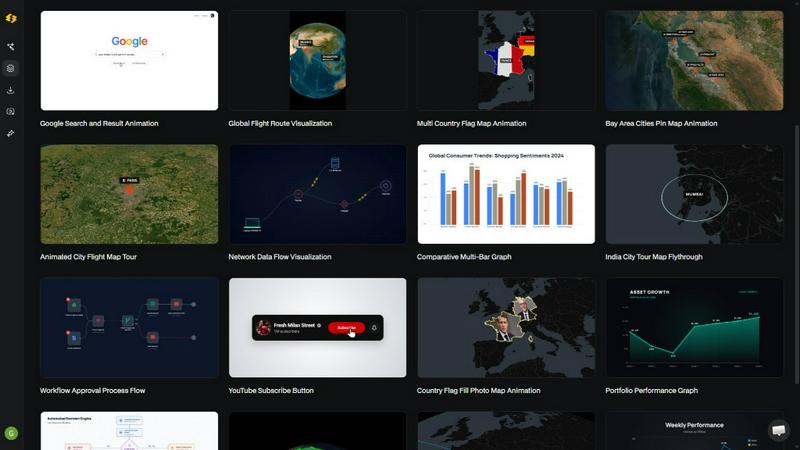
About Easymotion - AI Motion Graphic Generator
Easymotion is an AI-powered motion graphics generator and map animation platform designed to solve a critical problem for content creators, video editors, marketers, founders, and data storytellers: the time-consuming complexity of traditional animation tools. Instead of spending hours in After Effects wrestling with keyframes, timelines, and templates that never quite fit, users can now create polished, professional animated videos simply by chatting with AI. The platform transforms ideas, static images, spreadsheets, and PDFs into animation-ready scenes in minutes. Whether you need a SaaS product promo, an animated flowchart, a data-driven chart, a UI explainer, or a geographic map animation showing flight routes and location pins, Easymotion handles the heavy lifting. After generating an animation, users can refine every detail through conversational editing, adjusting colors, pacing, labels, layout, and visual style without touching a timeline. The platform also offers a premium template library for proven motion graphics layouts that can be customized for any brand or campaign. When finished, export as MP4 or MOV, including videos with transparent backgrounds for seamless integration into editing workflows. Easymotion supports all major aspect ratios: 16:9 for YouTube, 9:16 for TikTok and Reels, 1:1 for square social posts, and 4:5 for feed-friendly vertical formats. Built entirely in the browser, it eliminates software installation and steep learning curves, enabling creators to produce more content, post more frequently, and grow faster.
Features of Easymotion - AI Motion Graphic Generator
AI-Powered Chat-Based Animation
Describe your animation in plain English and the AI generates a complete motion graphic video instantly. No timeline editing, no keyframes, no complex software. You simply type what you want, and the AI handles all the animation curves, transitions, and timing. This feature eliminates the biggest barrier to video creation: the technical skill required to operate tools like After Effects.
Static Design to Animation
Upload any static image, such as a logo, infographic, or product screenshot, and let the AI bring it to life with stunning motion. The platform intelligently analyzes the image content and applies appropriate animations, making it perfect for transforming existing brand assets or client deliverables into engaging video content without starting from scratch.
Map Animation Maker
Create geographic storytelling visuals effortlessly. Generate flight route animations, location pin drops, flag fill highlights, and globe fly-throughs by simply describing the locations or uploading data. This feature is ideal for travel content, logistics presentations, global business reports, and any scenario where you need to visualize movement across a map.
Data to Animated Visuals
Upload a CSV or XLSX spreadsheet and let the AI automatically create beautiful animated charts and graphs. Transform boring rows of numbers into scroll-stopping bar charts, line graphs, and data visualizations that clearly communicate insights. This feature solves the problem of static data presentations that fail to capture audience attention in video-first platforms.
Conversational Editing and Customization
After generating an animation, you can refine every aspect by chatting with the AI. Adjust colors to match brand guidelines, change pacing for different platforms, modify labels and text, rearrange layout elements, and alter visual styles. This iterative, natural language approach replaces the tedious manual tweaking required in traditional editing software.
Multi-Format Transparent Export
Export finished videos as MP4 or MOV files, including support for alpha channel transparency. This means you can drop your Easymotion creations directly into any editing software like Premiere Pro or Final Cut Pro for compositing. Combined with support for 16:9, 9:16, 1:1, and 4:5 aspect ratios, your content is ready for YouTube, TikTok, Instagram, presentations, and client deliverables.
Use Cases of Easymotion - AI Motion Graphic Generator
Social Media Content Creation for Marketers
Marketing teams can create and iterate on campaign videos the same day without waiting on designers or freelancers. Describe a promo for a coffee shop launch, upload a product image, or paste a campaign brief, and get a polished social media video in minutes. Keep it on brand by chatting with AI to adjust colors and messaging. This eliminates the back-and-forth email chains and bottlenecks that delay campaigns.
Data Storytelling for Analysts and Reporters
Turn static charts and spreadsheet data into animated videos that actually stop the scroll. Analysts and data journalists can upload a CSV file and instantly generate an animated bar chart or line graph that clearly communicates trends and insights. Since video posts get 5x more engagement than static images, this use case directly solves the problem of data reports being ignored on social platforms.
Travel and Geographic Content for Creators
YouTubers and travel content creators can build multi-stop travel route map animations step by step. Describe a journey from New York to Paris to Tokyo, and Easymotion generates a flight path animation with location pins and flag highlights. This creates visually compelling content for travel vlogs, destination guides, and logistics presentations without needing any After Effects skills.
Product and SaaS Demos for Founders
Startups and founders can create professional product explainer videos, UI walkthroughs, and feature promos without hiring expensive freelancers. Upload a screenshot of your software interface and let AI animate it, or describe a flowchart showing how your product works. This enables startups to build their social presence and demonstrate value quickly, scaling content production without scaling headcount.
Internal Communications and Presentations
Editors and team leads can animate process flows, org charts, and project timelines for internal meetings and client pitches. Turn a static PDF or spreadsheet into an animated flowchart or timeline that clearly communicates complex processes. This saves hours of manual animation work and ensures your presentations are more engaging and easier to understand.
Frequently Asked Questions
What is Easymotion and who is it for?
Easymotion is an AI-powered motion graphics generator that lets you create professional animated videos simply by chatting. It is designed for content creators, video editors, marketers, founders, data storytellers, and anyone who needs to produce motion graphics, map animations, or social media videos quickly. You do not need any design skills or experience with complex software like After Effects to use it effectively.
How does the AI motion graphics generation process work?
It works in three simple steps. First, describe the animation you want in plain English, or upload an image, spreadsheet, or PDF. Second, the AI generates your animation instantly. You can then refine the result using chat commands to adjust colors, timing, map styles, labels, and assets. Finally, export your completed video as an MP4 or MOV, including with a transparent background for editing workflows.
What types of videos can I create with Easymotion?
You can create a wide variety of motion graphics including SaaS product promos, animated flowcharts, data charts and graphs, UI explainers, quizzes, social media promos, and more. The platform also specializes in map animations such as flight routes, location pins, flag fill highlights, and globe fly-throughs. It supports all major aspect ratios for YouTube, TikTok, Instagram, and presentations.
Do I need any design or animation experience to use Easymotion?
No, you do not need any design or animation experience. Easymotion is built specifically for people who need a faster way to create motion graphics without learning complex timeline editing. The AI handles all keyframes, animation curves, and transitions. You simply describe what you want and refine it through natural language chat commands.
Can I export videos with a transparent background?
Yes, Easymotion supports exporting videos with an alpha channel (transparent background) as MOV files. This allows you to drop your animations directly into any editing software like Premiere Pro, Final Cut Pro, or DaVinci Resolve for compositing with other footage or graphics.
What aspect ratios and formats are supported for export?
Easymotion supports 16:9 for YouTube and landscape content, 9:16 for TikTok and Instagram Reels, 1:1 for square social posts, and 4:5 for feed-friendly vertical formats. You can export as MP4 or MOV files, making your content ready for any platform or editing workflow.
Pricing of Easymotion - AI Motion Graphic Generator
Easymotion offers a free tier to explore the platform with no credit card required. For detailed pricing information on premium plans, templates, and export options, please visit the Easymotion website. Specific pricing tiers and costs are not available in the provided context.
Similar to Easymotion - AI Motion Graphic Generator

Send files straight between two browsers with a 6-digit key. No signup, no install, nothing stored on a server.

Turn text ideas or reference images into videos through conversation, with agent-assisted prompts and a choice of video models.

Open-source Android comic & manga reader with encrypted cloud streaming and AI ad-page stripping.


Manifolds deanonymizes and researches your users at signup, so you can know who your users actually are.

Jomatter provides free online tools for HTML, CSS, and JavaScript developers, helping simplify common web development and coding tasks.

Clone any webpage pixel-perfect, export HTML/CSS/ZIP or React/Vue components.

Every key you press lights up on an on-screen keyboard, and each shortcut is named as you press it.