
Online Keyboard Shortcuts
Stop struggling to remember complex shortcuts and master Windows, macOS, and Linux faster with a complete, searchable reference at your fingertips.
Visit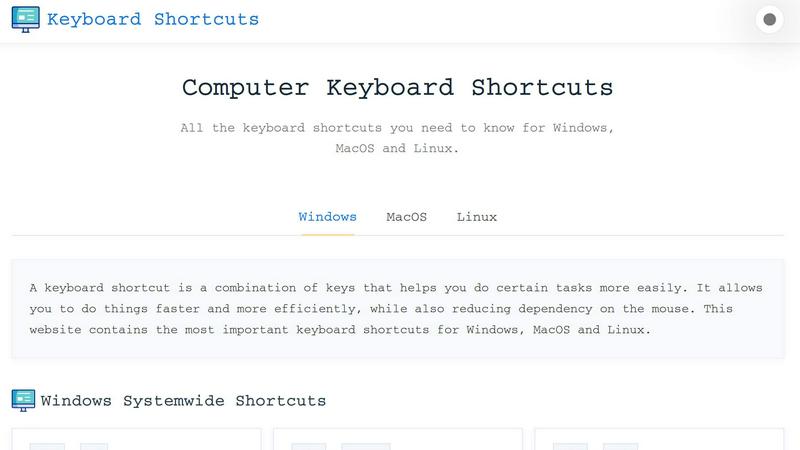
About Online Keyboard Shortcuts
Online Keyboard Shortcuts, available at OnlineShortcuts.com, is a comprehensive, no-nonsense reference guide designed to solve a universal problem: wasted time navigating software with a mouse. This product is a curated, searchable database of the most essential keyboard shortcuts for Windows, MacOS, and Linux operating systems. Its core purpose is to help users replace slow, repetitive mouse clicks with fast, efficient keystrokes, dramatically improving workflow speed and reducing physical strain. The website organizes shortcuts into logical categories, including system-wide commands, operating system-specific keys like the Windows Key, and application-specific shortcuts for tools like File Explorer, Command Prompt, text editors, web browsers, and virtual desktops. It is built for anyone who uses a computer daily, from developers and writers to designers and office administrators. The main value proposition is simple: stop hunting for commands in menus and start executing them instantly. The site is completely free, contains no ads, and offers downloadable cheat sheets in PDF and PNG formats, making it a practical, always-available tool for boosting productivity. It cuts through the clutter to deliver only the most impactful shortcuts, solving the specific problem of inefficiency in daily computer use.
Features of Online Keyboard Shortcuts
Cross-Platform Coverage
The website provides a unified reference for the three major operating systems: Windows, MacOS, and Linux. Instead of searching multiple sources, users can find the critical shortcuts for their specific OS in one place. This solves the problem of platform switching, especially for professionals who work across different machines or in mixed-OS environments. The shortcuts are organized clearly, making it easy to find the exact combination needed without confusion.
Categorized and Organized Layout
Shortcuts are not just dumped into a single list. They are meticulously categorized into system-wide shortcuts, OS-specific key shortcuts (like Windows Key commands), and application-specific shortcuts for tools like Command Prompt, File Explorer, web browsers, and text editing. This logical structure solves the problem of information overload. Users can quickly navigate to the section relevant to their current task, whether they need to manage windows, edit text, or browse the web, saving them from scrolling through irrelevant data.
Downloadable Cheat Sheets
Recognizing that memory is fallible, the product offers the entire shortcut library as downloadable PDF and PNG files. Users can choose between a dark or light theme for the PNG image. This feature solves the practical problem of needing a quick reference at your desk or on a secondary device. You can print the PDF, set the PNG as a desktop wallpaper, or save it to your phone for instant access, ensuring the shortcuts are always visible when you need them most.
100% Free and Ad-Free Experience
Online Keyboard Shortcuts is provided completely free of charge with no advertisements, upsells, or tracking spyware. This solves the problem of intrusive monetization that plagues many online resources. The user can focus entirely on learning and applying the shortcuts without being distracted by pop-ups, banners, or requests for payment. This commitment to a clean, user-focused experience makes it a reliable and trustworthy tool for daily use.
Use Cases of Online Keyboard Shortcuts
Accelerating Daily Office Work
An office administrator or data entry specialist can use the site to master shortcuts like Win+D to show the desktop, Alt+Tab to switch between applications, and Ctrl+Z to undo mistakes. By learning these commands, they can move between spreadsheets, emails, and documents significantly faster than using a mouse. This solves the specific problem of repetitive, time-consuming navigation, allowing them to complete tasks like filing, scheduling, and report generation in a fraction of the time, leading to higher overall productivity.
Streamlining Software Development
A developer spends hours in code editors and terminals. Using the application-specific shortcuts for Command Prompt (like F7 for history) and general text editing (Ctrl+C, Ctrl+V, Ctrl+Z) is critical. The developer can use the site to reinforce their muscle memory for these commands, reducing the need to switch contexts to the mouse. This solves the problem of workflow interruption, allowing for a more fluid coding session where focus remains on the logic and structure of the code rather than the mechanics of the interface.
Enhancing Web Research and Browsing
A researcher or student who spends a lot of time online can use the browser shortcuts section to master opening new tabs (Ctrl+T), closing them (Ctrl+W), reopening closed tabs (Ctrl+Shift+T), and refreshing pages (Ctrl+R). This solves the problem of managing dozens of open tabs efficiently. Instead of clicking small icons, they can navigate their research workflow with lightning speed, making the process of gathering information from multiple sources much smoother and less cumbersome.
Managing Multiple Workspaces
A power user or designer who works with many applications simultaneously can use the virtual desktop shortcuts (Win+Ctrl+D to create a new desktop, Win+Ctrl+Arrow to switch between them). This solves the problem of screen clutter by allowing them to organize projects into separate, focused workspaces. They can keep communication tools on one desktop, design software on another, and research on a third, switching between them instantly without minimizing or searching for windows.
Frequently Asked Questions
What is Online Keyboard Shortcuts?
Online Keyboard Shortcuts is a comprehensive, free reference website that lists the most important keyboard shortcuts for Windows, MacOS, and Linux. It is designed to help users improve their productivity by providing quick access to commonly used commands, reducing their dependency on the mouse. The site is curated and organized by category, making it easy to find shortcuts for system functions, specific applications, and text editing.
How do I use Online Keyboard Shortcuts?
Simply browse the list of shortcuts organized by operating system and category (e.g., Systemwide, Windows Key, Application Specific). Find the shortcut you need and start using it in your daily workflow. For offline access, you can download the entire list as a PDF or PNG image. The site is designed to be intuitive; you simply read a shortcut, learn it, and apply it on your computer.
Are the keyboard shortcuts updated regularly?
The shortcuts are curated to be as accurate as possible for the specified software versions. However, software updates can sometimes change hotkeys, so it is always good practice to verify with the specific version you are running. The site aims to cover the most stable and widely-used shortcuts across the major operating systems.
Is there a mobile version of the site?
The website is designed to be accessible and responsive, allowing you to view the cheat sheets on mobile devices, tablets, and desktops. While the primary use case is for desktop computers, you can easily access the information on your phone or tablet to learn shortcuts on the go or use it as a secondary reference screen.
Explore more in this category:
Similar to Online Keyboard Shortcuts

Private email. Pure. Secure. Exclusive. No ads, no tracking, no data selling. GDPR compliant, EU-hosted.


Apps and files on an infinite canvas where people and AI agents work together.

Panzoe is an all-in-one AI platform for personal productivity, business automation, AI assistants, content creation, and custom AI solutions.


AI Email Filter sorts incoming mail into folders using plain-language prompts you write. Works with any IMAP mailbox; bring your own LLM if you want.


No-code 2D game editor: visual node logic, drag-and-drop scenes, live preview. Exports to Windows, macOS, Linux, Android, iOS, Web.