
SideKik
SideKik helps small businesses turn enquiries into customers by organizing CRM, follow-ups, tasks, and growth in one simple tool.
Visit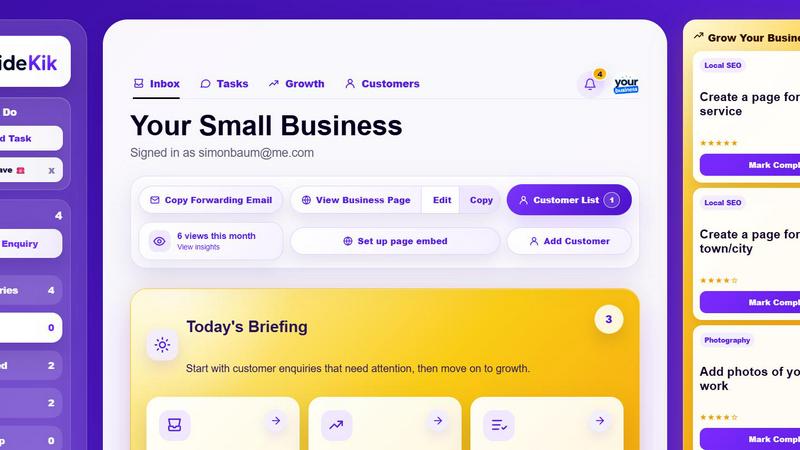
About SideKik
SideKik is a practical, easy-to-use CRM built specifically for small businesses and sole traders who want to win more customers without the complexity and overhead of traditional business software. Unlike heavyweight enterprise systems that require training and setup, SideKik provides a streamlined dashboard where every customer enquiry, follow-up task, and daily priority lives in one place. From the moment a new enquiry arrives through email, social media, your website, or manual entry, SideKik captures it and keeps everything organized so no opportunity slips through the cracks. The product is designed for electricians, plumbers, builders, cleaners, landscapers, photographers, estate agents, salon owners, dog groomers, mechanics, personal trainers, freelancers, consultants, marketing agencies, and other local service businesses that need a simple system to respond faster, follow up consistently, and turn more enquiries into paying customers. SideKik also includes a ready-to-share mini website with your own branding and simple daily growth tasks to help improve your online presence. It removes the need for messy spreadsheets and scattered notes, giving you more time to focus on growing your business rather than managing admin. Start with a free 30-day trial with no credit card required.
Features of SideKik
All-in-One Customer Enquiry Dashboard
SideKik brings every new customer enquiry from email, social media, website forms, and manual entries into a single, simple dashboard. You can instantly see who needs a reply or follow-up, track every opportunity from start to finish, and never miss a lead. This centralized view eliminates the chaos of checking multiple inboxes and scattered notes, giving you a clear picture of your entire customer pipeline at a glance.
Daily Tasks and Reminders
Create tasks in seconds, set optional due dates, and instantly see what needs doing today, tomorrow, or later. SideKik organizes your daily workload with a clear briefing that shows how many enquiries need attention, how many growth tasks are ready, and how many tasks are due today. This feature helps small business owners stay on top of follow-ups, quotes, and customer calls without relying on sticky notes or memory.
Ready-to-Share Mini Website with Branding
Showcase your services, service areas, and contact details on a professional business page that you can share with potential customers. This mini website includes a built-in enquiry form that sends every quote request directly into your SideKik dashboard. You can add your own branding to create a polished, professional presence online without needing any web design skills or additional tools.
Simple Daily Growth Tasks
SideKik provides three simple growth tasks each day that help you improve your online presence and attract more customers steadily. These practical actions range from creating your Google Business Profile to asking for reviews and improving your website. Each task is designed to be completed in minutes, helping you build consistent marketing habits that drive real results over time without feeling overwhelmed.
Use Cases of SideKik
Managing Customer Enquiries for a Plumbing Business
A plumber receives enquiries from multiple sources: phone calls, text messages, website contact forms, and social media messages. Instead of juggling a notebook, sticky notes, and a cluttered email inbox, the plumber uses SideKik to capture every enquiry in one dashboard. They can see who needs a quote, who is waiting for a callback, and which jobs are booked. Daily tasks remind them to follow up on quotes that haven't been accepted yet, ensuring no potential job is forgotten. The mini website with built-in enquiry form also helps attract new local customers searching for plumbing services.
Organizing Client Work for a Freelance Consultant
A freelance marketing consultant works with multiple clients on different projects. SideKik helps them track every new enquiry from referrals, email, and LinkedIn. They create tasks for each client with due dates for deliverables, follow-up calls, and invoice reminders. The daily briefing shows exactly what needs attention today, so they never miss a deadline or forget to send a proposal. The simple growth tasks encourage them to ask for testimonials and update their online portfolio, helping them win more consulting projects over time.
Scheduling Appointments for a Dog Grooming Salon
A dog groomer runs a busy salon with appointments booked weeks in advance. SideKik captures new enquiries from phone calls and website form submissions. The groomer creates tasks for each booking, sets reminders for follow-up calls to confirm appointments, and tracks customer notes about breed preferences and special handling requirements. The daily dashboard shows how many enquiries need attention and what tasks are due, keeping the entire day organized. The mini website helps new pet owners find the salon and submit booking requests directly.
Tracking Leads for a Real Estate Agent
A real estate agent receives enquiries from property listings, open houses, referrals, and social media ads. SideKik centralizes all these leads into one dashboard where the agent can see who has viewed a property, who needs a follow-up call, and which leads are ready to move forward. Daily tasks remind them to send property updates, schedule viewings, and follow up with past clients. The growth tasks help the agent build their online presence by requesting reviews and updating their service areas, leading to more listing opportunities.
Frequently Asked Questions
Is SideKik suitable for someone who has never used a CRM before?
Yes, SideKik is designed specifically for small business owners who want simplicity over complexity. There is no steep learning curve, no complicated setup, and no training required. The interface is intuitive and focused on the essentials: capturing enquiries, managing tasks, and following up with customers. You can start using it immediately without any prior CRM experience.
How does the free 30-day trial work?
The free trial gives you full access to all SideKik features for 30 days with no credit card required. You can sign up instantly and start adding customers, creating tasks, and using the mini website right away. After the trial period, you can choose a paid plan that fits your business needs, or you can cancel at any time with no obligations.
Can I use SideKik on my mobile phone?
SideKik is built to work on any device with a web browser, including smartphones and tablets. The dashboard is responsive and optimized for smaller screens, so you can manage enquiries, check your daily briefing, and update tasks while you are on the go at job sites, client meetings, or between appointments.
What types of businesses is SideKik best for?
SideKik is ideal for sole traders, tradespeople, freelancers, and local service businesses of all kinds. This includes electricians, plumbers, builders, cleaners, landscapers, photographers, estate agents, salon owners, dog groomers, mechanics, personal trainers, consultants, and marketing agencies. If you receive customer enquiries and need a simple way to organize follow-ups and daily tasks, SideKik is built for you.
Explore more in this category:
Similar to SideKik

Private email. Pure. Secure. Exclusive. No ads, no tracking, no data selling. GDPR compliant, EU-hosted.


Apps and files on an infinite canvas where people and AI agents work together.

Panzoe is an all-in-one AI platform for personal productivity, business automation, AI assistants, content creation, and custom AI solutions.


AI Email Filter sorts incoming mail into folders using plain-language prompts you write. Works with any IMAP mailbox; bring your own LLM if you want.


No-code 2D game editor: visual node logic, drag-and-drop scenes, live preview. Exports to Windows, macOS, Linux, Android, iOS, Web.