
SubtitlesFast
SubtitlesFast enables creators to effortlessly add stylish subtitles to videos in minutes, enhancing engagement and.
VisitPublished on:
August 30, 2025
Pricing:
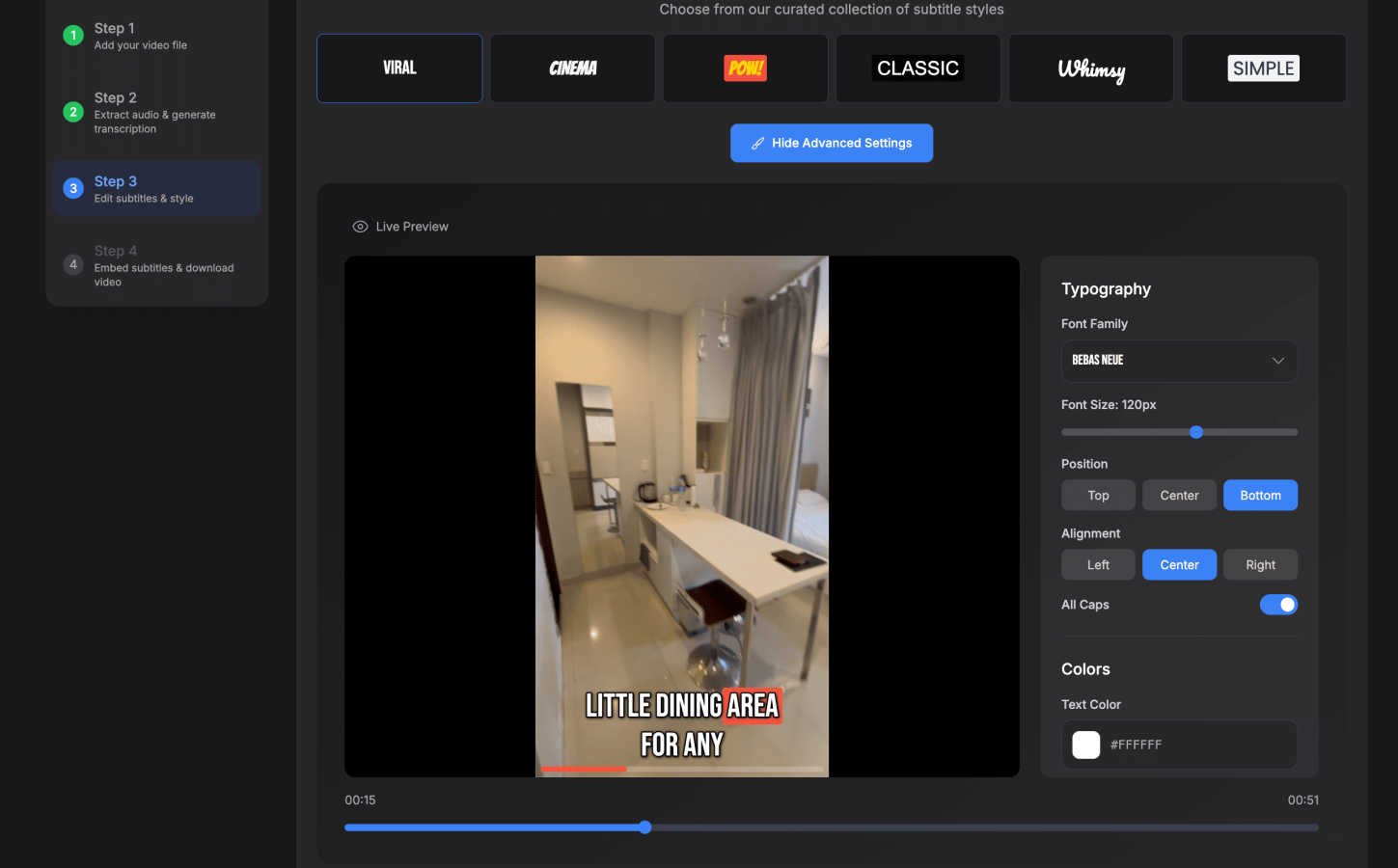
About SubtitlesFast
SubtitlesFast is an intuitive online tool specifically designed to streamline the addition of subtitles to videos, making it an invaluable resource for content creators, marketers, and advocates for accessibility. This platform caters to a wide audience, including daily vloggers, businesses seeking to enhance their marketing strategies, and educators looking to reach diverse audiences. The process is remarkably simple: users can upload their videos, and the platform automatically transcribes the audio into text, allowing for easy customization of subtitles. SubtitlesFast's primary value proposition lies in its speed and efficiency; users can complete the entire subtitling process in under five minutes without needing to install any software. With support for over 50 languages and various subtitle styles, SubtitlesFast helps ensure that videos are polished, professional, and engaging, ultimately boosting viewer retention and engagement. It has garnered praise from numerous creators for its user-friendly interface and effective results, making it a must-have tool in the arsenal of any video content creator.
Features of SubtitlesFast
Auto-Transcription
SubtitlesFast offers automatic transcription of audio into text in over 50 languages, making it easier than ever to create accurate subtitles. This feature eliminates the need for manual transcription, saving time and reducing errors, allowing creators to focus on content rather than the technicalities of subtitle creation.
Customizable Subtitle Styles
With 30+ animated styles available, users can customize their subtitles to match the tone and branding of their videos. This feature allows content creators to enhance their videos' visual appeal, ensuring that subtitles are not only functional but also aesthetically pleasing, helping to capture viewers' attention.
One-Click Export
Once the subtitles are styled and edited, users can easily export their videos with burnt-in subtitles in just one click. This feature provides a seamless publishing experience, enabling creators to quickly share their videos on platforms like YouTube, TikTok, and Instagram without the hassle of additional editing tools.
Simple Editor
SubtitlesFast includes a user-friendly editing interface that requires no prior experience. Features like timeline editing, the ability to add text and images, and background music integration make it accessible for anyone, regardless of their technical skills, ensuring that the focus remains on content creation.
Use Cases of SubtitlesFast
Daily Vlogging
For daily vloggers, SubtitlesFast offers a quick and efficient way to add subtitles, enhancing viewer engagement by making content accessible to a broader audience. This is particularly vital for viewers who prefer to watch videos without sound, ensuring that the message is conveyed regardless of the viewing conditions.
Marketing Videos
Businesses can utilize SubtitlesFast to create marketing videos that are more engaging and informative. By adding subtitles, companies can better capture the attention of viewers and communicate their messages effectively, leading to increased brand awareness and customer retention.
Educational Content
Educators can leverage SubtitlesFast to create accessible learning materials. By adding subtitles to instructional videos, they can cater to students with different learning preferences and those who may be hearing impaired, thereby promoting inclusivity in education.
Social Media Content
Content creators on platforms like TikTok and Instagram can benefit from SubtitlesFast by quickly adding stylish subtitles to their videos. This enhances their social media presence and ensures that their content is accessible, increasing the likelihood of shares and engagement on these platforms.
Frequently Asked Questions
How long does it take to generate subtitles using SubtitlesFast?
Generating subtitles with SubtitlesFast is incredibly fast, allowing users to complete the entire process in under five minutes. This includes uploading the video, automatic transcription, customization of subtitles, and exporting the final product.
Do I need to download any software to use SubtitlesFast?
No, SubtitlesFast is an online tool that requires no software installation. Users can access the platform directly through their web browser, making it convenient and accessible from any device.
Is there a trial version available?
Yes, SubtitlesFast offers a free trial that allows users to test the platform without any watermarks. This enables potential customers to experience the tool's features and benefits before committing to a subscription.
What languages does SubtitlesFast support for transcription?
SubtitlesFast supports auto-transcription in over 50 languages, making it a versatile tool for users from diverse linguistic backgrounds. This feature ensures that creators can reach a global audience effectively.
Similar to SubtitlesFast

CleanSmart removes duplicates, fixes formatting, fills gaps, and flags anomalies in one automated pass. No code. No data engineers.

A focused two-photo AI studio for original duet videos or portraits, with paid credits and MP4 export.

AI Email Filter sorts incoming mail into folders using plain-language prompts you write. Works with any IMAP mailbox; bring your own LLM if you want.

Free YouTube transcripts on the web, a Chrome extension, and an API + MCP server so AI assistants can read YouTube.

No-code 2D game editor: visual node logic, drag-and-drop scenes, live preview. Exports to Windows, macOS, Linux, Android, iOS, Web.

Free collection of online developer utilities, code formatters, and digital converters designed to streamline your daily workflow.

Online tally counter for tracking attendance, workouts, inventory, visitors, sports scores, habits, and everyday counting tasks.

Visual financial timelines for couples and young professionals: model cash flow, life events, and shared goals.