
DueDrop
DueDrop sends personalized payment reminders from your inbox so you get paid faster without chasing clients.
Visit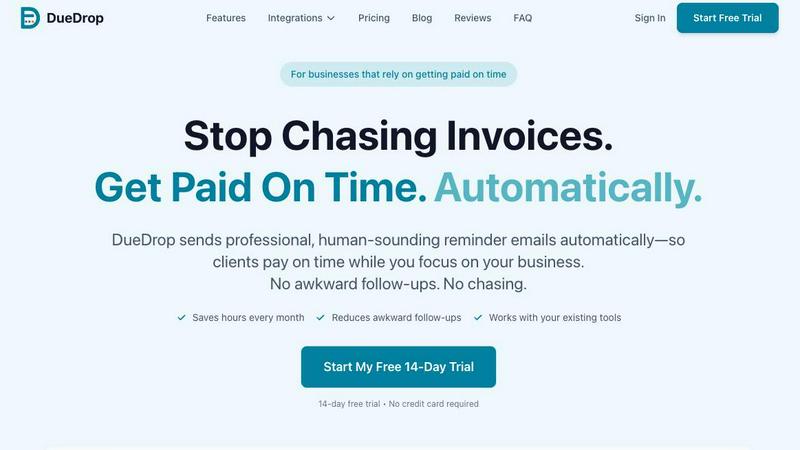
About DueDrop
DueDrop is an automated invoice follow-up tool designed to help freelancers, agencies, and small businesses get paid faster without the awkwardness of chasing clients. The core problem DueDrop solves is simple: you did the work, you sent the invoice, and now you are stuck waiting while your unpaid invoices quietly age past due. DueDrop removes this friction by connecting directly to your accounting software and your email inbox. Once connected, it monitors your outstanding invoices, drafts personalized reminder emails that match your natural writing tone, and sends them from your real email address on a schedule you set. The entire process runs in the background without you needing to log in or manually trigger each follow-up. What makes DueDrop different from generic billing bots is the human touch. Its reminders do not come from a no-reply domain with robotic urgency. Instead, they arrive in your client's inbox as a normal email from you, signed with your name, and written in a tone that reflects your existing communication style. DueDrop reads prior email threads with each client to understand how you talk to them, then drafts reminders that feel personal and considerate. If a client replies to a reminder, DueDrop automatically pauses the follow-up sequence for that invoice, so you never send a second nudge after payment has been discussed. The product integrates with major accounting platforms like QuickBooks, Xero, FreshBooks, and Wave, and works with email providers including Gmail, Outlook, Yahoo, and Zoho Mail. Setup takes about five minutes, requires no credit card for the trial, and uses OAuth authentication with read-only access where possible for security. DueDrop is built for business owners who want to protect their cash flow without damaging client relationships.
Features of DueDrop
Smart Tone Matching
DueDrop reads your previous email conversations with each client to understand your natural writing style. It analyzes sentence structure, formality level, and typical phrasing so the reminder emails it drafts sound like they came directly from you. This eliminates the robotic, generic feel of standard automated reminders and ensures each follow-up maintains the relationship you have built with your client.
Automated Send Scheduling
You set a reminder schedule once, and DueDrop handles the timing from there. It sends pre-due date reminders, gentle first nudges after the due date passes, and progressively firmer follow-ups if payment remains outstanding. All emails are queued and sent during business hours you specify, so your clients receive reminders at appropriate times without any manual effort on your part.
Real Inbox Delivery
Reminders are sent through your actual email account, not through a relay server or a generic no-reply domain. This means emails land in your client's primary inbox, not spam folders. Replies go directly to your normal inbox, and the email headers show your real name and email address. Clients see a message from you because technically, DueDrop sends it using your account credentials.
Automatic Pause on Reply
The moment a client replies to any reminder email, DueDrop automatically pauses the entire follow-up sequence for that specific invoice. This prevents the awkward situation of sending a second reminder after a client has already responded with a payment date or a question. You can manually resume the sequence if needed, but the default behavior respects active conversations and avoids unnecessary nagging.
Use Cases of DueDrop
Freelancers Managing Multiple Clients
Freelancers often juggle several projects with different clients, each on their own payment timeline. DueDrop tracks every invoice across all clients and sends appropriate reminders based on each client's payment history and your relationship with them. This removes the mental load of remembering who owes what and when, allowing freelancers to focus on delivering work instead of chasing payments.
Small Agencies with Recurring Billing
Agencies with monthly retainers or recurring project fees benefit from DueDrop's consistent follow-up cadence. The tool ensures every invoice gets the same professional treatment without relying on a team member to remember to send reminders. This creates predictable cash flow and reduces the time partners spend on administrative collection tasks.
Businesses with Seasonal Payment Cycles
Companies that experience seasonal fluctuations in client payments can use DueDrop to maintain gentle, consistent follow-up during slower months. The automated system keeps invoices top of mind for clients without requiring the business owner to send awkward reminders during periods when cash flow is already tight.
Teams Using Multiple Accounting Platforms
Growing businesses often transition between accounting tools or use different platforms for different client segments. DueDrop integrates with QuickBooks, Xero, FreshBooks, and Wave, so teams can connect multiple accounts and manage all invoice follow-ups from one central system. This eliminates the need to log into separate tools to check payment statuses.
Frequently Asked Questions
Is my data secure with DueDrop?
DueDrop uses OAuth authentication to connect to your accounting software and email provider. This means DueDrop never sees or stores your login credentials. Where possible, DueDrop uses read-only access to your accounting data, meaning it can see invoice statuses but cannot modify your financial records. You can revoke access at any time from your account settings. All data is encrypted in transit and at rest using bank-grade encryption standards.
Does DueDrop work with any email provider?
DueDrop supports direct integration with Gmail, Outlook, Yahoo, and Zoho Mail. If you use a different email provider, DueDrop can still send reminders through any standard SMTP server. This means it works with custom business email domains, private email servers, and most other email hosting services. The setup process varies slightly depending on your provider, but the core functionality remains the same.
What happens if a client replies to a reminder?
When a client replies to a DueDrop reminder email, the system automatically detects the reply and pauses the follow-up sequence for that specific invoice. This prevents you from sending additional reminders after the client has already responded. The reply lands in your normal inbox, and you can handle the conversation from there. If the client does not follow through on their reply, you can manually resume the sequence from your DueDrop dashboard.
Can I customize the tone and content of reminders?
Yes, you can customize the tone of your reminders to match your brand voice and relationship with each client. DueDrop offers preset tone options ranging from casual and friendly to professional and direct. You can also review and edit individual reminder drafts before they are sent. The system learns from your past email threads to suggest appropriate language, but you have full control over the final message content.
Similar to DueDrop

No-code 2D game editor: visual node logic, drag-and-drop scenes, live preview. Exports to Windows, macOS, Linux, Android, iOS, Web.

Online tally counter for tracking attendance, workouts, inventory, visitors, sports scores, habits, and everyday counting tasks.

SnitchFeed is an agentic social listening tool that surfaces high-intent conversations on LinkedIn, X, Hackernews, and more for GTM and product teams.


Explore Flux LoRA online workflows in a browser-based AI Studio, with a roadmap for dedicated Flux LoRA models, generation, and training.

Create readable text, logos, posters, ads, packaging, and ecommerce visuals with Ideogram 4 AI workflows.

AI motion control video generator for reference-driven character animation

AI regulatory intelligence platform that turns complex requirements into cited, audit-ready outputs.