
QuickTextTools
QuickTextTools provides 76+ free browser-based utilities to instantly process text, improve SEO, and boost writing productivity without sign-ups.
Visit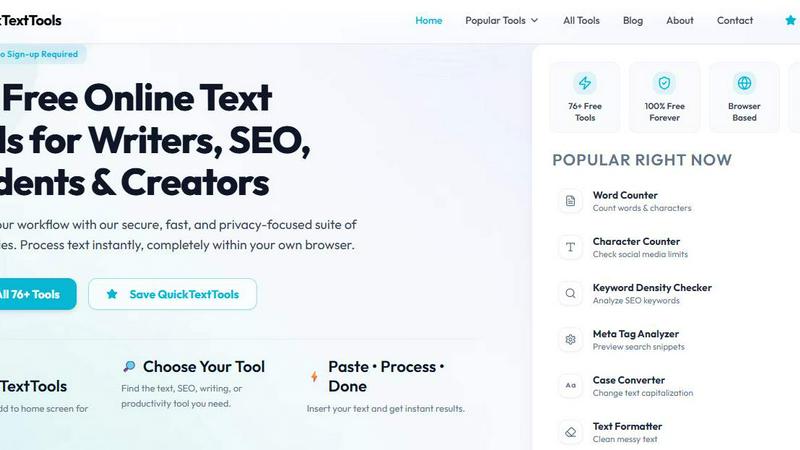
About QuickTextTools
QuickTextTools is a completely free, user-friendly online platform that provides over 76 browser-based utilities designed to boost productivity for a wide range of users, including writers, marketers, developers, students, SEO professionals, and content creators. This comprehensive toolkit solves common workflow problems by offering a diverse collection of tools for text formatting, SEO analysis, writing assistance, keyword management, and developer tasks. The core value proposition of QuickTextTools is its simplicity and speed: every tool operates entirely within your own browser, ensuring that your data never leaves your device and no complicated software downloads or sign-ups are required. Whether you need to clean up a messy keyword list, analyze SEO meta tags for better search rankings, convert text case formatting in seconds, or improve your writing process with accurate word and character counts, QuickTextTools delivers practical, instant solutions. The platform is built around a problem-solving philosophy, helping users work smarter and more efficiently by eliminating the need for multiple standalone applications or expensive subscriptions. With a focus on privacy, security, and hassle-free operation, QuickTextTools empowers you to process text instantly, all while maintaining complete control over your data. The platform is 100% free forever, with no hidden fees or premium tiers, making it an indispensable resource for anyone who regularly works with text and content.
Features of QuickTextTools
Comprehensive Text Formatting and Cleaning
QuickTextTools offers a robust set of text formatting and cleaning utilities that solve the common problem of messy or inconsistent text. The Text Cleaner tool removes unwanted special characters, extra spaces, and hidden HTML tags, while the Case Converter instantly transforms text to uppercase, lowercase, title case, or sentence case. The Remove Extra Spaces tool and Duplicate Line Remover further streamline your workflow, allowing you to quickly prepare data for publishing, analysis, or further processing. These tools are designed to save you minutes of manual editing and ensure your content is clean and professional.
Powerful SEO Analysis and Optimization Tools
For SEO professionals and content marketers, QuickTextTools provides essential utilities to optimize content for search engines. The Keyword Density Checker analyzes the frequency and density of keywords within your text, helping you avoid over-optimization or under-utilization. The Meta Tag Analyzer previews how your page will appear in search engine results, while the Meta Tag Generator creates optimized meta titles and descriptions. The SEO Title Generator and Keyword Builder tools further assist in crafting search-friendly content, making it easier to improve your website's visibility and ranking.
Developer and Data Processing Utilities
QuickTextTools includes a suite of developer tools that solve common coding and data processing challenges. The JSON Formatter beautifies and validates JSON data for easier reading and debugging, while the Base64 Encoder and URL Encoder handle data encoding tasks. The QR Code Generator allows you to create downloadable QR codes for links or text, and the Text Compare Tool highlights differences between two text blocks. These utilities are invaluable for developers, data analysts, and anyone who needs to process or transform technical data quickly and accurately.
Productivity and Content Creation Assistants
Beyond text processing, QuickTextTools enhances overall productivity with tools designed for time management and creative content generation. The Pomodoro Timer and Countdown Timer help you manage your work sessions and stay focused. The Random Word Generator and Random Password Generator provide creative inspiration and security solutions. Additionally, tools like the YouTube Title Generator, Instagram Caption Generator, and Hashtag Generator help content creators generate engaging social media content instantly. These features make QuickTextTools a versatile companion for both professional and personal projects.
Use Cases of QuickTextTools
Streamlining Content Creation and Editing for Writers
Writers frequently struggle with formatting inconsistencies, word counts, and readability issues. QuickTextTools solves these problems by providing instant access to a Word Counter, Character Counter, Sentence Counter, and Reading Time Calculator. A blogger preparing a 1500-word article can use the Case Converter to ensure consistent title casing, the Text Cleaner to remove formatting from copied text, and the Reading Time Calculator to estimate how long their audience will spend reading. This eliminates manual counting and formatting, allowing the writer to focus on crafting high-quality content.
Optimizing Website Content for SEO Professionals
SEO professionals need to analyze and optimize content for search engines, a task that often involves checking keyword density and previewing meta tags. With QuickTextTools, an SEO specialist can paste a draft blog post into the Keyword Density Checker to identify if target keywords are used too frequently or too rarely. They can then use the Meta Tag Analyzer to preview how the title and description will appear in search results, and the Meta Tag Generator to create optimized tags. This streamlined workflow ensures content is fully optimized for search engines without leaving the browser.
Cleaning and Preparing Data for Developers and Analysts
Developers and data analysts often receive messy data from various sources, such as CSV files or web scrapes, that require cleaning and formatting. QuickTextTools provides the Text Cleaner to remove special characters, the Remove Extra Spaces tool to normalize spacing, and the Duplicate Line Remover to eliminate redundant entries. A developer working with a list of user inputs can use the Base64 Encoder or URL Encoder for data transmission, and the JSON Formatter to beautify API responses. This saves hours of manual data cleaning and reduces the risk of errors.
Generating Social Media Content for Marketers
Marketers and social media managers need to create engaging posts quickly, often requiring catchy headlines, relevant hashtags, and optimized captions. QuickTextTools offers the YouTube Title Generator and Instagram Caption Generator to spark creative ideas, while the Hashtag Generator provides a list of relevant tags to increase post visibility. A marketer preparing a product launch can use these tools to generate multiple title options, craft a compelling caption, and add a set of trending hashtags, all within minutes. This accelerates the content creation process and helps maintain a consistent posting schedule.
Frequently Asked Questions
Is QuickTextTools really free to use?
Yes, QuickTextTools is 100% free forever. There are no hidden fees, no premium tiers, and no subscription required. All 76+ tools are available to everyone without any cost. You do not need to create an account or sign up to access any of the utilities. The platform is supported through optional affiliate links to recommended third-party products, but the core tool suite remains completely free for all users.
Do I need to download any software or create an account?
No, you do not need to download any software or create an account. QuickTextTools is entirely browser-based, meaning all tools run directly in your web browser. There is no installation required, and you can start using any tool immediately by visiting the website. This also means your data is processed locally on your device, ensuring your privacy and security.
How does QuickTextTools protect my privacy?
QuickTextTools is built with a strong focus on privacy. All text processing occurs entirely within your own browser, meaning your data never leaves your device or is sent to any external server. There is no tracking, no data collection, and no storage of your input or results. This ensures that sensitive information, such as proprietary content or personal data, remains completely secure and confidential.
What types of tools are available on QuickTextTools?
QuickTextTools offers over 76 free tools organized into several categories, including Writing Tools (Word Counter, Character Counter), SEO Tools (Keyword Density Checker, Meta Tag Analyzer), Text Cleaning Tools (Text Cleaner, Duplicate Line Remover), Developer Tools (JSON Formatter, Base64 Encoder, QR Code Generator), and Productivity Tools (Pomodoro Timer, Text Sorter). New tools are added regularly, expanding the platform's capabilities. You can browse all tools by category or search for a specific utility on the website.
Explore more in this category:
Similar to QuickTextTools

Private email. Pure. Secure. Exclusive. No ads, no tracking, no data selling. GDPR compliant, EU-hosted.


Apps and files on an infinite canvas where people and AI agents work together.

Panzoe is an all-in-one AI platform for personal productivity, business automation, AI assistants, content creation, and custom AI solutions.


AI Email Filter sorts incoming mail into folders using plain-language prompts you write. Works with any IMAP mailbox; bring your own LLM if you want.


No-code 2D game editor: visual node logic, drag-and-drop scenes, live preview. Exports to Windows, macOS, Linux, Android, iOS, Web.