

Alternatives to QuickTextTools
QuickTextTools provides 76+ free browser-based utilities to instantly process text, improve SEO, and boost writing productivity without sign-ups.
Explore 20 alternatives to QuickTextTools. Compare features, pricing, and find the best fit for your needs.

@fuck.it - email with attitude
Private email. Pure. Secure. Exclusive. No ads, no tracking, no data selling. GDPR compliant, EU-hosted.


Panzoe
Panzoe is an all-in-one AI platform for personal productivity, business automation, AI assistants, content creation, and custom AI solutions.

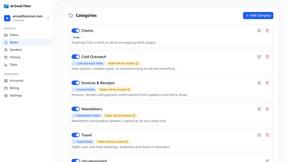
AI Email Filter
AI Email Filter sorts incoming mail into folders using plain-language prompts you write. Works with any IMAP mailbox; bring your own LLM if you want.


Egmatic
No-code 2D game editor: visual node logic, drag-and-drop scenes, live preview. Exports to Windows, macOS, Linux, Android, iOS, Web.

Kody Tools
Free collection of online developer utilities, code formatters, and digital converters designed to streamline your daily workflow.

Tally Counter
Online tally counter for tracking attendance, workouts, inventory, visitors, sports scores, habits, and everyday counting tasks.
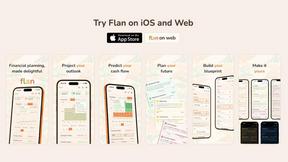
Flan
Visual financial timelines for couples and young professionals: model cash flow, life events, and shared goals.
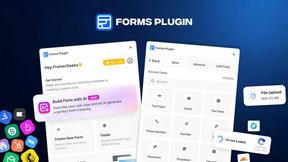
Forms Plugin
The #1 Native Form Builder Plugin for Framer - No Code, No Embeds, No External Platforms.

Product Launch Checklist
A free launch checklist for SaaS, apps, AI tools and more. Every step says why it matters and when you can skip it.

HomeAnswerBook
Practical, independent guides to home repairs, maintenance, costs, troubleshooting, and everyday fixes.
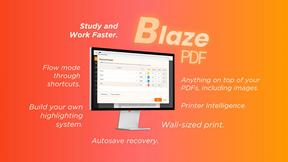
BlazePDF
Highlight faster. Study in flow with custom shortcuts and a workflow built around you. Print smarter, or turn any page into a tiled poster.


Video2URL
Turn videos, images, and files into secure direct links for sharing, embedding, and automated workflows.

Build Mode for Mac
Build Mode is a Mac app that turns focused sessions into visible progress, so you can see the work adding up before the results arrive.


About QuickTextTools Alternatives
QuickTextTools is a free, browser-based platform that falls under the Productivity & Management category, offering over 76 utilities designed to help writers, marketers, developers, and students optimize their text and streamline their daily workflows. While the tool is robust for general text formatting, SEO analysis, and keyword management, users often look for alternatives when they need more specialized features like advanced API integrations, collaborative team editing, or offline desktop functionality that a browser-based toolkit cannot provide. Others may seek platforms with a more modern user interface, dedicated mobile apps, or tools that focus exclusively on a single, deeper function rather than a broad collection of utilities. When evaluating an alternative, you should first identify your primary pain point. If your main need is complex data processing or bulk batch operations, look for tools that offer higher character limits or file upload capabilities. If privacy is your top concern, prioritize platforms with clear data handling policies and client-side encryption similar to what QuickTextTools offers. For those who require seamless workflow integration, consider solutions that provide API access or direct export options to other software like Google Docs or Excel. Ultimately, the best choice will balance depth of features with ease of use, ensuring you don’t sacrifice speed or simplicity for the sake of having more tools.
FAQs about QuickTextTools Alternatives
What is QuickTextTools?
QuickTextTools is a free, online platform that provides over 76 browser-based utilities designed to enhance productivity for writers, marketers, developers, students, and SEO professionals. It operates directly in your browser without requiring any software downloads or complicated setups, making it a convenient solution for text formatting, SEO analysis, writing assistance, and keyword management. The platform focuses on delivering fast, user-friendly tools that simplify workflows and save time.
Who is QuickTextTools for?
QuickTextTools is designed for a broad audience including writers, content creators, SEO professionals, marketers, developers, and students who need to optimize text and improve their daily productivity. It is particularly useful for anyone who regularly handles text formatting, keyword lists, meta tag analysis, or writing improvements and wants a quick, no-fuss solution. The tools are accessible to both beginners and experienced professionals due to their straightforward interface.
Is QuickTextTools free?
Yes, QuickTextTools is completely free to use, offering all of its 76+ utilities without any paywalls or subscription fees. Users can access the entire toolkit directly in their browser without needing to sign up for an account or provide personal information. This makes it a cost-effective option for individuals and small teams looking to boost productivity without financial commitment.
What are the main features of QuickTextTools?
QuickTextTools features a comprehensive set of utilities including text formatting tools, SEO analysis utilities, writing assistants, keyword management tools, and developer utilities. Specific capabilities include cleaning up messy keyword lists, analyzing SEO meta tags, converting text case formatting, and improving writing processes. All tools are designed to be fast, easy to use, and operate entirely within your browser for a secure and hassle-free experience.