
Very Good Calendar Sync
Very Good Calendar Sync effortlessly aligns your work, personal, and client calendars while keeping your data private and secure.
Visit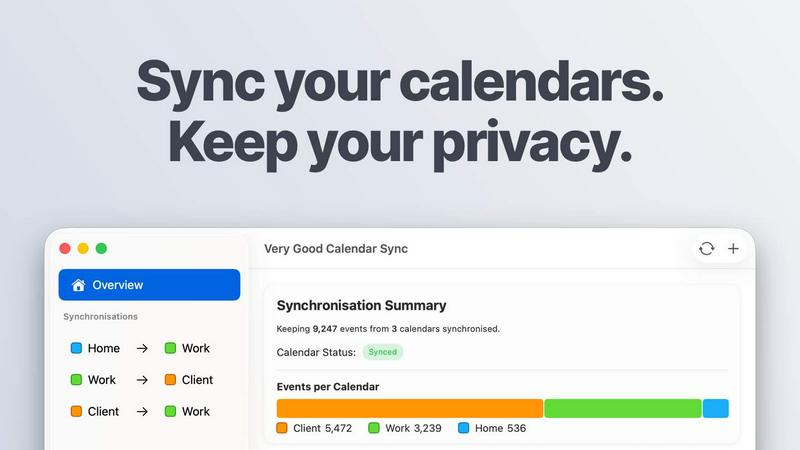
About Very Good Calendar Sync
Very Good Calendar Sync is a powerful macOS application designed to keep your work, personal, and client calendars perfectly aligned without compromising your privacy. The app runs seamlessly in the background, monitoring your calendars for any changes and syncing them automatically. This means that whether you receive a new meeting invite on your work calendar or add a personal appointment, the app ensures that all relevant calendars reflect these changes in real-time. Perfect for busy professionals, freelancers, consultants, or anyone juggling multiple schedules, Very Good Calendar Sync eliminates the chaos of double-bookings and missed appointments. With a simple setup that takes just two minutes, users can fine-tune their synchronization preferences, such as specific weekdays, daily hours, and what details are shared. Best of all, your calendar data remains securely on your Mac, with no external transmission, ensuring complete control over your information.
Features of Very Good Calendar Sync
Automatic Background Synchronization
Very Good Calendar Sync operates quietly in the background, continuously monitoring your calendars for changes. Once set up, users can forget about manual updates as the app automatically syncs new events and modifications, ensuring that all calendars reflect the most current information.
Privacy-Centric Design
Your privacy is paramount with Very Good Calendar Sync. The app does not require any credentials to link accounts or store your data externally. All synchronization occurs locally on your Mac, which means no third-party access or cloud storage, providing peace of mind for users concerned about data security.
Flexible Synchronization Rules
Users have full control over synchronization settings, allowing them to choose specific days and time ranges for syncing. Whether you want to sync only weekdays or set specific work hours, the app accommodates various preferences, ensuring that only relevant events are shared across calendars.
Event Cloning and Redaction
Very Good Calendar Sync allows users to share their availability without exposing sensitive information. You can clone events with full details for trusted contacts or redact them to only show that you're busy, keeping private details like titles, descriptions, and locations hidden.
Use Cases of Very Good Calendar Sync
Consultants Managing Client Calendars
Consultants often juggle multiple client calendars, leading to potential conflicts. Very Good Calendar Sync helps them maintain accurate availability across all calendars, reducing the risk of double bookings and allowing for seamless scheduling of client meetings.
Employees with Multiple Calendars
For employees balancing work and personal commitments, Very Good Calendar Sync is an essential tool. It ensures that personal appointments do not clash with work meetings, providing a clear view of availability without the hassle of manual checks.
Freelancers Juggling Projects
Freelancers often deal with various clients and projects simultaneously. This app allows them to sync client calendars with personal schedules effortlessly, keeping them organized and on track without the chaos of overlapping obligations.
Teams and Cross-Functional Collaboration
For agencies and cross-functional teams, maintaining aligned schedules is crucial. Very Good Calendar Sync enables team members to view each other's real-time availability, facilitating better collaboration and reducing scheduling conflicts among team members and clients.
Frequently Asked Questions
Do you store any of my calendar data?
No, Very Good Calendar Sync does not store any of your calendar data. All synchronization is done locally on your Mac, ensuring that your information remains private and secure.
Which calendar providers are supported?
Very Good Calendar Sync supports all calendars available in macOS' Calendar.app, including Google Calendar, Microsoft Outlook, Apple iCloud, and any CalDAV account, providing flexibility for diverse user needs.
Does it sync when my Mac is off or asleep?
No, the app requires your Mac to be awake to perform synchronizations. However, it operates in the background, so you do not need to keep it in the foreground for it to sync events.
Is this app available for Windows?
Currently, Very Good Calendar Sync is designed exclusively for macOS and is not available for Windows. Users on macOS can enjoy its seamless integration with the Calendar.app without any additional setup.
Explore more in this category:
Similar to Very Good Calendar Sync

Panzoe is an all-in-one AI platform for personal productivity, business automation, AI assistants, content creation, and custom AI solutions.

AI Email Filter sorts incoming mail into folders using plain-language prompts you write. Works with any IMAP mailbox; bring your own LLM if you want.

No-code 2D game editor: visual node logic, drag-and-drop scenes, live preview. Exports to Windows, macOS, Linux, Android, iOS, Web.

Free collection of online developer utilities, code formatters, and digital converters designed to streamline your daily workflow.

Online tally counter for tracking attendance, workouts, inventory, visitors, sports scores, habits, and everyday counting tasks.

Visual financial timelines for couples and young professionals: model cash flow, life events, and shared goals.

The #1 Native Form Builder Plugin for Framer - No Code, No Embeds, No External Platforms.

A free launch checklist for SaaS, apps, AI tools and more. Every step says why it matters and when you can skip it.