
ytskim
Stop wasting time on clunky editors and get background-free, WebP-ready images in one click with BgFox.
Visit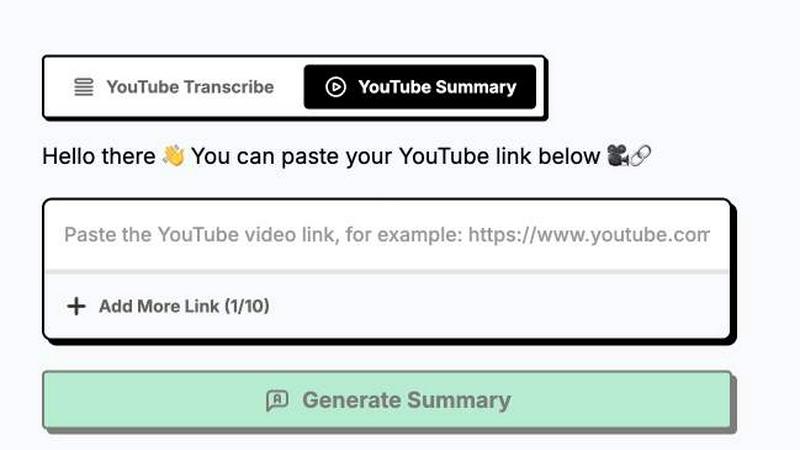
About ytskim
ytskim is a practical AI-powered tool designed to solve a common problem for content creators, researchers, students, and marketers: extracting accurate transcripts and structured summaries from YouTube videos quickly. Instead of watching an entire video or manually transcribing audio, users can paste a YouTube link and receive a full, precise transcript along with a concise, organized summary within seconds. The tool is built for anyone who needs to digest video content efficiently, whether for research, content repurposing, note-taking, or accessibility. Its main value proposition is eliminating the time-consuming process of watching long videos or using multiple tools for transcription and summarization. By combining these two critical functions into one seamless workflow, ytskim helps users save hours of manual work, improve productivity, and focus on extracting actionable insights. The platform is designed with a clean, intuitive interface that requires no technical expertise, making it accessible for beginners and powerful enough for professionals. Whether you are a student pulling key points from a lecture, a content creator repurposing video scripts, or a marketer analyzing competitor content, ytskim delivers reliable, accurate results in a fraction of the time.
Features of ytskim
Accurate AI Transcription
ytskim leverages advanced speech recognition models to convert spoken audio from any YouTube video into highly accurate text. The system handles various accents, speaking speeds, and background noise levels, ensuring that even complex or fast-paced dialogue is captured with minimal errors. This feature is essential for users who need verbatim transcripts for legal, academic, or content verification purposes. The transcription output is cleanly formatted with timestamps, making it easy to reference specific moments in the video.
Structured Summarization
Beyond simple transcription, ytskim automatically generates a structured summary that breaks down the video's key points, main arguments, and important details. The AI analyzes the transcript to identify core themes, extract critical data, and present the information in a logical, easy-to-read format. This feature saves users from having to read through long transcripts or rewatch entire videos, allowing them to grasp the essential content in seconds. The summary is designed to be actionable, providing bullet points, headings, and concise paragraphs for quick comprehension.
Instant Processing Speed
One of the standout capabilities of ytskim is its speed. The tool processes video links and returns both the transcript and summary in a matter of seconds, regardless of the video's length. This rapid turnaround is critical for professionals who work under tight deadlines or need to review multiple videos in a single session. The backend infrastructure is optimized for parallel processing, ensuring that even high-demand usage does not result in significant delays. Users can paste a link and have their content ready almost immediately.
User-Friendly Interface
ytskim is designed with simplicity in mind. The interface features a straightforward input field where users paste a YouTube URL, and a single button to initiate the process. No account creation, software installation, or complex settings are required. The results are displayed in a clean, organized layout with clear sections for the transcript and summary. Users can easily copy the text, download it as a file, or share it directly. This frictionless experience makes ytskim accessible to anyone, from tech-savvy developers to casual users.
Use Cases of ytskim
Academic Research and Study
Students and researchers can use ytskim to quickly extract key information from educational YouTube videos, lectures, and tutorials. Instead of watching a one-hour lecture, they can obtain a structured summary of the main concepts and a full transcript for citation purposes. This allows for faster note-taking, easier review of complex topics, and efficient preparation for exams or papers. The tool is particularly valuable for non-native speakers who may benefit from reading the transcript alongside the video.
Content Creation and Repurposing
Content creators, bloggers, and social media managers can leverage ytskim to repurpose video content into written formats. By obtaining a transcript and summary, they can quickly draft blog posts, social media captions, articles, or email newsletters based on video material. This streamlines the content creation pipeline, allowing creators to produce more written content from a single video source. The structured summary also helps identify quotable moments and key takeaways for promotional materials.
Market Research and Competitive Analysis
Marketers and business analysts can use ytskim to analyze competitor videos, product reviews, and industry webinars. Instead of manually watching hours of content, they can obtain structured summaries that highlight key product features, customer pain points, and market trends. This accelerates the research process, enabling teams to make data-driven decisions faster. The accurate transcription also allows for precise quoting and referencing in reports and presentations.
Accessibility and Note-Taking
Individuals who are deaf, hard of hearing, or prefer reading over watching videos can benefit from ytskim's instant transcription. The tool provides a full text version of any YouTube video, making content accessible to a wider audience. Additionally, professionals attending virtual meetings or webinars can use the tool to generate notes and summaries for later review, ensuring they never miss critical information. This is especially useful for long-form content where retaining key points is challenging.
Frequently Asked Questions
How do I use ytskim to get a transcript from a YouTube video?
To use ytskim, simply copy the URL of the YouTube video you want to transcribe. Paste the link into the input field on the ytskim website. Click the processing button, and within seconds, the tool will generate a full, accurate transcript along with a structured summary. You can then copy the text, download it, or share it directly. No account or software installation is required.
Is ytskim free to use, or are there paid plans?
Based on the available information, ytskim offers a free tier that allows users to generate transcripts and summaries from YouTube videos. There may be limitations on the number of videos processed per day or the length of videos supported on the free plan. For higher usage limits or additional features, a paid subscription plan may be available. Users should check the official website for the most current pricing and plan details.
What languages does ytskim support for transcription and summarization?
ytskim's AI models are designed to support multiple languages, though the primary focus is on English. The tool can accurately transcribe videos in English, as well as other major languages depending on the audio quality and clarity. The summarization feature works best with English content, as the AI is trained on English-language data for generating structured summaries. Users transcribing videos in other languages may receive accurate transcripts but less refined summaries.
Can I download the transcript or summary as a text file?
Yes, ytskim allows users to download the generated transcript and summary in common text formats. After the processing is complete, you will see options to copy the text to your clipboard or download it as a plain text file or a Word document. This makes it easy to save the content for offline use, further editing, or integration into other projects. The download feature is available on both the free and paid tiers.
Explore more in this category:
Similar to ytskim

Private email. Pure. Secure. Exclusive. No ads, no tracking, no data selling. GDPR compliant, EU-hosted.


Apps and files on an infinite canvas where people and AI agents work together.

Panzoe is an all-in-one AI platform for personal productivity, business automation, AI assistants, content creation, and custom AI solutions.


AI Email Filter sorts incoming mail into folders using plain-language prompts you write. Works with any IMAP mailbox; bring your own LLM if you want.


No-code 2D game editor: visual node logic, drag-and-drop scenes, live preview. Exports to Windows, macOS, Linux, Android, iOS, Web.