
HypeShare
HypeShare lets you send large files up to 10GB securely with end-to-end encryption and no signup required.
Visit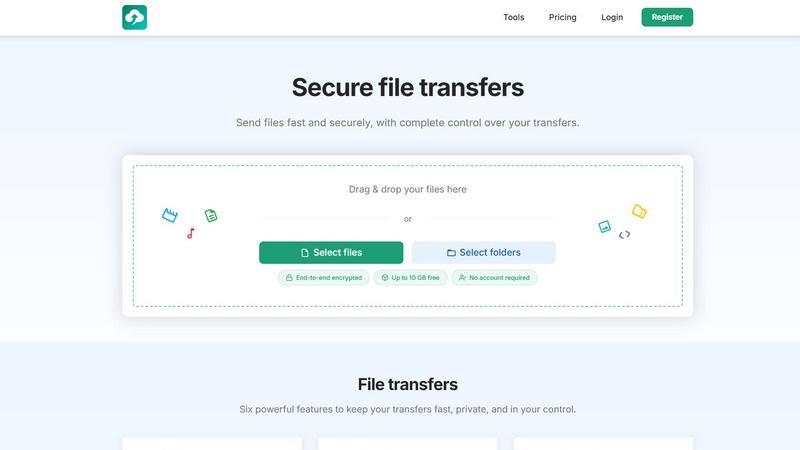
About HypeShare
HypeShare is a secure file transfer platform designed to solve the common frustrations of slow, bloated, and privacy-invasive file sharing tools. It provides a fast, no-friction alternative for freelancers, agencies, and teams who need to send large files quickly without sacrificing control or security. The core value proposition is simplicity and privacy: you can send files up to 10GB without creating an account, making it ideal for one-off transfers. For regular users, a free account unlocks 20GB of storage with end-to-end encryption, custom expiry links, and the ability to set download limits. A standout feature is File Requests, which creates a personal upload page. You share a custom link, and anyone can upload files directly to you without needing to log in themselves. This eliminates the back-and-forth of traditional file sharing. HypeShare also offers password protection, email notifications for downloads, and data retention controls. For power users, Pro plans unlock unlimited transfers, 1000GB storage, larger file sizes up to 200GB per transfer, branded downloads, and priority support. The platform is built for speed, privacy, and complete control, addressing the real pain points of managing large file transfers in a professional workflow.
Features of HypeShare
Secure File Transfers with Full Control
Every transfer on HypeShare is protected with end-to-end encryption, ensuring your files are secure from the moment they leave your device until they reach the intended recipient. You maintain complete control over each transfer by setting a custom password for an extra layer of security, defining an automatic expiration date so the link becomes invalid after a set time, and limiting the number of times the file can be downloaded. This prevents unauthorized access and ensures your data is only available exactly as long as you need it to be.
File Requests for Effortless Inbound Uploads
This feature solves the hassle of collecting files from clients, collaborators, or anyone else. You create a unique, shareable request link that leads to your personal upload page. The person sending you files simply clicks the link and uploads their content directly to your HypeShare dashboard. They do not need an account, a login, or any software installation. You can customize the request with an expiry date, accept any file type, and receive email notifications every time a new file is uploaded, keeping your workflow streamlined.
Instant Sharing via Link and Email
HypeShare offers two primary methods for sharing your transfers. You can instantly generate a shareable link that you can paste anywhere, including in chat messages, project management tools, or social media. Alternatively, you can send the transfer link directly via email using HypeShare's built-in email feature. This allows you to send a secure, encrypted transfer link directly to a recipient's inbox without needing to compose a separate email, saving time and reducing the risk of sharing an incorrect link.
Custom Alias and Domain Branding
For professionals and teams who want to maintain a consistent brand identity, HypeShare allows you to use custom aliases for your transfer links. Pro plan users can also connect their own custom domains (up to 5), meaning your transfer links can look like yourcompany.hypeshare.io or even use a fully branded domain. This feature is particularly valuable for agencies and businesses that want to present a polished, professional image to their clients, rather than a generic, unbranded link.
Use Cases of HypeShare
Freelancers Sending Large Creative Assets
A graphic designer or video editor needs to deliver a final project file that is 8GB in size. Instead of struggling with email attachment limits or slow, ad-filled free services, they can use HypeShare to upload the file, set an expiration date of 7 days, and password-protect it for client confidentiality. They share the link via email, and the client can download the file immediately without any account creation. The freelancer gets a download notification, confirming the file was received.
Agencies Collecting Client Content
A marketing agency needs to collect raw video footage, high-resolution images, and brand guidelines from a new client. Instead of asking the client to sign up for a service or use a complicated FTP system, the agency creates a HypeShare File Request page. They share the custom link with the client. The client simply drags and drops their files onto the page, and the agency receives all the content directly in their dashboard with email notifications for each upload.
Remote Teams Collaborating on Documents
A distributed team working on a project needs to share sensitive financial documents and legal contracts. They use HypeShare to send files with end-to-end encryption and set a specific download limit of 3 downloads per file to ensure the document is not widely distributed. They also set an expiration date of 24 hours. This gives the team complete control over the lifecycle of the shared data, ensuring security and compliance with internal data policies.
IT Professionals Transferring Logs and Backups
A system administrator needs to send a large 150GB server log file to a colleague for analysis. With a HypeShare Pro account, they can upload the file (up to 200GB per transfer) and share the link. They can use a custom domain for a professional appearance and set an unlimited data retention period so the file remains available for the team's review period. The download notification feature lets them know exactly when the file has been accessed.
Frequently Asked Questions
Do I need an account to send a file on HypeShare?
No, you do not need an account to send files. HypeShare allows you to send files up to 10GB per transfer without any registration. This is the Guest plan. However, creating a free account provides you with 20GB of storage, more transfers per month, and access to features like File Requests and download notifications.
How does the File Requests feature work?
File Requests creates a personal upload page for you. You generate a unique, shareable link (like hypeshare.io/request/yourname). You share this link with anyone. When they click it, they are taken to a page where they can upload files directly to your HypeShare account. They do not need an account or to log in. You can set an expiry date for the request and receive an email notification every time someone uploads a file.
What security measures are in place for my transfers?
All transfers on HypeShare are protected with end-to-end encryption. Additionally, you can add an extra layer of security by setting a password that the recipient must enter to access the download. You also have control over the transfer's lifecycle with automatic expiration dates and download limits, ensuring your files are only accessible for a specific time and to a specific number of people.
What is the difference between the Free and Pro plans?
The Free plan offers 10 transfers per month, 20GB of storage, and a maximum file size of 10GB per transfer. The Pro plan, at $8.99 per month, removes transfer limits, provides 1000GB of storage, and allows files up to 200GB per transfer. Pro also includes unlimited download retention, custom domains, branded downloads, and priority support, making it suitable for heavy users and businesses.
Pricing of HypeShare
HypeShare offers three main pricing tiers to suit different needs. The Guest plan is free and requires no account, allowing 5 transfers per month with files up to 10GB each. The Free plan is also free but requires registration, offering 10 transfers per month, 20GB of storage, and 30-day data retention. The most popular option is the Pro plan, priced at $8.99 per month when billed monthly or $8.99 per month when billed yearly. This plan provides unlimited transfers, 1000GB of storage, file sizes up to 200GB, unlimited downloads per transfer, custom domains, and priority support. All plans include end-to-end encryption, password protection, and expiration controls.
Similar to HypeShare

A free launch checklist for SaaS, apps, AI tools and more. Every step says why it matters and when you can skip it.

Spot trending Whop products early to scale your income with smart market data.

Blueberry is an all-in-one Mac app that streamlines web app development by integrating your editor, terminal, and.

Shrinkpad compresses images and videos in bulk on Mac to save you time and disk space effortlessly.

Skene transforms your codebase into a self-sustaining engine for user activation and retention without external.

Yellow Systems creates custom AI-powered software solutions that drive growth for startups and enterprises.

Agenta is an open-source LLMOps platform that centralizes collaboration, evaluation, and observability for reliable AI.